
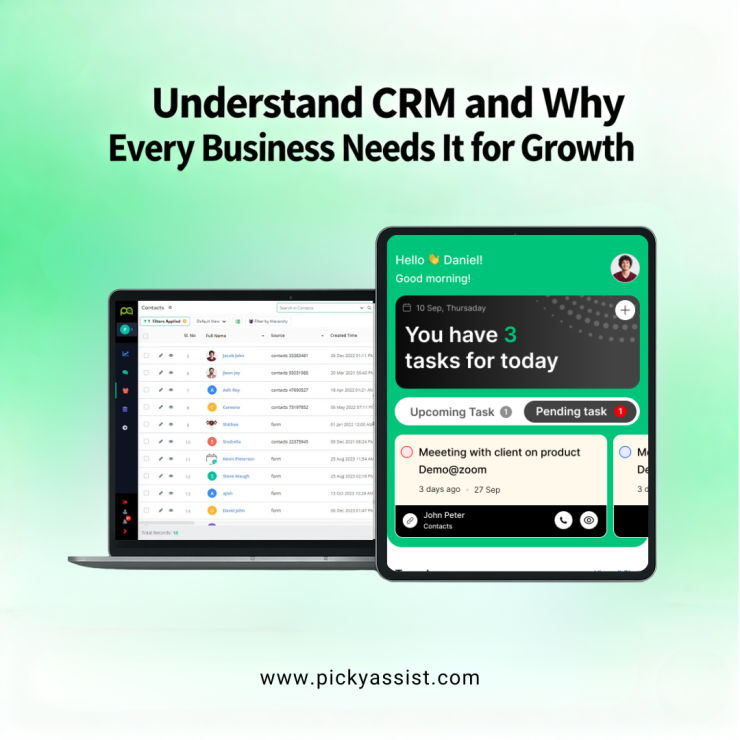
What is customer relationship management and why does it matter for growing businesses in 2026? In a sentence: it’s the strategy, systems and software that let companies capture customer data, coordinate sales and marketing activities, and deliver timely support so relationships turn into repeat revenue. This guide explains how CRM software works across sales, marketing and support, shows measurable benefits, and compares practical options (including free Customer Relationship Management system choices) so you can pick the right path for your team.
Quick summary
- CRM centralizes contacts, conversations and transactions so teams don’t duplicate work. Investopedia
- Companies using modern CRM + AI report faster conversions, better response times, and higher satisfaction. Picky Assist claims up to 50% faster lead conversion and improved CSAT from automation.
- For cost-conscious small businesses, several best free CRM tools provide essential features: contact management, simple pipelines, and limited automation. Reviews and comparisons that highlight HubSpot, Zoho, Bitrix24 and EngageBay as strong free- or freemium starters.
Customer relationship management is both a business philosophy and a set of tools, a CRM system captures customer profiles, logs interactions (calls, chats, emails), tracks deals through a sales pipeline, and powers marketing and support workflows. In practice, a CRM software system enables teams to treat customers as individuals rather than tickets or line items. Modern systems add automation, reporting and AI-driven routing to scale personalization.
What makes a CRM useful?
A useful CRM combines four things:
- Data: contact details, transaction history, interaction logs.
- Processes: lead scoring, follow-up cadences, SLA-driven routing.
- People: sales reps, marketers, support agents using shared records.
- Technology: the CRM tools and integrations (chat, email, e-commerce, telephony) that automate work.
When these elements align, teams reduce response times, avoid duplicate outreach and build predictable funnels, the exact benefits Picky Assist emphasizes with unified inboxes and conversational funnels.
CRM in Sales, Marketing & Support
Sales CRM
- Centralized pipelines let managers spot stalled deals and coach reps.
- Activity tracking (calls, meetings, emails) improves forecasting accuracy.
- Integrations that pull leads from platforms (marketplaces, websites, ad forms) reduce manual entry and speed lead response. Picky Assist, for example, highlights automation that brings leads from IndiaMART and social channels into one lead view.
CRM in Marketing
- Segment contacts for targeted campaigns and measure conversion rates by source.
- CRM + marketing automation runs and nurtures WhatsApp sequences to warm leads before handoffs. Studies show automation shortens lead conversion time when correctly implemented.
CRM in Customer Support
- Shared conversation history reduces resolution time and improves CSAT.
- Routing logic and AI chatbots handle common questions 24/7 and escalate only complex tickets, improving first response time and lowering costs.
Measurable Impact: Numbers that Matter
- Adoption: Many small businesses estimated to 70% run some sort of CRM solution. This is higher among tech firms and retail.
- Efficiency: vendors and case studies commonly report 50% improvements in lead response time and conversion velocity when CRM automation is implemented. Picky Assist publishes claims like 50% faster lead conversion for certain workflows.
- Market growth: CRM as a market continues to expand rapidly, driven by automation and AI features. Analysts project strong annual growth through the rest of the decade.
Choosing between Paid vs Free CRM Software Systems
When to start with a free CRM:
- You need contact management, simple pipelines, and basic email/marketing integration. Free tiers are fit-for-purpose for small teams with modest volumes. Popular online free CRM and Customer Relationship Management software free download options let you get started with zero license cost.
When to move to paid:
- You require advanced automation, cross-channel routing, detailed analytics, or high-volume messaging. Also consider security and data needs.
Decision factors: ease of use, integrations (WhatsApp, e-commerce), automation depth, pricing at scale, and the vendor’s support for local platforms (marketplaces, payment gateways). Picky Assist’s angle emphasizes messaging-first workflows and marketplace integrations for Indian sellers.
Freemium CRMs to choose for your Business
Many reviewers rated a few CRM for zero- or low-cost adoption that benefits well for business. Below are practical choices and when to pick them:
- Picky Assist — The free forever plan of Picky Assist is the best with automation, chatbots, broadcaster,no-code flows and catalog. If your workflows are WhatsApp-first, and you want conversational funnels and integrated lead capture from marketplaces and web forms, Picky Assist is built for that use case. It positions itself as an all-in-one management CRM focused on messaging automation for Indian businesses.
- HubSpot CRM — Best for integration-rich teams and marketers needing a polished free plan. Good for contact sync and pipeline basics.
- Zoho CRM — Strong India-friendly option with automation and wide app ecosystem.
- Bitrix24 — Unlimited users on free plans (but limited storage); good for cross-team collaboration.
- EngageBay — All-in-one approach with email, a CRM pipeline and marketing tools in the free tier.
Implementation Checklist and How to Get Value Quickly
- Define and Set measurable goals (reduce response time by X%, conversion by Y%).
- Centralize contact sources (marketplaces, website forms, social DMs) into the CRM. Picky Assist provides direct lead capture from IndiaMART and web pages.
- Build simple automations first: auto-assign leads, send introductory messages, and set follow-up reminders.
- Train users and monitor adoption — poor usability and lack of training are top reasons CRM projects fail.
- Measure and iterate: track conversion, response time, ticket volume and CSAT.
To Conclude
In 2026 and beyond, companies that rely on spreadsheets or disconnected tools risk losing up to 40% of potential revenue due to slow follow-ups and poor customer visibility. On the other hand, businesses using modern CRM tools, even the best free CRM tools, report measurable improvements in conversion speed, customer retention, and team productivity. With powerful options ranging from online free CRM platforms to advanced AI-driven automation systems, every business; startup, SME, or enterprise, can now adopt CRM without financial burden.
The businesses that thrive in the coming years will not be the ones with the loudest marketing, but the ones with the strongest relationships. And that begins with choosing the right Customer Relationship Management system today.
FAQs on Free Customer Relationship Management Software
1. What is customer relationship management and why is it important for small businesses?
It’s the combination of practices and tools that let small businesses track leads, conversations and purchases in one place so follow-ups happen reliably. For small teams, even a simple CRM system reduces lost leads and improves repeat business by making interactions visible to everyone.
2. Which CRM features should I look for in a free plan?
Look for contact management, sales pipelines, basic automation, reporting, and integrations with email and messaging channels. Free plans vary: HubSpot and Zoho provide generous starter features while Bitrix24 is strong in collaboration.
3. Can I use free Customer Relationship Management software for WhatsApp and messaging?
Many CRMs integrate with messaging platforms; some providers (including messaging-first platforms like Picky Assist) focus specifically on WhatsApp and social messaging automation for lead capture, chatbots and conversational funnels. If messaging is core to your operations, pick a CRM that advertises native messaging or easy integrations.
4. How long before a CRM shows ROI?
ROI timelines vary: quick wins (reduced lead leakage, faster follow-up) can appear within weeks; deeper ROI from automation and analytics often takes 3–9 months as processes mature.



Add comment