
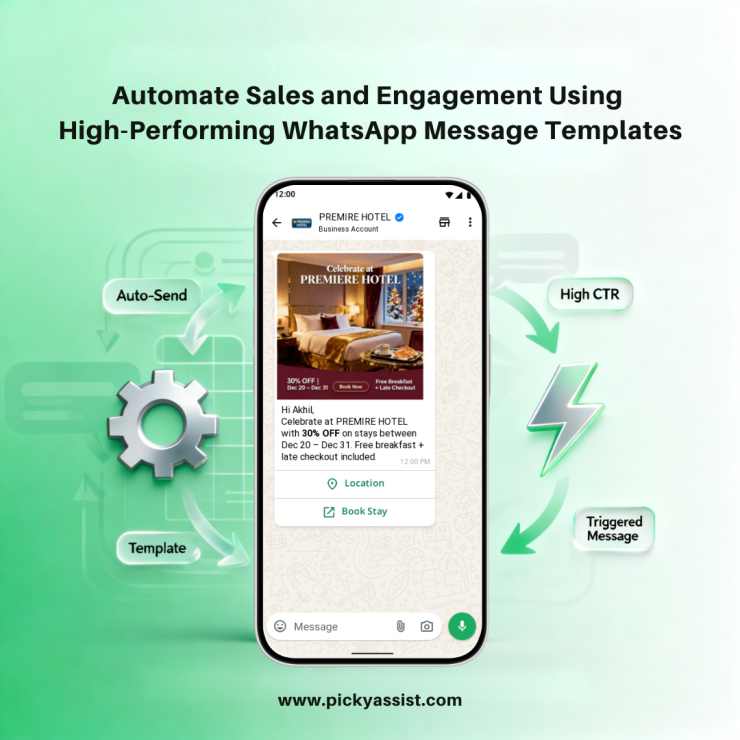
As businesses scale customer communication on WhatsApp, free-form messaging alone is no longer sufficient, or compliant. WhatsApp message templates are pre-approved message formats that businesses must use to initiate conversations or send automated notifications outside the standard 24-hour customer service window. These templates are a mandatory requirement under the WhatsApp Business API and form the foundation of automated sales, transactional messaging, and customer engagement at scale.
When used correctly, WhatsApp message templates enable brands to deliver timely updates, promotional offers, and authentication messages with high deliverability and trust. According to industry benchmarks, template-based WhatsApp messages achieve open rates above 90% and response rates that are 5× higher than email. In this guide, we break down template categories, real examples, API creation workflows, compliance rules, and how Picky Assist simplify deployment for businesses.
What Are WhatsApp Message Templates?
WhatsApp message templates are standardized message formats that must be approved by Meta before being used for outbound business communication. They are required whenever a business sends a message outside the 24-hour customer interaction window or initiates a new conversation. These customer-initiated messages are service messages which don’t add additional costs.
Each WhatsApp template message follows a defined structure and can include dynamic placeholders (for example, {{1}}, {{2}}) that pull customer-specific data such as names, order numbers, or dates. This structured approach ensures consistency, scalability, and compliance across all business communications.
A WhatsApp template typically consists of:
- Header (optional: text, image, video, or document)
- Body text (up to 1,024 characters)
- Footer (optional)
- Interactive elements such as buttons
Why Are WhatsApp Message Templates Mandatory for API Users?
Unlike the WhatsApp Business App, the WhatsApp Business API does not allow unrestricted outbound messaging.Every WhatsApp business message template is reviewed and approved by Meta, ensuring it meets quality and policy standards before it can be sent to customers. Templates are required to:
- Prevent spam and misuse
- Protect user experience
- Standardize business communication
- Enable large-scale automation
Categories of WhatsApp Message Templates (Meta-Defined)
Meta requires all WhatsApp templates to be classified into one of three categories, which directly affect pricing, approval rules, and usage.
1. Marketing Templates
Marketing templates are used for promotional and growth-oriented communication.
Common use cases:
- Product launches
- Discount offers
- Abandoned cart reminders
- Re-engagement campaigns
Example (WhatsApp marketing message template):
“Hi {{1}}, your cart is waiting! Complete your purchase today and enjoy free delivery.”
A WhatsApp promotion message template must be opt-in based and should not mislead or pressure users.
2. Utility Templates
Utility templates deliver critical transactional or informational updates.
Common use cases:
- Order confirmations
- Shipping notifications
- Appointment reminders
- Payment receipts
Example (WhatsApp template message example):
“Hello {{1}}, we’ve received your order #{{2}}. We’ll notify you once it’s shipped.”
These messages are highly valued by users and typically achieve the highest engagement rates.
3. Authentication Templates
Authentication templates are used for secure verification.
Key characteristics:
- Used for OTPs and login verification
- Fixed wording with minimal customization
- Must include a Copy Code button
Example:
“Your verification code is {{1}}. This code expires in 10 minutes.”
These templates follow the strictest approval rules.
Common WhatsApp Message Template Examples
Templates often include placeholders to personalize content dynamically.
1. Order Confirmation
“Hello {{1}}, we’ve received your order #{{2}}. We’ll update you once it’s on the way.”
2. Appointment Reminder
“Hi {{1}}, just a reminder of your appointment on {{2}} at {{3}}.”
3. Shipping Update
“Good news, {{1}}! Your package {{2}} has been shipped. Track it here: {{3}}.”
4. Promotional Offer
“Flash Sale Use code {{1}} to get 20% off. Offer valid until {{2}}.”
These examples demonstrate how a message template for WhatsApp balances clarity, personalization, and compliance.
WhatsApp Message Templates for Automated Sales
Lead Follow-Ups at Scale
A structured WhatsApp chat template allows sales teams to respond instantly after inquiries, without manual effort.
Mid-Funnel Nurturing
Templates help keep prospects engaged with:
- Pricing follow-ups
- Demo reminders
- Case study sharing
Bottom-Funnel Conversions
Using CTA buttons, a WhatsApp marketing template can trigger payments, bookings, or contract confirmations directly inside WhatsApp.
Businesses using templates across the funnel report 40% faster deal closures.
WhatsApp Message Templates for Customer Engagement
Customer engagement templates focus on value, not promotion. The goal is to stay relevant without overwhelming users, maintaining a high quality rating with Meta. A WhatsApp marketing sample template may include:
- Educational updates
- Feature announcements
- Usage reminders
How to Create and Send WhatsApp Message Templates?
To create and deploy templates, businesses must follow a formal approval process.
1. Draft the Template
- Use lowercase letters and underscores for the name
- Select category and language
- Write clear, policy-compliant content
2. Add Content
- Body text (max 1,024 characters)
- Optional header (text or media)
- Optional footer
3. Add Interactive Elements
- Quick Reply buttons
- Call-to-Action buttons (Visit Website, Call Now)
4. Submit for Approval
Meta’s automated systems often approve templates within minutes, though human review may take up to 48 hours.
5 Send via WhatsApp API Business Platform
Once approved, pre-customized template messages can be sent securely with Picky Assist. Broadcaster is an easy tool that lets you send WhatsApp Broadcast messages to a large group of customers, without account blockage or limits. Broadcaster lets you automate sales with interactive broadcast messages and built-in templates. You can also do this without coding skills or technical knowledge. That’s how Picky Assist helped millions of businesses around the globe!
Message Template Component Limits (Current API Rules)
1. Template Name
- Must use lowercase alphanumeric characters and underscores.
- Character limit: up to 512 characters (name field itself).
2. Header (Optional)
- Text header limit: 60 characters (including any placeholders).
- Optional media headers (image, video, document) do not count toward text character limits, but must meet media file size rules.
3. Body (Required)
- Maximum character limit: 1024 characters.
- Includes all text and placeholder variables.
- Must be within this limit for delivery and approval.
4. Footer (Optional)
- Text only (no placeholders).
- Character limit: 60 characters.
5. Buttons (Optional)
- Buttons do not add to the character count of the body, header, or footer text limits.
- There are specific limits by type (Quick Reply up to 3, CTA up to 2), but the button labels themselves must follow their own limits (generally up to 20 characters for quick replies; URL length limits apply separately).
Summary of Accurate Limits
| Component | Character Limit | Notes |
| Template Name | 512 characters | Meta requirement for internal identifier |
| Header (text) | 60 characters | Media is used instead of text if your message header is an image, video, or document |
| Body | 1024 characters | Required part of every template; includes placeholders like {{1}} |
| Footer | 60 characters | Optional text only |
| Buttons | N/A (separate limits by type) | Do not count in body/header/footer character limits |
Best Practices and Approval Rules for WhatsApp Message Templates
To avoid rejections and quality downgrades:
- Obtain explicit user opt-in
- Avoid spammy or misleading language
- Keep formatting clean and simple
- Provide sample values for placeholders
- Always include an opt-out option (e.g., “Reply STOP”)
Following these rules improves approval speed and long-term deliverability.
How Picky Assist Simplifies WhatsApp Template Management?
Picky Assist enables businesses to manage WhatsApp business templates without dealing directly with API complexity.
Key capabilities include:
- Template creation and submission support
- Category selection and compliance checks
- Dynamic personalization using CRM data
- Automation workflows tied to templates
- Analytics on delivery, clicks, and conversions
This allows teams to focus on strategy rather than technical setup.
Measuring Performance and ROI
Data-driven optimization can double engagement within a few campaign cycles. Key metrics to track:
- Open rate
- Click-through rate
- Conversion per conversation
- Cost per conversation
- Revenue attribution
To Conclude
WhatsApp message templates are the backbone of compliant, scalable, and high-performing business communication on WhatsApp. From automated sales follow-ups to critical transactional updates and secure authentication, templates ensure businesses can engage customers effectively without violating platform rules. When combined with automation platforms like Picky Assist, templates unlock measurable gains in engagement, efficiency, and revenue, making them indispensable for modern customer communication strategies.
FAQs on WhatsApp Message Templates
1. What are WhatsApp message templates?
They are pre-approved message formats required for business-initiated communication on WhatsApp outside the 24-hour window.
2. Are WhatsApp templates mandatory?
Yes, for all outbound messages sent via WhatsApp Business API outside active conversations.
3. How long does template approval take?
Typically minutes to 48 hours, depending on review type.
4. Can templates include buttons?
Yes. Templates can include quick replies and CTA buttons.
Are WhatsApp templates charged?
Templates themselves are free, but WhatsApp charges per conversation based on category.
Add comment