
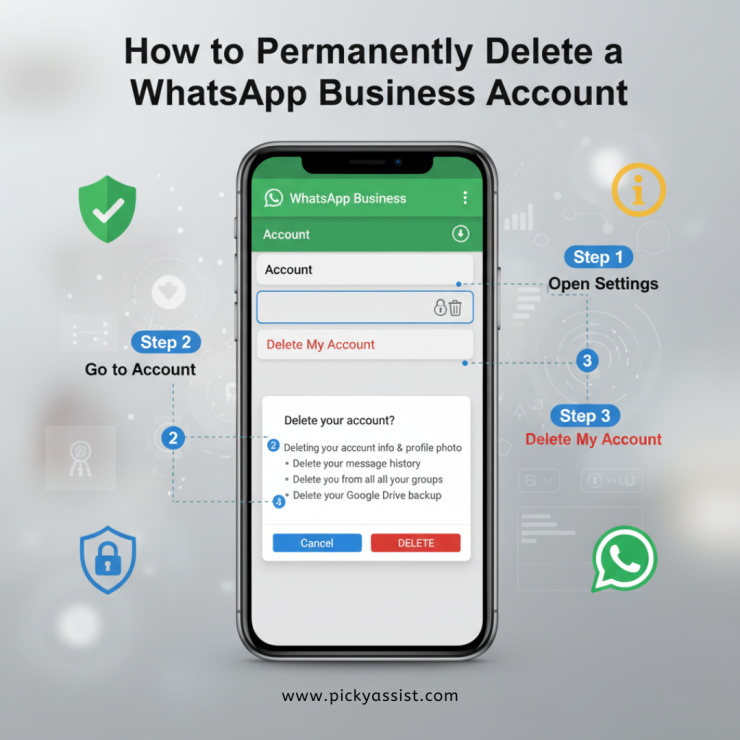
If you’re searching for how to delete WhatsApp, chances are you’re either switching devices, shutting down a business, or no longer need your WhatsApp Business account. Whatever the reason, deleting a WhatsApp Business account is a permanent action and understanding what happens before you proceed is crucial.
This guide explains how to delete a WhatsApp Business account, what data gets removed, what customers see (and don’t see), and what API users must do before deletion.
What Happens When You Delete WhatsApp Business?
Before walking through the steps, it’s important to understand the impact of deleting your account.
While deleting your WhatsApp Business account:
- Your business profile is permanently removed
- Chat history, media, and backups are erased
- You’re removed from all WhatsApp groups
- Your business will no longer appear on WhatsApp
- Customers are not notified about the deletion
Deleting a WhatsApp Business account is irreversible and permanently removes all associated data.
How To Delete a WhatsApp Business Account?
If you’re looking for the exact steps on how to delete WhatsApp, follow the process below carefully.
Steps to Delete WhatsApp Business Account
- Open the WhatsApp Business app on your phone
- Go to Settings
- On Android: tap the three-dot menu → Settings
- On iPhone: Settings is visible in the bottom menu
- On Android: tap the three-dot menu → Settings
- Select Account
- Tap Delete my account
- Enter your phone number in full international format
- Example: +91XXXXXXXXXX
- Example: +91XXXXXXXXXX
- Tap Delete my account
- Choose a reason for deletion
- Tap Delete my account again to confirm
Once confirmed, your WhatsApp Business account is permanently deleted.
Is Deleting WhatsApp Business Different From Deleting WhatsApp?
Yes. While the steps are similar, WhatsApp Business and WhatsApp Messenger are treated as separate products.
- Deleting WhatsApp Business removes your business profile and business tools
- Deleting WhatsApp Messenger removes only personal account data
If your search intent is how to delete WhatsApp completely, make sure you’re deleting the correct app and account type.
Can You Recover a Deleted WhatsApp Business Account?
No. Account deletion cannot be undone.
However:
- You can re-register the same phone number later
- Re-registration creates a fresh account, not a restoration
- Previous chats, backups, labels, and catalogs cannot be recovered
What Customers See When You Delete WhatsApp Business
A common concern is whether customers are alerted.
Here’s what happens:
- Customers do not receive a notification
- Your chat disappears from their active conversations
- If they message the number later, it will behave like a new account if re-registered
Important Notes for WhatsApp Business API Users
If you are using the WhatsApp Business API, deleting the app alone is not sufficient.
Additional Steps for API Users
- Cancel your WhatsApp Business API subscription
- Inform your Business Solution Provider (BSP)
- Ensure billing and templates are properly closed
- Remove API integrations from CRM or automation platforms
Failing to do this may result in continued charges or partial deactivation.
Common Reasons People Search “How To Delete WhatsApp”
Users typically delete WhatsApp or WhatsApp Business for reasons such as:
- Business closure or brand shutdown
- Switching phone numbers
- Migrating to a different WhatsApp account type
- Data privacy concerns
- Reducing customer communication channels
Understanding your reason helps ensure deletion is the right decision, not just a temporary fix.
Should You Delete or Just Disable WhatsApp Business?
If you’re unsure, consider alternatives:
- Uninstalling the app (data remains intact)
- Turning off notifications temporarily
- Removing catalogs or business hours
- Switching to WhatsApp Messenger instead
Deletion should be chosen only when you are certain you no longer need the account.
Final Thoughts
If you were looking for how to delete WhatsApp, specifically a WhatsApp Business account, the process is simple, but the consequences are permanent. Once deleted, all business data, chats, and media are erased without recovery. Always back up important information and confirm you’re deleting the correct account type before proceeding.
FAQs on Deleting WhatsApp Business
1. How do I delete WhatsApp Business permanently?
To delete WhatsApp Business permanently, open the WhatsApp Business app, go to Settings > Account > Delete my account, enter your phone number in international format, and confirm. Once deleted, your account, chats, backups, and business profile are permanently removed and cannot be recovered.
2. Is deleting a WhatsApp Business account reversible?
No. Deleting a WhatsApp Business account is irreversible. All chat history, media, backups, and business information are permanently erased. Even if you register again using the same phone number, the previous data will not return.
3. Will customers know if I delete my WhatsApp Business account?
No. WhatsApp does not notify customers when you delete your WhatsApp Business account. Your chat will simply disappear from their conversation list, and your business profile will no longer be visible.
4. Can I reuse my phone number after deleting WhatsApp Business?
Yes. You can reuse the same phone number to register a new WhatsApp or WhatsApp Business account later. However, the new account will start fresh without access to old chats, backups, or business settings.
5. What happens to chat backups after deleting WhatsApp?
When you delete WhatsApp Business, all cloud backups and local backups linked to that account are deleted. Restoring chats after deletion is not possible, even if a backup exists.





Add comment