
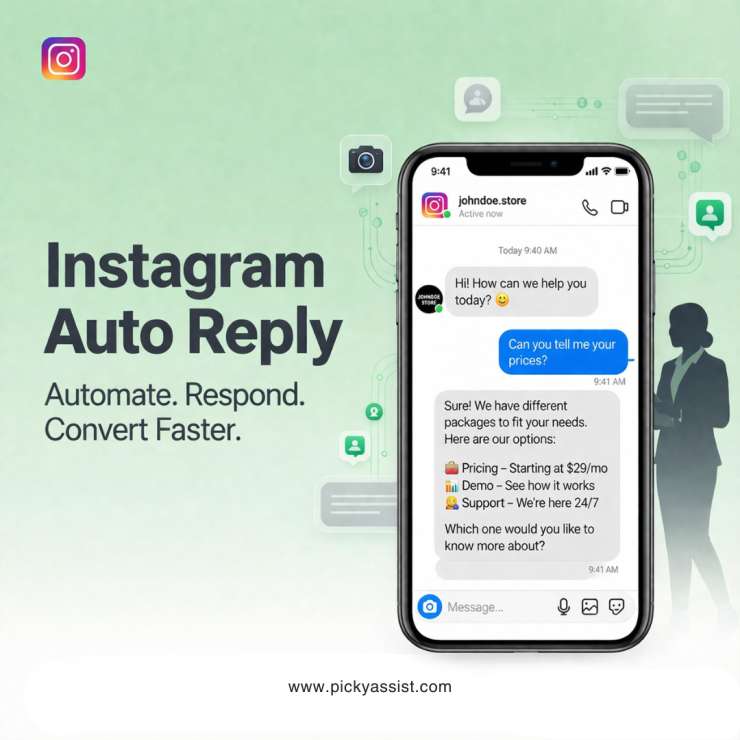
Instagram has evolved from a visual platform into a full-scale communication channel where customers ask questions, explore products, and make buying decisions. As message volume grows, responding instantly becomes difficult, especially for small teams and scaling businesses. This is where Instagram auto reply systems become critical. Instead of manually replying to every DM or comment, businesses can automate responses, qualify leads, and guide users toward action without delays.
In this guide, you’ll learn exactly how Instagram auto reply works, what it can do, how to use it effectively, and how tools like Picky Assist help you implement automation that actually improves engagement, not harms it.
What is Instagram Auto Reply?
Instagram auto reply refers to automated responses sent to users when they interact with your Instagram account, through direct messages, comments, or triggers like follows.
These can include:
- Instant replies to DMs
- Automated welcome messages for new followers
- Replies to comments on posts or ads
- Predefined responses to frequently asked questions
In simple terms, an Instagram auto responder ensures that no message goes unanswered, even when your team is offline.
What does Instagram Auto Reply do?
A well-configured system goes far beyond sending a simple “Thanks for your message.”
Here’s what it actually enables:
1. Instant Response Handling
Automatically send a reply when someone sends a DM, commonly called an Instagram DM auto reply.
2. Lead Qualification
Ask structured questions and segment users based on responses.
3. Content Delivery
Share product catalogs, brochures, links, or videos via an automatic message Instagram workflow.
4. Comment Automation
Trigger responses when users comment on posts, this includes Instagram auto reply comment use cases for campaigns.
5. Follow-Based Engagement
Send an automated welcome message Instagram when someone follows your page.
6. Routing Conversations
Assign conversations to the right team member after initial automation.
In short, an automated Instagram response system converts passive engagement into structured conversations.
How does Instagram Automation work?
Instagram automation relies on APIs and approved platforms (like Meta integrations) to create trigger-based workflows.
Core Components
1. Triggers
- New message received
- Comment posted
- User follows your account
- Keyword detected in a message
2. Rules
- If user asks about pricing → send pricing info
- If user types “book” → initiate booking flow
3. Actions
- Send reply
- Ask a follow-up question
- Assign to human agent
- Tag or categorize user
Tools like Picky Assist use these components to create an Instagram auto reply bot that feels conversational rather than robotic.
Types of Instagram Auto Replies
Understanding different automation types helps you design better workflows.
1. Instant DM Replies
Also called automatic dm reply Instagram, this sends a response immediately after a message is received.
Example:
“Hi! Thanks for reaching out. Are you looking for pricing, demo, or support?”
2. FAQ-Based Replies
Predefined answers to common questions using an Instagram autoresponder.
3. Keyword-Based Automation
Trigger replies based on keywords like “price,” “demo,” or “location.”
4. Comment-Based Automation
Respond automatically when users comment on posts, useful for campaigns and giveaways.
5. Welcome Messages
Automatically greet new followers with an automatic message in Instagram .
6. Lead Capture Flows
Structured conversational flows that collect name, email, or requirements.
Instagram Auto Reply for Personal vs Business Accounts
Instagram Auto Reply Personal Account
Native automation options are extremely limited. Most Instagram auto reply personal account use cases require external tools.
Instagram Business Account Auto Reply
Business accounts unlock:
- Integration with tools
- Access to automation APIs
- Advanced features like meta business suite auto reply
If you’re serious about automation, a business account is non-negotiable.
How Instagram Auto Reply Helps Your Team?
Automation isn’t just about saving time, it directly impacts performance.
1. Reduces Response Time to Seconds
Users expect instant replies. An instant reply Instagram setup ensures zero delay.
2. Handles High Volume Efficiently
Whether it’s ads or organic traffic, automation scales without adding manpower.
3. Improves Lead Conversion
Structured flows guide users toward booking, purchasing, or inquiry completion.
4. Eliminates Repetitive Work
No need to manually answer the same questions repeatedly.
5. Enables 24/7 Availability
Your auto responder Instagram works even outside business hours.
Business Use Cases Across Industries
E-commerce
In e-commerce, businesses use auto reply to instantly recommend products based on user queries, share order tracking updates without manual intervention, and recover abandoned carts through timely follow-ups triggered via an Instagram message auto reply workflow.
Healthcare Clinics
Clinics rely on automation to streamline patient communication by enabling appointment booking through DMs, answering common service-related questions, and sending automated reminders that reduce no-shows and improve overall patient experience.
Education & Coaching
Institutes and coaches use automated replies to handle course inquiries efficiently, guide prospects toward demo session bookings, and qualify leads by collecting essential details before passing them to the admissions team.
Real Estate
Real estate businesses leverage automation to instantly share property details, send location links, and schedule site visits, ensuring faster responses and higher chances of converting inquiries into actual visits.
Travel & Hospitality
Travel and hospitality brands use automation to respond to package inquiries, deliver instant itineraries, and confirm bookings, helping them manage high volumes of queries while maintaining a smooth and responsive customer experience.
Each of these industries benefits from automated message response Instagram workflows that are tailored to their specific customer journeys and engagement needs.
Instagram Auto Reply Message Examples
Here are practical, conversion-focused examples:
1. General Inquiry
“Thanks for your message! How can we help you today?
- Pricing
- Demo
- Support”
2. Lead Capture
“Great! Could you share your requirements so we can assist you better?”
3. Comment Trigger
“Thanks for your interest! We’ve sent you the details via DM.”
4. Welcome Message
“Welcome! We’re glad you’re here. Let us know how we can help.”
These Instagram auto reply message examples should always feel natural and helpful not as if it is scripted.
Best Practices for Sending Auto Replies
Keep It Human
Avoid robotic phrasing. Write like a real conversation.
Use Smart Branching
Don’t send the same reply to everyone. Personalize flows based on intent.
Combine Automation + Human Support
Use automation for first response, then hand off to agents when needed.
Optimize Response Timing
Immediate replies work best for engagement, but avoid over-triggering.
Regularly Update Responses
Keep your Instagram automated response aligned with current offers and services.
Common Mistakes to Avoid
1. Over-Automation
Sending too many automated messages can annoy users.
2. Generic Responses
“Thanks for contacting us” without context reduces engagement.
3. No Escalation Path
Users should always have a way to reach a human.
4. Ignoring Analytics
Track what works and refine your automatic reply on Instagram strategy.
5. Poor Keyword Triggers
Irrelevant triggers can send incorrect responses.
Instagram Auto Reply Not Working: Common Issues
If your Instagram auto reply not working, check:
- API connection issues
- Incorrect trigger setup
- Platform restrictions
- Message policy violations
- Tool configuration errors
A reliable platform like Picky Assist can ensure consistent delivery and compliance.
How to Set Up Auto Reply on Instagram?
Native Setup (Limited)
Using meta business suite auto reply, you can:
- Set instant replies
- Create away messages
However, customization is limited.
Advanced Setup with Picky Assist
To create scalable automation:
Step 1: Connect Instagram Account
Integrate your business account with Picky Assist.
Step 2: Define Triggers
Set rules for DMs, comments, or keywords.
Step 3: Build Workflows
Design conversational flows using automatic message reply Instagram logic.
Step 4: Test and Optimize
Ensure responses are accurate and engaging.
Step 5: Go Live
Start sending automated messages on Instagram instantly.
Picky Assist allows deeper automation compared to native tools, especially for lead qualification and routing. You can always
How to Turn Off Auto Reply on Instagram?
If needed, you can:
- Disable automation inside your tool
- Turn off rules in meta business suite auto reply
- Remove triggers causing responses
This helps when you want manual control.
Why Choose Picky Assist for Instagram Auto Reply?
Picky Assist is designed for businesses that want structured, scalable, and intelligent automation.
Key Advantages
- Advanced workflow automation
- Multi-step conversation flows
- Lead capture and qualification
- Integration with CRM systems
- Comment + DM automation in one platform
Unlike basic tools, Picky Assist focuses on business outcomes, not just replies.
To Conclude
Instagram is no longer just a content platform, it’s a conversation engine. If your business cannot respond instantly, you lose opportunities.
A well-designed Instagram auto reply system ensures:
- Faster engagement
- Better user experience
- Higher conversion rates
However, success depends on how intelligently you implement automation. With the right strategy and a capable platform like Picky Assist, you can turn every interaction into a meaningful business outcome.
FAQs on Instagram Auto Replies
1. What is the best way to set up Instagram auto replies?
Use a business account and integrate it with an automation platform like Picky Assist to create structured workflows beyond basic instant replies.
2. Can I use Instagram auto reply for free?
Basic features are available through native tools, but advanced automation like lead qualification requires external platforms.
3. How do I create an Instagram auto reply message?
Define user intent, keep the message conversational, and guide users toward a clear next step.
4. Does Instagram allow automated messages?
Yes, but only through approved integrations and APIs that comply with platform policies.
5. Can I automate replies to comments on Instagram?
Yes, tools can trigger Instagram auto reply comment workflows to engage users and move them into DMs.
6. How do I turn off auto reply on Instagram business accounts?
Disable automation settings in your tool or switch off instant replies in Meta Business Suite.
7. Why is my Instagram auto reply not working?
Common reasons include incorrect setup, API issues, or policy restrictions.
8. Is automation safe for my Instagram account?
Yes, as long as you use compliant platforms and avoid spam-like behavior.
Add comment