
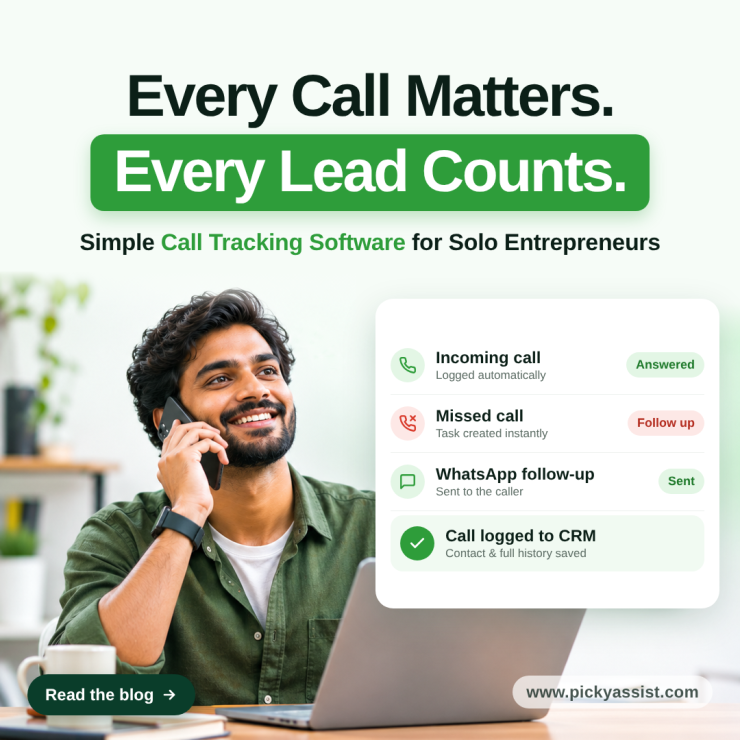
Simple call tracking software gives a solo entrepreneur what a notebook and a memory can’t. An automatic record of every call, who it came from, whether it was answered, and what should happen next.
When you become the only one who handles your business you are the salesperson, the support desk and the person doing the work. When the phone rings during a client session, nobody else picks up, and a missed call quietly becomes a lost enquiry. A tool built for a fifty-seat call centre won’t fix that. This guide covers what a one-person business needs from a call tracking system, what to ignore, and how to run it in about twenty minutes a week.
What Call Tracking Means for a One-Person Business?
Call tracking does three jobs. It records that a call happened, links it to a person, and prompts a next step. Features like multi-agent routing, whisper messages and large number pools are made for teams running big ad programmes.
For a solo entrepreneur, simple call tracking software should pass one test: can you set it up in an afternoon and trust it without checking it daily? If it demands a dashboard habit, it becomes another tab you ignore.
Where Solo Businesses Lose Leads on the Phone?
Usually the problem isn’t the marketing. It’s three small leaks:
- Missed calls during work. You can’t answer while you’re with a client or driving, and nobody covers for you.
- Follow-up that lives in your head. “I’ll call them back” works until a busy week.
- No idea where calls come from. Instagram, a Google profile, a referral and a flyer all look identical when the phone rings.
A Quick Framework and What to Look for?
| Capability | Why it matters when you work alone | Can you skip it? |
|---|---|---|
| Automatic call logging | Every call has a record without manual notes | No |
| Missed-call follow-up | Turns a missed call into a task or message | No |
| Caller history in one place | You see past conversations before calling back | No |
| Source labels | Shows which channel brings calls | Only if all calls come from one channel |
| Light call monitoring software features | Reveals your busy hours and missed-call patterns | Skip live listening and agent scoring |
| Setup without a developer | You have no IT help | No |
When you compare simple call tracking software, score each option against this table. Anything beyond it is nice to have, and usually priced like it.
Using Call Tracking for Lead Generation Without a Marketing Team!
Call tracking software for lead generation sounds like an agency tool, but the solo version is modest: know where each call came from and reply quickly. Give every channel a clear label, such as your website, your Google Business listing and your social profile, and note the source when you log a call. After a month you’ll see which channel deserves your time.
Speed matters as much as attribution. A prospect who calls and gets no answer often moves to the next name on their list. A prompt callback, or a WhatsApp message sent while the enquiry is fresh, keeps you in the running.
How Picky Assist’s CallBlaze Fits a Solo Setup?
Picky Assist’s CallBlaze follows the same philosophy as simple call tracking software; record automatically and set the follow-up automatically. It logs calls and syncs them to your CRM software, creates follow-up tasks for missed calls, and uses connectors to trigger a WhatsApp message or chatbot reply, so a caller who didn’t reach you still hears from you.
CallBlaze is currently free and included with all plans on Picky Assist V4. Calls, WhatsApp conversations and your CRM sit in one workspace, so you aren’t stitching three tools together.
Choosing Between Call Tracking Services
The best call tracking software for you depends on where you already work. There are three common routes:
- Standalone call tracking services: strong attribution, but built around ad campaigns and often more than a solo owner needs.
- A business phone app with call logs: easy to start, but follow-up stays manual.
- A CRM with call tracking built in: calls, contacts and follow-ups in one place. This is the best fit if you also chase leads on WhatsApp.
Before you commit, ask three questions. Does it log calls without my input? Does it help me follow up on missed calls? Will I still be using it in six months?
A 20-Minute Weekly Routine just for Solo owner businesses
- Clear missed calls (10 minutes). Review them and close any unfinished follow-ups.
- Check sources (5 minutes). See which labels produced calls.
- Spot busy hours (5 minutes). Adjust your availability if calls cluster at times you’re usually unreachable.
Run this routine consistently and simple call tracking software becomes a quiet assistant rather than another chore.
Conclusion
A solo entrepreneur doesn’t need enterprise reporting. You need every call logged, every missed call answered and a clear view of what brings leads. Simple call tracking software delivers that as long as it stays simple. Choose simple call tracking software that connects to your CRM and WhatsApp, and follow-up stops depending on your memory.
If you want to try this without adding another subscription, CallBlaze is free with all Picky Assist V4 plans. Set it up this week and see every call, missed or answered, in one place.
FAQs on Simple Call Tracking Software
It is a tool that automatically logs your calls, links each one to a contact or source, and prompts follow-up, without the routing, scoring and reporting features that larger teams need.
If calls bring you customers, yes. Even a handful of missed or forgotten calls a month can cost you work, and a log makes them visible.
Not exactly. Tracking records and attributes calls. Monitoring usually means listening to or scoring calls, which matters for teams. Solo owners mostly need the tracking side plus simple patterns like busy hours.
Label each channel or ask callers how they found you, and record the answer in your log. Some tools can assign separate numbers per channel, so check what your setup supports.
Yes, if the tool creates a task or sends a message when a call goes unanswered. That is the feature solo owners benefit from most.
CallBlaze is currently free and included with all Picky Assist V4 plans. V3 customers need to upgrade and migrate to V4 to access it.
A simple setup should take an afternoon at most. If a tool needs a developer or a long onboarding, it isn’t built for a one-person business.


Add comment