
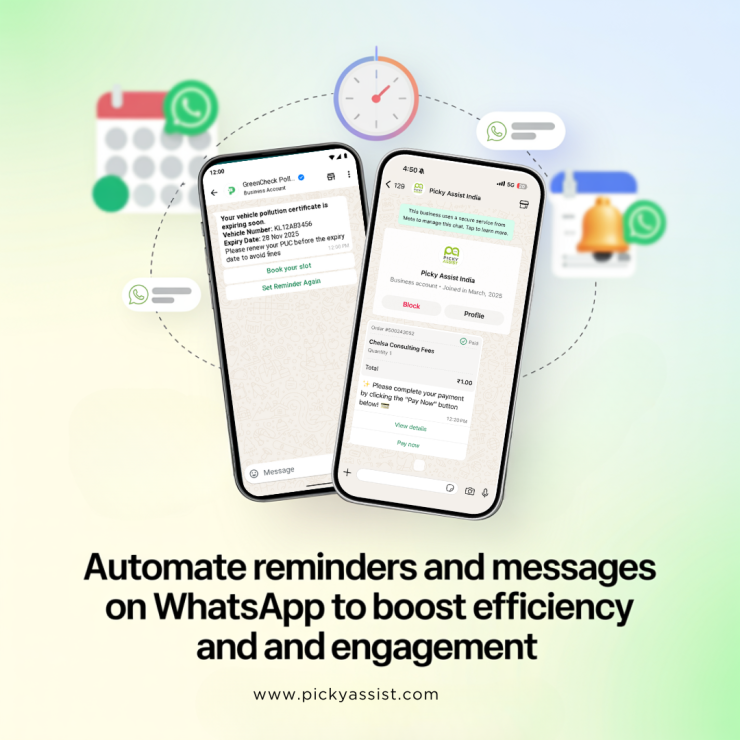
A reliable WhatsApp message scheduler ensures the right message reaches the right person at the right moment, from appointment reminders to cart-recovery nudges and promotional broadcasts. Compared with email, conversational messaging delivers markedly higher visibility; businesses that add scheduled messaging to their stack see faster responses and better conversion efficiency.
This long-form guide explains why WhatsApp message scheduler matters, how to design automated flows, sample templates you can use today, and how platforms like Picky Assist make the process enterprise-ready. It’s written for marketers and operations leads who value both tactical how-to and data-driven outcomes.
Business Benefits of WhatsApp Message Scheduler
- Higher read rates and faster action: Messaging channels typically produce much higher open and read rates than email, making a scheduled notification more likely to be seen and acted upon.
- Reduced no-shows and churn: Automated reminders for appointments and deliveries cut missed appointments and late pickups, improving capacity utilisation. Picky Assist customers report significant reductions in no-shows when reminders are scheduled.
- Consistent customer experience at scale: Scheduling removes manual error and ensures every customer receives standard, on-time information, from shipping updates to VIP offers.
Real Use-Cases that Justify Automation
- Appointment & service reminders — automated reminders 24–48 hours before appointments reduce no-shows. Use a scheduled reminder plus one follow-up one hour before the slot. Picky Assist supports recurring schedulers for these use-cases.
- Cart recovery flow — trigger scheduled nudges for abandoned carts: 1 hour, 24 hours and 72 hours. The first should be frictionless (cart link + one-click buy); follow-ups escalate with discounts.
- Event and webinar reminders — schedule a confirmation + reminders at 24 hours and 1 hour before start to lift live attendance.
- Subscription and billing alerts — proactive billing reminders reduce involuntary churn.
- Recurring customer touches — birthday offers and membership renewals scheduled monthly/annually using recurring jobs. Picky Assist’s recurring scheduler is purpose-built for repeated sends.
Why Should you Automate with WhatsApp and Schedule Messages Automatically?
When you schedule a WhatsApp message, you can choose between device-level workarounds (phone apps or web extensions) and Business-API platforms designed for scale. For teams, an API-based WhatsApp scheduler or an automation platform is the correct choice because it supports templates, compliance and bulk orchestration. Picky Assist provides template management, scheduled workflows, and CRM connectors to make scheduled campaigns reliable and auditable.
Compare features you should require:
- Template approval & dynamic fields
- Recurring scheduler with timezone support
- Bulk scheduling and throttling controls for high-volume sends
- CRM & e-commerce integration to pull personalised fields
- Analytics (delivery, read, CTR, conversion) and audit trails
How to Design a Schedule-first WhatsApp Campaign?
- Define objectives and timeline
Decide whether your goal is reminders, retention, revenue or support automation. That determines cadence and template content. - Collect and record opt-ins
Only send to customers who have consented. Store opt-in timestamps and channels for compliance. - Build segments
Separate VIPs, first-time buyers, subscribers and no-shows so you can tailor scheduled reminders appropriately. - Prepare templates and request approvals
Most business platforms require pre-approved templates for promotional or repeated messages. Submit them early, platform validation times increase during peak seasons.
- Map triggers and schedule rules
Examples: schedule send in WhatsApp for appointments (48h/24h/1h), schedule a message on WhatsApp for post-purchase follow-ups (3 days after delivery), and schedule sending messages on WhatsApp for subscription renewals (7 days before expiry).
- Test and run small
Start with a pilot segment and monitor delivery, read and opt-out rates; then scale.
- Scale with throttling
When sending in volume, throttle and stagger sends to protect delivery reputation and maintain low complaint rates.
Sample Plug-and-Play Templates and Timing
Appointment reminder — 48 hours
Hi {{name}}, this is a reminder of your appointment on {{date}} at {{time}}. Reply YES to confirm or RESCHEDULE to change. Thanks!
Cart recovery — 1 hour
Hey {{name}}, you left items in your cart. Tap to complete checkout: {{cartlink}} — enjoy 10% off with code SAVE10.
Subscription renewal — 7 days
Hi {{name}}, your {{plan}} renews on {{date}}. Renew now to avoid interruption: {{renewlink}}.
These examples assume you will schedule messages in WhatsApp using approved templates and dynamic fields; always keep CTAs short and links trackable.
How it Helps to Run Scheduled Flows on WhatsApp?
Picky Assist offers a purpose-built WhatsApp scheduler and recurring scheduler features that are particularly useful for businesses needing reliability and scale. Core advantages include:
- Prebuilt schedulers & automation modules to schedule recurring reminders and one-time sends.
- Template management and assistance with approvals so you can send approved messages without manual resubmission each season.
- CRM and connector support to pull customer fields and schedule personalised messages (e.g., birthday greetings or invoice reminders).
These capabilities let teams move beyond “send-later” hacks to full, auditable scheduling where every schedule a message on WhatsApp action is logged and trackable.
Security, Compliance & Deliverability
- Always honour opt-outs and provide clear HELP/STOP instructions.
- Use approved templates for recurring or promotional messages to avoid blocks.
- Respect rate limits: use throttling when you need to send bulk messages to avoid temporary restrictions. Platforms offer controls to send later on WhatsApp in a compliant manner and handle retries.
- Timezones and local laws: schedule based on customer local time zones and respect local messaging hours for consumer protection.
Metrics to Track for Scheduled Programs
- Delivery rate — confirms platform acceptance.
- Read/open rate — measures visibility (often far higher than email benchmarks).
- Click-through & action rate — measures CTA effectiveness for cart recovery or bookings.
- Conversion / revenue per message — final business outcome.
- Opt-out & complaint rates — protect sender reputation; high rates signal the need to reduce frequency or revise copy.
Best Practices for Scheduled Messages on WhatsApp
- Keep messages short and actionable, one CTA per message.
- Personalise with first name and a single contextual fact (order number, appointment time).
- Use short links and UTM parameters to measure ROI.
- For recurring sends, humanise messages (e.g., “Just a quick reminder…”).
- For critical flows (payments, appointments), schedule both an automated reminder and a follow-up if no confirmation arrives.
WhatsApp Message Scheduling Implementation Checklist for Businesses
- Record explicit opt-ins.
- Select a scheduler platform (confirm template & recurring support).
- Draft templates and submit for approval.
- Build segments and pilot the flow.
- Monitor metrics and iterate.
Final Thoughts
A disciplined approach to scheduled messaging turns one-off reminders into predictable business outcomes. Whether you need to schedule a WhatsApp message for a single appointment, send later on WhatsApp for a drip campaign, or run recurring billing notifications, moving to a proper WhatsApp scheduler gives teams control, auditability and measurable ROI. Platforms like Picky Assist simplify these steps, handling scheduler configuration, template approvals and CRM integrations so you can focus on the customer experience.
FAQs on Scheduling Messages on WhatsApp
How do I schedule a WhatsApp message for a future date?
Use a WhatsApp Business API provider or platform that supports scheduling. Create an approved template with dynamic fields, choose the recipient segment, pick the date/time and enable timezone-aware scheduling. Platforms like Picky Assist provide scheduler modules and recurring options for enterprise workflows.
Can I send later on WhatsApp from my phone?
Native consumer apps don’t offer full scheduled marketing sends. There are device-level apps and web extensions for personal reminders, but for business-scale scheduling (bulk sends, templates, analytics) use an API-based scheduler or a provider such as Picky Assist.
What is a WhatsApp timed message and when should I use it?
A WhatsApp timed message is simply a message scheduled to be delivered at a specific time. Use timed messages for appointment confirmations, delivery windows, and event reminders to reach customers when they are most likely to act.
Is it safe to schedule send in WhatsApp for promotions?
Yes, provided recipients opted in, templates are approved, and you respect throttling and local messaging rules. Scheduling promotional campaigns through a trusted provider reduces the risk of blocks and improves deliverability.




Add comment