
WhatsApp has become one of the most widely used communication platforms for both personal and business conversations. What started as a simple chat application is now a powerful channel for sharing content, driving website traffic, and guiding users toward specific actions. Despite this, many users and businesses still struggle with a fundamental question: how to send links in WhatsApp in a way that feels natural, clickable, and effective, especially during broadcasting.
This blog explains the process in depth, covering personal chats, broadcasts, business messaging, and the use of clickable CTA buttons.
How to Send a Link in WhatsApp in a One-to-One Chat?
The simplest way to send a link in WhatsApp is through a personal chat. When a URL is pasted directly into the message box, WhatsApp automatically detects it and converts it into a clickable link. In many cases, it also generates a preview containing the page title, description, and image.
This method works well for sharing website links, blog articles, Google Forms, payment links, or product pages. However, while it is effective for individual conversations, it lacks structure and tracking when used repeatedly or for marketing purposes.
Sending Links in WhatsApp Groups
Sending links in WhatsApp groups works in the same way as personal chats. The link becomes clickable for all members once the message is sent.
Groups are useful for communities and discussions, but they are not designed for controlled communication. Messages can get buried quickly, and links may be overlooked. For businesses, groups also come with limitations such as lack of personalization, no automation, and no performance insights. This is why many businesses move toward broadcasting instead.
How to Send a Link in WhatsApp Broadcast Lists?
Broadcasting allows you to send the same message to multiple contacts individually, without creating a group. When you send a link via a WhatsApp broadcast list, each recipient receives it as a personal message.
In regular WhatsApp and WhatsApp Business App, links sent during broadcasting appear as plain clickable URLs. While this method allows wider reach, it still has constraints. Broadcast messages are delivered only to users who have saved your number, and there is no way to add interactive elements like buttons or track link clicks.
For small-scale communication, this may be sufficient. For growing businesses, it quickly becomes limiting.
Sending Links Using WhatsApp Business API
This is where link sharing becomes more powerful.
When using the WhatsApp Business API, businesses can send links through pre-approved message templates. These templates allow you to structure messages clearly and guide users toward action.
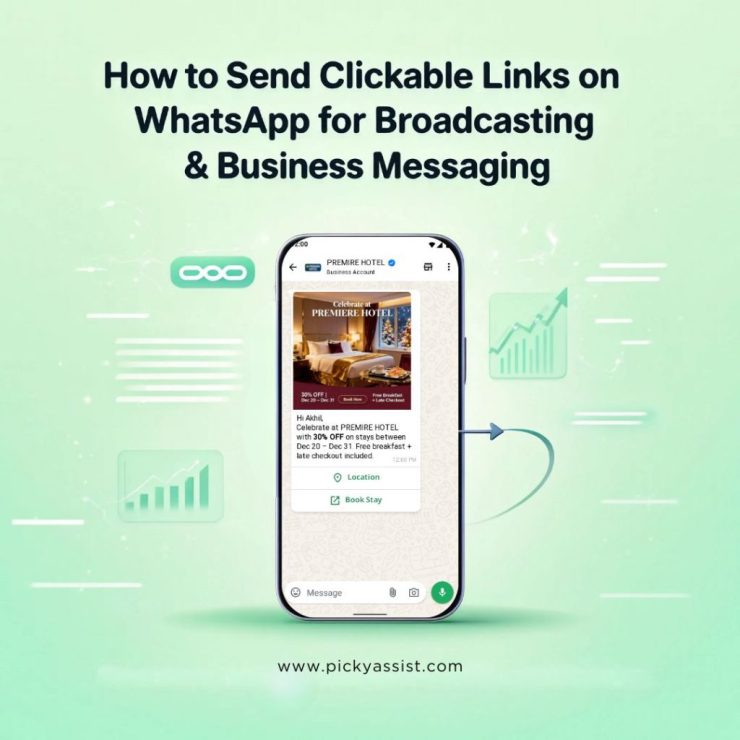
Instead of pasting raw URLs, links can be embedded within professionally written messages that feel conversational and intentional. More importantly, businesses can include clickable CTA buttons, making it easier for users to take the next step.
Messages with Clickable CTA Buttons on WhatsApp
Clickable CTA buttons transform how links perform on WhatsApp. Rather than asking users to read a message and tap a long URL, CTA buttons present a clear action such as “Visit Website,” “Book a Demo,” or “Register Now.” These buttons are visually distinct, mobile-friendly, and designed to improve engagement.
CTA buttons can be used for:
- Website redirects
- Webinar registrations
- Product pages
- Payment links
- Appointment booking
- Lead capture forms
WhatsApp Broadcasting with API
When links are sent during WhatsApp broadcasting using the Business API, every recipient receives the message individually. The presence of CTA buttons ensures consistency across thousands of messages while maintaining a personal feel.
Additionally, businesses can:
- Schedule broadcasts
- Segment audiences
- Personalize message content
- Track delivery and engagement
- Automate follow-ups based on clicks
This makes WhatsApp broadcasting not just a messaging tool, but a structured communication channel.
Best Practices to Follow
The effectiveness of a link on WhatsApp depends heavily on context. A message that explains why the link matters performs significantly better than a message that simply drops a URL. Keeping messages concise, relevant, and conversational helps maintain trust. Using CTA buttons instead of raw links improves clarity. Avoid sending too many links in a short time, as this can feel spammy and reduce engagement. For businesses, compliance with WhatsApp policies and opt-in rules is also essential to ensure message delivery and account safety.
FAQs on WhatsApp Links
1. How do I send a link in WhatsApp so it becomes clickable?
To make a link clickable in WhatsApp, paste the full URL directly into the message box and send it. WhatsApp automatically converts valid links into clickable URLs. No special formatting is required.
2. How to send a link in WhatsApp without showing a preview?
If you want to send a link in WhatsApp without generating a preview, send the message immediately after pasting the link, before WhatsApp loads the preview. Alternatively, add text before or after the link and remove the preview manually if available.
3. Can I send links during WhatsApp broadcasting?
Yes, links can be sent during WhatsApp broadcasting. In regular WhatsApp or WhatsApp Business App, links appear as standard clickable URLs. When using the WhatsApp Business API, links can be sent within structured message templates and enhanced with clickable CTA buttons.
4. How to send links in WhatsApp broadcasts with a CTA button?
To send a link with a clickable CTA button, you must use the WhatsApp Business API. CTA buttons such as “Visit Website” or “Register Now” are added to approved message templates and appear directly below the message content.
5. Why are my links not delivering in WhatsApp broadcasts?
Links may fail to deliver if the recipient has not saved your number (in regular broadcasts), if the message violates WhatsApp policies, or if the account is restricted. Using opt-in contacts and approved templates improves delivery reliability.
Picky Assist is best suited for businesses handling high-volume leads, especially in industries like real estate, education, BFSI, and insurance. It excels at lead capture, distribution, automated follow-ups, and sales execution.
Add comment