
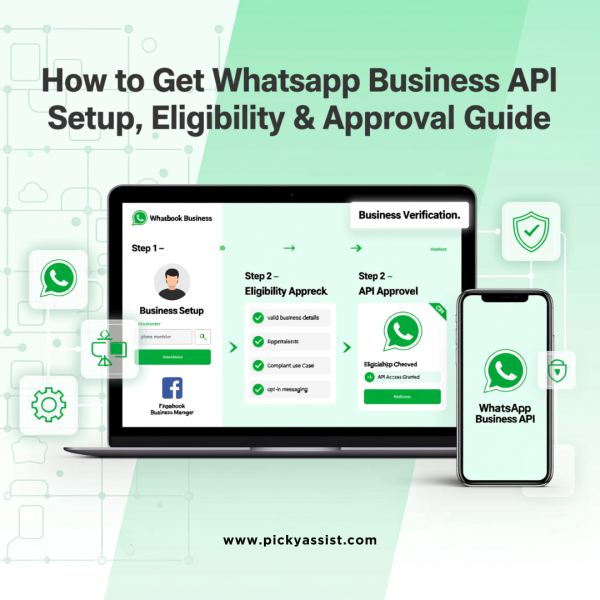
If you’re searching for how to get WhatsApp API, you’re likely a business looking to scale customer communication beyond the limits of the regular WhatsApp or WhatsApp Business app. The WhatsApp Business API is designed for medium and large businesses that want automation, CRM integration, and multi-agent support,without compromising compliance.
This guide explains how to get WhatsApp API for business, the eligibility requirements, setup methods, verification process, and what you can actually do once the API is live.
What is WhatsApp Business API?
The WhatsApp Business API is an official interface provided by Meta that allows businesses to send and receive WhatsApp messages programmatically. Unlike the WhatsApp Business app, the API does not have a built-in user interface and must be connected to a platform, CRM, or automation tool.
It is commonly used for:
- Customer support automation
- Transactional notifications
- Marketing campaigns using approved templates
- Team inbox and CRM workflows
How to Get WhatsApp API for your Business?
To get access to the WhatsApp Business API, you can choose between two methods, depending on your technical capabilities. You can connect directly to Meta’s WhatsApp Cloud API yourself or Depend on a Meta-approved Business Solution Provider (BSP) for the same. Using unauthorized, third-party software to access the WhatsApp Business API violates Meta’s Terms of Service and results in permanent account bans.
Option 1: Direct Setup via Meta Cloud API (For Developers)
If you want to build your own integration and skip third-party platform fees, you can use the official WhatsApp Cloud API hosted by Meta.
- Create a Meta Business Account: Open Meta Business Suite and set up an account for your company, if you don’t have one yet.
- Register a Developer App: Go to the Meta App Dashboard and create a new app under the Business use case.
- Add WhatsApp to Your App: In the app dashboard, find WhatsApp in the products list and click Set up. This instantly gives you a free sandbox with a temporary access token and a test phone number.
- Link a Live Number and Verify: To go live, add a permanent phone number that isn’t tied to a personal WhatsApp account or the WhatsApp Business app. To scale your messaging volume, you’ll also need to complete Meta’s Business Verification by submitting your company’s compliance documents.
Option 2: Via a Recognized Business Solution Providers (BSP)
The official API doesn’t come with a built-in user interface, so most businesses choose a Meta Business Solution Provider (BSP). These platforms take care of the infrastructure and template approvals, and give you a visual dashboard or CRM to chat with your customers.
- Sign up with Meta approved recognised platforms that offers support like Picky Assist, Wati or AiSensy .
- Connect Meta: Click “Log in with Facebook” to link your Meta Business Manager.
- Verify your number: Claim or confirm your business display name, then enter your phone number to receive an OTP for verification.
Key Requirements to Get WhatsApp Business API
Before starting the registration process, ensure you meet the following requirements:
1. Facebook Business Manager Account
Your business must have an active Meta (Facebook) Business Manager account with accurate details.
2. Phone Number
You need a phone number that:
- Is not connected to WhatsApp Messenger or WhatsApp Business app
- Can receive SMS or voice calls for verification
3. Business Website
A functional website is mandatory. Meta uses this to validate business authenticity.
4. Facebook Business Page
While not always mandatory, a business page significantly improves approval success.
What Can You Do With Business API?
Once your API is active, you can unlock advanced capabilities:
Automated Messaging
Send order confirmations, appointment reminders, payment alerts, and delivery updates automatically.
Bulk Messaging (Policy-Compliant)
Send broadcast messages using pre-approved templates that follow WhatsApp policies.
Multi-User Access
Allow multiple agents or teams to reply from the same WhatsApp number.
CRM & Tool Integration
Connect WhatsApp with CRMs, helpdesks, payment systems, and automation workflows.
How Long Does It Take to Get Business API?
Setup takes anywhere from 10 minutes to 7 days, depending on your paperwork and whether you go through an official Meta Business Solution Provider (BSP). Delays usually occur due to incomplete business details, website issues, or verification delays.
Common Reasons WhatsApp Applications Get Rejected
- Website lacks clear business information
- Phone number already linked to WhatsApp
- Inconsistent business details
- Policy-restricted industries
Ensuring compliance upfront significantly improves approval chances.
Final Thoughts
If your goal is to scale customer engagement, automate conversations, and build a professional WhatsApp communication system, understanding how to get WhatsApp API is the first step. Whether you choose direct Meta Cloud API access or a BSP-managed setup, the key lies in proper compliance, verification, and long-term strategy.
Frequently Asked Questions (FAQs)
You can get WhatsApp API without coding by using a Business Solution Provider like Picky Assist. BSPs handle all technical setup and provide a ready-to-use interface.
WhatsApp itself does not charge setup fees, but messaging is priced on a conversation-based model, and BSPs may charge platform fees.
Yes. Small businesses can apply as long as they meet Meta’s requirements, including having a website and verified business details.
Yes. The phone number used for API must not be connected to any existing WhatsApp personal or business app.
Approval typically takes between 1 to 7 days, depending on the setup method and business verification status.




Add comment