
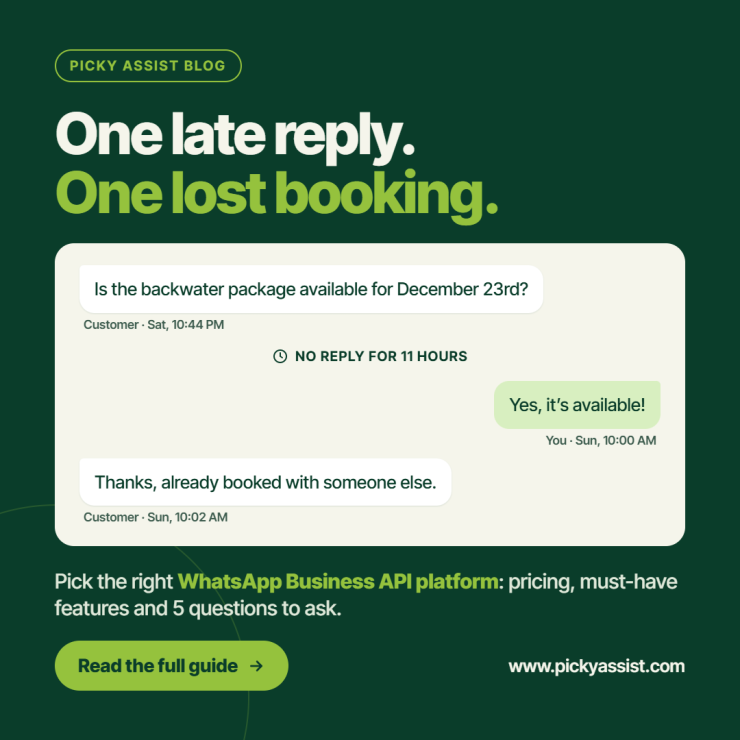
A founder runs a small travel studio. At 10.44 on a Saturday night, a prospect messages the brand on WhatsApp: “Is the backwater package available for December 23rd?” Nobody sees it until 10 a.m. By then, the prospect had booked with a competitor who replied in four minutes. Nothing was wrong with the product or the price. The business simply could not keep up with the channel its customers prefer. Stories like this push teams beyond the free WhatsApp Business App and toward a proper WhatsApp business API platform, where automation, shared inboxes and CRM data work together.
This guide explains what that platform does, how costs are structured, which features matter, and how to pick one without regretting it six months later.
What is a WhatsApp Business API Platform?
A WhatsApp business API platform is software that connects your business to WhatsApp through Meta’s official interface and gives your team the tools to use it at scale. The API itself has no screen. It only sends and receives messages. The platform adds everything people actually need: a team inbox, chatbot builder, broadcast tools, contact management, analytics and integrations.
In short, the API is the engine and the platform is the car.
The WhatsApp Business API is built for companies that need more than one person answering, automated replies, or messaging tied to systems like a CRM or an order database. Access is granted through approved Business Solution Providers (BSPs), which is why many teams start by looking for a WhatsApp business API provider rather than going to Meta directly.
WhatsApp Business App vs API: Which One Do You Need?
The free app works well for a single owner handling a few chats a day. The API becomes necessary when volume, speed or team size outgrow it.
| Factor | WhatsApp Business App | API through a platform |
| Users | One phone plus a few linked devices | Unlimited agents on a shared inbox |
| Automation | Basic away and greeting messages | Chatbots, workflows, triggers |
| Bulk messaging | Limited and manual | Campaigns using approved templates |
| CRM and integrations | None built in | Connects to CRMs, stores, payment tools |
| Reporting | Minimal | Delivery, read and response analytics |
| Cost | Free | Platform fee plus Meta message charges |
A useful rule: if more than two people touch customer chats, or if you lose leads because replies come late, the API is worth evaluating.
How WhatsApp API Pricing Works?
WhatsApp API pricing confuses many buyers because the final bill has more than one part. Break it into three layers.
1. Meta’s message charges. Meta charges per delivered template message, based on the message category (marketing, utility or authentication) and the recipient’s country. Replies inside the 24-hour customer service window are generally free, and utility templates sent inside an open window are typically free too. Rates change, so always check Meta’s current rate card before you forecast a budget.
2. Your provider’s fees. Providers usually charge a monthly or annual subscription. Some add a markup on Meta’s per-message rates, and others pass them through at cost. This is where plans differ most.
3. Extras. Watch for charges on additional agents, chatbot usage, number of contacts, onboarding or premium support.
When you compare WhatsApp business pricing across vendors, ask for a worked example: “We send 20,000 marketing messages and 5,000 utility messages a month in India. What is the total bill?” A vendor who cannot answer clearly is a risk. The same applies when you search for WhatsApp for business pricing online: published numbers rarely include every add-on, so request a full quote.
Must – Have Features in a WhatsApp Business API Platform
Price matters, but features decide whether the investment pays off. Prioritise these:
- Shared team inbox. Agents should see conversation history, assign chats, add notes and avoid replying twice.
- No-code chatbot builder. You should be able to build and edit flows for FAQs, lead capture and bookings without waiting on developers.
- Automation workflows. Triggers such as “new lead,” “payment pending” or “order shipped” should start messages automatically.
- Built-in CRM. Contacts, tags, lead stages and message history belong in one place, not in three spreadsheets.
- Campaign tools. Segmentation, template management, scheduling and delivery reports keep broadcasts compliant and measurable.
- Integrations. Look for native connections or webhooks and API access for your CRM, e-commerce store, payment gateway or helpdesk.
- Multi-channel support. If customers also reach you through Instagram, Messenger or SMS, one unified inbox saves your team from switching tools.
- Template approval support. Meta must approve message templates, and good guidance reduces rejections.
Choosing a WhatsApp Business API Provider: Questions to Ask
A provider is more than a price list. Before you sign, ask:
- Are you an official Meta partner, and who owns the WhatsApp Business Account after setup?
- Can I export my contacts and conversations if I leave?
- What does onboarding involve, and how long does number verification usually take?
- How is support delivered, and in which hours?
- Which costs are fixed, and which grow with usage?
These questions surface lock-in and hidden costs early, when they are cheap to fix.
Where Picky Assist Fits?
Picky Assist is an official Meta partner that works as a complete WhatsApp business API platform rather than a messaging pipe alone. Teams can build chatbots without code, run campaign automation, manage leads in a conversational CRM, and collaborate in a shared inbox. Integrations connect those conversations to existing business tools, and multi-channel support helps when customers move between WhatsApp and other channels.
It will not suit every business. A solo owner with a handful of daily chats may do fine with the free app. Picky Assist makes more sense when response speed, follow-up and team coordination directly affect revenue.
Real Business Scenarios
Clinic with appointment no-shows. A multi-doctor clinic sends reminders and rescheduling links through approved utility templates. Reception staff handle exceptions from a shared inbox. The key feature needed: workflow automation plus a team inbox.
D2C store with abandoned carts. An online store connects its e-commerce platform so cart, order and delivery updates trigger messages automatically. A chatbot answers “Where is my order?” at any hour. The key feature needed: integrations and a no-code bot builder.
Education institute handling admissions. Enquiries from ads and forms land in WhatsApp. A bot qualifies each lead by course and city, then routes warm leads to counsellors. The key feature needed: CRM with lead stages and assignment rules.
In all three cases the cheapest option on paper would have been the wrong choice, because the missing feature would have cost more in lost leads than the subscription saved.
Common Mistakes to Avoid
Before you shortlist any WhatsApp business API platform, watch for these traps:
- Comparing only monthly fees. Per-message markups often outweigh subscription savings at higher volumes.
- Ignoring template rules. Poorly written or over-promotional templates get rejected or lower your quality rating.
- Skipping opt-in. WhatsApp requires clear consent before you send business-initiated messages. Collect it properly.
- Overbuilding the first chatbot. Start with your five most common questions, then expand using real conversation data.
- Choosing without a growth plan. Think about next year’s agents, contacts and campaigns, not just today’s.
A Simple Way to Decide
- Estimate volume. Count monthly conversations and expected template messages by category.
- List must-have features. Separate essentials from nice-to-haves.
- Request itemised quotes from two or three vendors using the same assumptions.
- Run a pilot with one use case, such as lead follow-up, before moving everything.
- Measure results. Track first-response time, lead conversion and agent workload.
Conclusion
The right WhatsApp business API platform is the one that fits your volume, your team and your workflows, not the one with the lowest sticker price. Start with the real cost structure: Meta’s charges, your provider’s fees and any extras. Then judge each vendor on the features that match your daily work: shared inbox, automation, CRM, integrations and campaign tools. Finally, test before you commit.
If you want to see how this works in practice, explore Picky Assist. You can build a chatbot, connect your CRM and run your first campaign automation on one platform, and decide with real data rather than guesswork.
Frequently Asked Questions on WhatsApp Business API Platform
A WhatsApp Business API platform like Picky Assist lets companies send and receive WhatsApp messages at scale. Typical uses include customer support with multiple agents, chatbots, appointment and order notifications, lead qualification and approved marketing campaigns. It combines Meta’s official API with tools such as a team inbox, CRM and analytics.
Costs have two main parts: Meta’s per-message charges for template messages, which vary by category and country, and your provider’s subscription or markup. Replies within the 24-hour customer service window are generally free. Ask any vendor for an itemised quote based on your expected volume.
The app is built for one small team using a phone, with basic automation. The API supports unlimited agents, advanced chatbots, bulk campaigns with approved templates and integrations with business software.
In most cases, yes. Meta works with approved providers who handle onboarding, number registration and technical access, then add tools on top. Choosing an official partner reduces compliance and continuity risks.
Setup usually involves business verification, number registration and template approval. Some businesses launch within 2 weeks, while others take longer if documents or display name approvals are delayed. Your provider’s onboarding team can speed this up process.
Often yes, but it depends on your setup. Some numbers can be migrated or used alongside the app through coexistence options, while others need to be removed from the regular app first. Confirm the exact process with your provider before you begin so you do not lose chat history.


Add comment