
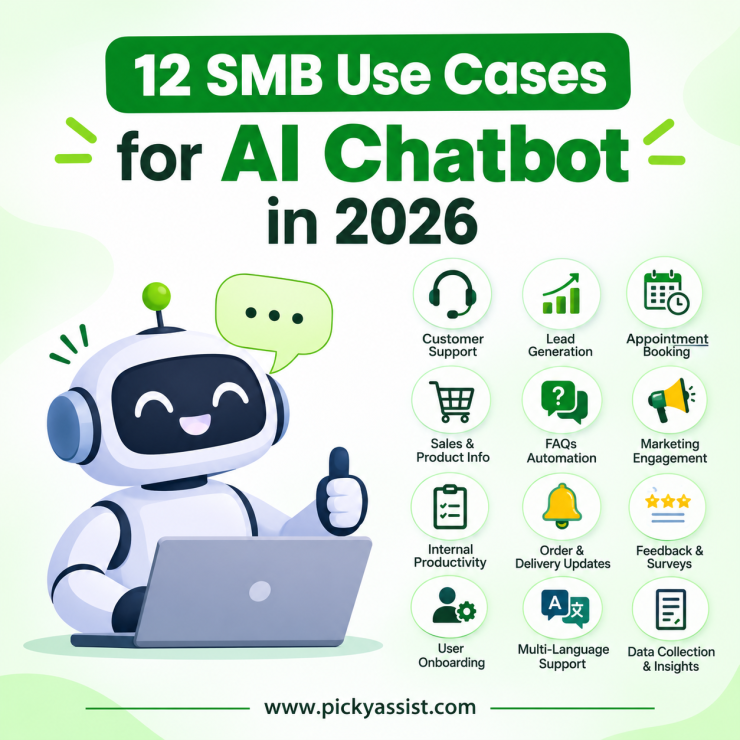
In 2026, small and mid-sized businesses use an WhatsApp AI Chatbot for business to answer repeat questions, qualify leads, book appointments, confirm orders and hand tricky conversations to a human. They often do this inside WhatsApp, where customers already spend their day. The difference from older bots is capability. A modern WhatsApp AI agent understands what a customer means, reads from your own information and completes tasks in your tools, instead of replying with canned menus.
Let’s cover how the main bot types differ, twelve practical use cases, a simple way to pick your first one, and the mistakes that quietly sink chatbot projects.
How do WhatsApp AI Chatbots and Agents for business differ?
| Rule-based bot | AI chatbot | Action-taking agent | |
| How it works | Fixed menus and keyword triggers | Understands free-text questions and replies in natural language | Understands intent, uses your data and completes tasks in connected tools |
| Best for | Simple menus, order status | FAQs, product questions | Bookings, lead qualification, follow-ups across systems |
| Main weakness | Breaks when wording changes | May answer without acting | Needs clean data and clear rules |
| Setup effort | Low | Medium | Medium to high |
Vendors use overlapping labels. You will see intelligent virtual agents and AI virtual agents used for products on the upper rungs of this ladder, often inconsistently. Ignore the label and test three things. Does it understand free-text questions? Does it answer from your information? Can it act, such as booking a slot or updating a record?
Why do most Small and Mid-sized Businesses use WhatsApp AI Chatbot?
Customers message businesses on WhatsApp for the same reason they message friends: it is fast and already open on their phone. A WhatsApp AI agent can greet the customer, answer from your catalog or FAQs, collect details and pass the thread to a teammate without moving the customer to another app.
One policy point is worth knowing. Meta’s WhatsApp Business API terms, effective 15 January 2026, say it won’t allow AI model providers to distribute their AI assistants on WhatsApp. The policy does not stop businesses from providing customer service via bots within WhatsApp. In practice, keep your bot focused on your own support, sales and updates and you stay on the right side of the rule.
12 ways SMBs are using WhatsApp AI Chatbot for Business
1. Answering FAQs after hours
A coaching institute gets the same fee, batch-timing and syllabus questions every evening. The WhatsApp chatbot replies instantly and logs anything it cannot answer for staff to review in the morning. The strongest setups work as a knowledge based agent: they answer only from approved documents, which stops the bot improvising prices or policies.
2. Qualifying leads
A property or admissions enquiry often arrives as one vague line. The bot asks about budget, timeline and location, scores the answers and routes serious enquiries to sales while keeping casual browsers warm.
3. Booking appointments
Clinics, salons and repair shops use bots to check open slots, confirm bookings and send reminders. This removes the back-and-forth that eats reception time.
4. Taking orders
A neighborhood bakery or restaurant shares its menu in the chat, collects item choices and the delivery address, and confirms the order. The owner steps in only for custom requests.
5. Recovering abandoned carts and quotes
When a shopper stalls or a quote goes quiet, a timely, relevant follow-up brings the conversation back. Business-initiated messages sent outside the 24-hour customer service window need an approved template, so prepare those in advance.
6. Sending payment and renewal reminders
Fee due dates, invoices and subscription renewals work well as polite, timed nudges with a payment link. Customers can reply with a question instead of ignoring an email.
7. Recommending products
Instead of scrolling a long catalog, the customer answers two or three questions, such as budget and use, and the bot suggests suitable items from your range.
8. Supporting customers in their own language
Many modern bots can reply in the language the customer writes in. Test your top languages with real customer phrasing before launch, especially mixed-language messages.
9. Handing off to humans at the right moment
A good AI agent knows its limits. When a customer is upset, asks for a refund exception or repeats the same question, the bot passes the chat to a person with a short summary, so nobody has to ask the customer to start over.
10. Answering staff questions internally
Growing teams use intelligent virtual agents behind the scenes for leave policies, SOP lookups and product-spec questions, which frees managers from repeating the same answers.
11. Collecting feedback and reviews
After a delivery or visit, the bot asks for a quick rating. Happy customers get a review link, and unhappy ones go straight to a manager before frustration turns public.
12. Following up on campaigns
Broadcasts create replies, and replies pile up. The bot answers the first response, tags the contact by interest and pushes warm leads into the CRM, so campaigns end in conversations rather than unread inboxes.
What are Picky Assist Smart Replies?
Smart Replies is an AI WhatsApp chatbot built for businesses that gives your customers instant, accurate answers without a live agent. You teach it your questions and answers, and it uses AI and Natural Language Processing to match each customer message to the best reply, even when customers word things differently.
It works across WhatsApp and your website, so customers get the same quick service wherever they message you.
How does WhatsApp AI Chatbot for business work?
- Add your knowledge. Type in questions and answers, add variations of how customers ask, or upload your existing FAQ in bulk.
- Organise by intent. The group replies into categories so the bot understands what each customer actually wants.
- Go live. Connect your channel. Smart Replies start answering immediately. Your team steps in only when needed.
What can you do with WhatsApp AI Chatbot for business?
Answer in natural language, not keywords. The bot matches customer queries to the closest answer using semantic matching and confidence scores, so a differently phrased question still gets the right reply.
Make it smarter with ChatGPT. With Smart Replies V2, you can connect ChatGPT to train a custom bot for each category. Your customers get more natural, contextual answers while the bot stays focused on your business.
Send more than text. Attach images, documents and other media to your replies. A car dealer, for example, can set a model name as the question and reply with its photo and details.
Add buttons and list menus. Offer interactive options on WhatsApp Official and Cloud API channels, so customers tap instead of type.
Trigger smart actions. Send customers to a link, a booking page or a payment page directly from the conversation.
Pull live answers from your systems. Developers can connect Smart Replies to a webhook and return dynamic answers from any third-party API, such as order status or account details.
Put it on your website. Add the customisable chat widget to your site so visitors get answers without leaving the page.
AI or flow-based as per your Choose
Some conversations need open, flexible answers. Others need a fixed path, like collecting booking details. Picky Assist supports both. Build AI-powered chatbots with Smart Replies, and switch to flow-based chatbots any time the situation calls for set rules.
Built for the questions your customers ask every day
- Retail and eCommerce: product details, prices, availability, delivery and return policies
- Education: fees, batch timings, admissions steps, course details
- Healthcare and clinics: timings, services, appointment information
- Automobile and real estate: model or property details with photos, brochures and enquiry capture
- Finance and services: common account, plan and process queries, with answers you control
Where should you start with WhatsApp AI Chatbot for business?
| Business type | Start with | Success signal |
|---|---|---|
| Clinic, Salon, Repair shop | Appointment booking and reminders | Bookings made without staff involvement |
| D2C, Retail, Food | Order status and cart recovery | Order queries resolved without a human |
| Education, Real estate | Lead qualification | Speed of first reply and quality of leads passed to sales |
| Services, B2B | FAQs plus human handoff | Chats resolved without escalation |
A five-step rollout that works?
- Pick one use case. Choose the question your team answers most often.
- Load approved information. Give the bot FAQs, price lists and policies, and make it behave as a knowledge based agent that answers only from that material.
- Write escalation rules. Decide when a human takes over and how fast they must respond.
- Test with real chats. Replay a few dozen genuine past messages and check whether the AI agent answers correctly and escalates on time.
- Review transcripts weekly. Treat your AI virtual agent like a new hire in its first month: check the work, correct it and widen its duties gradually.
Mistakes to avoid!
- No fallback. A bot with no path to a human frustrates customers faster than no bot.
- Letting it guess. A knowledge based agent that cannot find an answer should say so and escalate, not invent one.
- Ignoring consent and templates. Collect opt-ins and use approved templates for business-initiated messages.
- Automating sensitive moments. Complaints, refunds and negotiations deserve a person.
- Set and forget. Products, prices and policies change, so your bot’s information must change with them.
Conclusion
The best chatbot deployments in 2026 are boring in the right way: one clear use case, clean information, a quick human handoff and a weekly review. Start with the conversations that eat your team’s time, prove the result, then add use cases one at a time. If you want the bot, CRM, campaigns and team inbox working together on WhatsApp, Picky Assist can set that up. Give your AI agent clean information and keep your people for the moments that need judgment.
FAQs on WhatsApp AI Chatbot for business
It is software that answers customer messages in natural language on channels like WhatsApp or your website. It uses your own information to handle FAQs, bookings, orders and lead capture, and it hands complex chats to your team.
A regular chatbot follows scripted menus or only replies. An agent understands intent, uses your data and takes actions such as booking a slot, updating a CRM record or triggering a follow-up.
Yes, if you start narrow. Pick one repetitive task, measure it for a few weeks, then expand. Small teams often see the clearest benefit in after-hours replies and lead qualification.
It is worth it if you answer the same questions daily or lose enquiries outside working hours. If your volume is very low, a simple FAQ flow may be enough for now.
Cost depends on the platform fee, your message volume, WhatsApp messaging charges set by Meta and any setup help. Ask vendors for an itemized quote so you can see each part.
No. It handles repetitive questions so your team can focus on complaints, negotiations and relationship-building, which need human judgment.
Limit it to approved content, set clear escalation rules, test with real past chats before launch and review transcripts weekly.
Add comment