
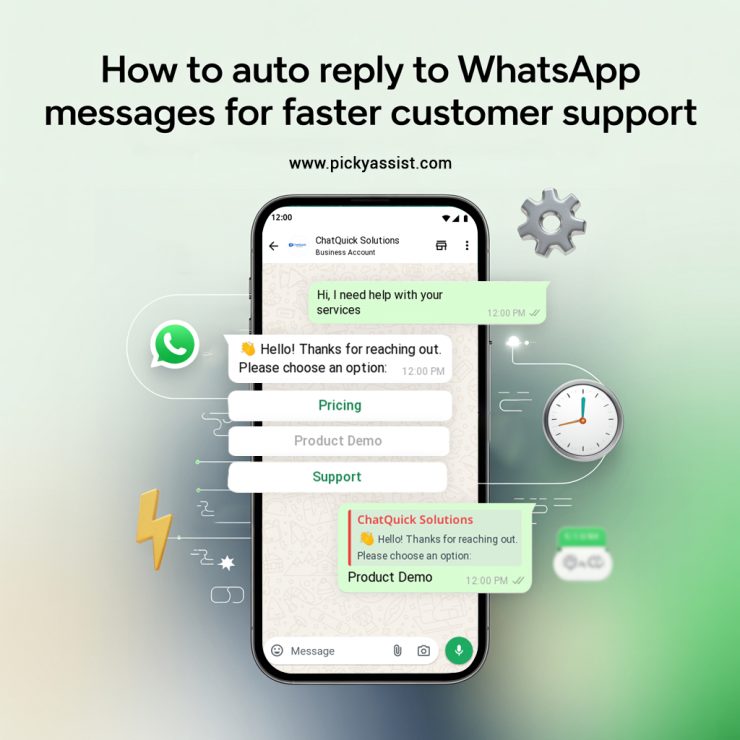
Customers expect quick responses, immediate acknowledgements, and seamless service. That is why learning how to auto reply to WhatsApp messages for faster customer support has become essential for businesses of all sizes. Whether you’re a small e‑commerce brand or an enterprise, using an autoresponder WhatsApp tool ensures no message goes unanswered, reducing the risk of losing leads or disappointing customers while providing round‑the‑clock support.
Automation lets companies increase first response rates dramatically, decrease support costs, and cultivate stronger customer loyalty. In fact, research shows that businesses with automated customer engagement systems reduce response times from hours to seconds, improving satisfaction and conversion potential.
Get ready to explore everything you need to know about auto reply to WhatsApp messages, from automation tools, setup, best practices and real strategies followed in businesses that drive growth.
What is Auto Reply to WhatsApp?
Auto reply to WhatsApp refers to a system where incoming messages are automatically responded to without human intervention. Using an autoresponder WhatsApp tool, businesses can send predefined messages instantly to customers, ensuring no query goes unanswered.
This automation can handle a variety of scenarios, such as:
- Greeting new customers with a welcome message
- Answering frequently asked questions like product details, pricing, or service hours
- Acknowledging received messages to assure customers their request is being processed
- Routing urgent queries to the right team members
By implementing WhatsApp automatic reply, businesses can reduce response times from hours to seconds, improve customer satisfaction, and scale support operations without increasing headcount. Studies show that companies using automated messaging see up to 70% faster first response rates, leading to higher engagement and conversion potential.
Why Should Businesses Use Auto Replies on WhatsApp?
The Role of Automation in Customer Support
Customers today no longer tolerate slow responses. A well‑configured WhatsApp auto reply system ensures that basic queries are answered instantly, even outside working hours, creating an always‑on customer support experience. Businesses leveraging automatic messaging tools see higher engagement, improved satisfaction, and reduced churn rate.
Here’s how an auto response on WhatsApp helps:
- Instant acknowledgment: Customers know their message has been received.
- Consistency: Every user gets a uniform response tailored to their needs.
- Scalability: Multiple conversations can be handled without increasing headcount.
- Reduced manual work: Teams avoid repetitive typing and can focus on complex issues.
Automation Enhancers
While implementing auto replies, businesses set:
- Predefined shortcuts to address common questions.
- Rules‑based triggers that send specific messages.
- Designed messages that fit scenarios like “out of office” or “pricing info.” or other key phrases that relate to a query.
These features are part of a broader message automation ecosystem that makes customer support faster and smarter.
Tools and Platforms for WhatsApp Auto Replies
Here’s a look at the most effective solutions that businesses use to automate WhatsApp communication:
1. WhatsApp Business App (Built‑in Automation)
WhatsApp Business provides essential tools such as Greeting Messages, Away Messages, and Quick Replies to manage common questions. This is a basic WhatsApp auto reply capability included within the app’s settings.
Pros:
- Simple setup
- No additional software needed
Cons:
- Limited automation logic
- Cannot route messages to team members or handle complex workflows
2. Third‑Party Autoresponder Platforms
Picky Assist and other autoresponder WhatsApp tools enable businesses to go beyond basic replies and implement WhatsApp business auto response with context‑aware automation, CRM integration, and analytics.
Benefits include:
- Advanced keyword triggers
- AI and NLP‑powered reply logic
- Analytics for message performance
- Team inbox and CRM sync
- Support ticket automation
How Does Auto Reply Work on WhatsApp? (Step‑by‑Step process)
Step 1: Define Your Response Objectives
Before setting up automation, identify what you want to achieve:
- Welcome new users
- Provide instant FAQ replies
- Route urgent queries to support staff
- Confirm order receipt or status
Step 2: Choose the Right Tool
Depending on your needs:
- For simple responses, use auto reply on WhatsApp business
- For advanced logic, use an autoresponder for WhatsApp business tool
Both approaches have their advantages, but Picky Assist offer deeper automation capabilities and customization without coding.
Step 3: Create Auto Reply Rules
Use conditions and triggers based on customer messages, whether through:
- Keyword matching
- Time‑based triggers (e.g., outside business hours)
- CRM data information
- User intent detection via AI
This rule‑based automation ensures that the right reply is sent when relevant, making your WhatsApp automatic reply experience more accurate and helpful.
Step 4: Personalize Your Messages
Personalized replies feel more human and increase engagement rates. Include customer names or reference recent interactions whenever possible. Most advanced autoresponder WhatsApp tools allow dynamic personalization within automated text.
Step 5: Monitor and Optimize
Continually review metrics such as response times, unresolved conversations, and customer engagement rates to refine and improve your automation setup.
Best Practices for Auto Reply to WhatsApp Messages
Using WhatsApp auto reply effectively is more than a technical setup; it’s about customer experience.
1. Keep Replies Clear and Actionable
Automation should feel helpful, not robotic. Provide customers with clear Next Steps or options to contact a human agent if needed.
2. Set Escalation Paths
Basic queries can be handled by automation, but complex issues should escalate to human staff with context preserved. A clear escalation matrix prevents customer frustration.
3. Personalize Where Possible
Personalization increases engagement; research indicates over 72% of customers prefer communications tailored to them. While automated, messages should reflect context and customer data.
4. Avoid Overuse of Generic Responses
Repeat or irrelevant messages can lead to disengagement. Label your messages with clear intents and triggers.
5. Combine Auto Reply With Live Follow‑Ups
Use automation to handle the first touch, then transition to live support for deeper engagement. This hybrid approach delivers speed and quality.
Advanced Use Cases for WhatsApp Auto Replies
1. Support Ticket Creation
Automatically log incoming inquiries as tickets in your CRM system, enabling structured follow‑ups and resolution tracking.
2. Lead Qualification
Initial automated questions can help segment customer interest before routing to sales teams.
3. Appointment and Order Updates
Send timely reminders for appointments or order status notifications to keep customers informed.
4. Cross‑platform Messaging
Picky Assist support unifying replies across channels such as Instagram and Facebook Messenger, offering holistic automation management.
Conclusion
Learning how to auto reply to WhatsApp messages is a foundational step toward delivering faster, smarter, and more consistent customer support. Whether you use built-in tools within WhatsApp Business or advanced third‑party autoresponder platforms, automation empowers your team to respond instantly and focus on complex tasks where human nuance matters most.
By implementing best practices like personalized scripts, escalation paths, and analytics tracking, your business won’t just answer messages, it will build trust, reduce response times, and scale customer engagement. Integrating automated replies with broader CRM and conversational workflows is no longer optional; it’s a competitive necessity in today’s customer‑centric marketplace.
FAQ on Auto Reply on WhatsApp
1. What is an auto reply on WhatsApp?
An auto reply on WhatsApp automatically sends predefined messages to users who contact your business, saving manual effort and reducing response time.
2. Can you auto reply on WhatsApp without a business account?
Basic replies are only officially supported on WhatsApp Business. While third‑party tools exist, using official channels ensures compliance with WhatsApp policies.
3. How do I set up automatic replies in WhatsApp Business?
Go to the Business Tools section in the app, choose your message type (greeting or away), and customize your message. For more advanced automation, consider Picky Assist platform with extended functionality.
4. Are auto‑replies effective for customer support?
Yes, when configured with thoughtful triggers and personalization, auto‑replies significantly speed up response time and improve customer satisfaction.




Add comment