
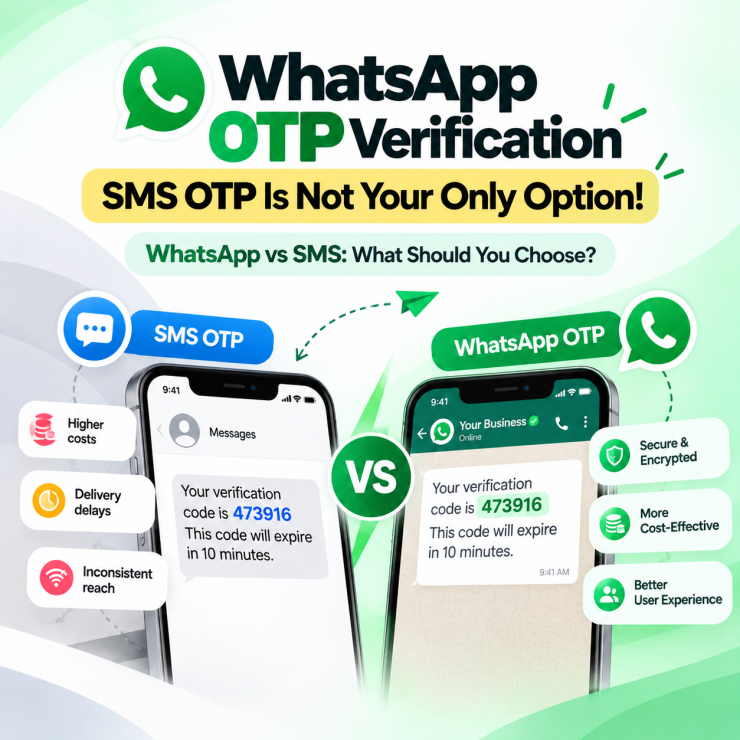
While comparing verification channels for your business, you’ve probably weighed the cost of SMS gateways against messaging alternatives and wondered whether the switch is worth it. SMS OTP has been the default for years, but delivery delays, per-message costs, and inconsistent reach in certain regions have pushed businesses to look elsewhere. WhatsApp OTP verification has emerged as a serious alternative, not because it’s trendy, but because it solves specific problems SMS often can’t. Understanding how it works, and where it fits your verification flow, matters before you commit a budget to any provider.
What is WhatsApp OTP?
WhatsApp verification code is a one-time password sent to a user through WhatsApp instead of SMS or email. It serves the same core purpose as any OTP. It confirms that the person completing an action, logging in, resetting a password, confirming a transaction, is actually who they claim to be. The difference is the delivery channel. Instead of relying on telecom SMS infrastructure, the code arrives inside a WhatsApp conversation, using the same encrypted messaging layer that protects personal chats.
How Does WhatsApp OTP Verification Work?
The flow is straightforward from a user’s perspective, even though the backend setup takes some configuration. When a customer starts a login, signup, or transaction that requires verification, the business triggers a request through the WhatsApp Business API. The customer receives a message on their registered WhatsApp number containing the code. They enter it back into the app or website, and the system verifies the match before allowing the action to proceed.
For a business, getting this running requires a verified WhatsApp Business Account, API access approved by Meta, and a template message set up specifically for OTP delivery, since WhatsApp requires structured formats for authentication messages.
WhatsApp OTP vs. SMS OTP: What Actually Changes
Businesses often assume the two are interchangeable, but they behave differently in practice.
| Factor | SMS OTP | WhatsApp OTP |
|---|---|---|
| Delivery requirement | Works over telecom network, no internet needed | Requires internet connectivity |
| Encryption | Sent in plain text | End-to-end encrypted |
| Cost per message | Often higher, varies by carrier and country | Generally more cost-effective at scale |
| International delivery | Can face delays or carrier restrictions | Consistent where WhatsApp is widely used |
| User experience | Separate app (Messages) | Often the same app users already have open |
Neither channel wins universally. SMS OTP still has an edge in regions with poor internet access or where WhatsApp adoption is lower. WhatsApp OTP tends to perform better where your customer base already communicates with you on the platform, since it keeps the entire interaction, inquiry, purchase, verification, in one place instead of switching apps.
Where can Businesses Use WhatsApp Verification?
The use cases go beyond login screens. Common scenarios include:
- Account signup and login, confirming a new user before granting access
- Password resets, verifying identity before allowing account recovery
- Transaction confirmation, adding a security step for high-value payments
- Appointment and booking confirmations, reducing no-shows for service businesses
- Customer support identity checks, verifying a caller before discussing account details
- Secure document access, gating sensitive files behind a verification step
Each of these benefits from the same underlying advantage. The OTP arrives inside a channel the customer is already using, which tends to reduce drop-off compared to waiting for a delayed SMS.
Why Send OTP via WhatsApp Instead of Email or SMS?
The strongest case for choosing to send OTP via WhatsApp comes down to two things: encryption and convenience. WhatsApp’s end-to-end encryption protects the code in transit, which plain-text SMS and email don’t offer by default. And because most customers already have WhatsApp open throughout the day, the verification step feels faster, without requiring them to check a separate inbox or wait for network-dependent SMS delivery.
Setting Up WhatsApp API for Verification Code: What to Expect?
Implementing WhatsApp API for one-time passwords isn’t a plug-and-play toggle. It requires Meta’s business verification, API approval, and pre-approved message templates specifically built for authentication use cases. This is where most businesses either build the integration themselves or work with a WhatsApp Business Solution Provider to handle the technical setup.
This is where Picky Assist fits into the picture. Rather than navigating Meta’s API requirements independently, businesses can set up WhatsApp verification through Picky Assist’s platform, which already handles the API layer, template approval process, and message delivery.
Because OTP delivery runs on the same infrastructure as broader WhatsApp automation, businesses can combine verification with other workflows, triggering a chatbot conversation after successful verification, logging the interaction in the CRM, or routing verified customers into a campaign sequence, without stitching together separate tools for each step.
For teams already using Picky Assist for multi-channel conversations, campaign automation, or team collaboration on shared WhatsApp numbers, adding verification extends functionality you’re already paying for, rather than introducing a new system to manage.
Frequently Asked Questions
A one-time password sent to a user through WhatsApp instead of SMS or email, used to verify identity during login, signup, or transactions.
Businesses use the WhatsApp Business API, often through a solution provider like Picky Assist, to trigger and deliver OTP messages to a customer’s registered number.
WhatsApp OTP benefits from end-to-end encryption, while SMS OTP is typically sent in plain text, making WhatsApp generally more secure in transit.
Yes, since WhatsApp relies on internet connectivity rather than the traditional SMS network.
A verified WhatsApp Business Account, Meta’s API approval, and a pre-approved authentication message template.
It depends on your audience. Businesses with strong WhatsApp adoption among customers often replace or reduce SMS use, while others keep both as a fallback.
Account signups, password resets, transaction confirmations, appointment bookings, and secure document access.
Add comment