
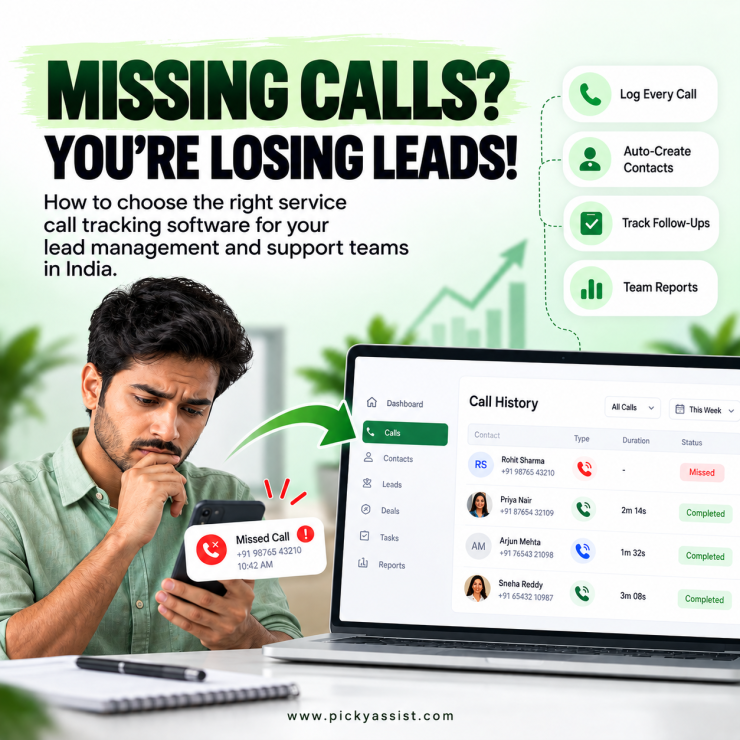
A service call tracking software records every customer call, links it to a contact, and shows what happened next. Indian teams often start the search with price, and rightly so. Tools billed in dollars and charged per number or per minute can get expensive once sales and support teams make hundreds of calls a day. Comparing options first shows which tool fits your workflow and which one only looks cheap. This guide explains how the software works, what lead management and support teams each need from it, and how to compare costs.
What Does Call Tracking Software Do?
It captures the caller’s number, time, duration, direction, and outcome, then stores them against a customer record. Better tools add recordings, transcripts, missed-call alerts, and reporting by team members. The goal is simple: nobody should have to ask a technician or sales rep, “Did you call them back?”
How Does Service Call Tracking Software Work?
It captures the caller’s number, time, duration, direction, and outcome, then stores them against a customer record. Most call tracking solutions use one of three methods:Large contact centers may need call center call tracking software with routing and QA scoring. Smaller teams usually need accurate logging tied to a CRM.
| Method | How it captures calls | Best for | Trade-off |
|---|---|---|---|
| Tracking numbers | Unique numbers per ad or source forward to your line | Marketing attribution | Fees grow with numbers and minutes |
| Cloud phone system | Replaces your phone system and records inside it | Queues, routing, and QA | Migration effort and per-user cost |
| Mobile app sync | An app on team phones logs calls to your CRM | Sales and support teams calling from mobiles | No ad-source attribution |
What Lead Management Teams Need?
For lead management, the right service call tracking software makes sure no enquiry disappears because a rep was on another call. Look for:
- Automatic contact creation. Call logging software should turn unknown numbers into CRM contacts without manual typing.
- Missed-call follow-up. A missed call should create a task or trigger a message automatically.
- Call history before callback. Reps should see earlier conversations before they dial.
- Rep-wise reporting. Managers should see volume, duration, and outcomes without asking for updates.
What Support Teams Need?
Support teams care less about lead source and more about context and accountability:
- One customer history. Calls, chats, and follow-ups should sit in one place.
- Recordings and transcripts. These help with coaching and with resolving disputes over what was promised.
- Conversation-level detail. Call monitoring services that only count calls don’t help you improve quality. You need to know what was said.
- Agent-level reports. Call duration and volume by agent show where workload or training gaps exist.
What to Check for Service Call Tracking Software in India?
- Mobile-first setup. Many Indian teams work from Android phones, so app-based logging avoids VoIP migration and extra hardware.
- Local billing. Ask whether pricing is in rupees and whether you receive GST invoices.
- WhatsApp alongside calls. Customers often move between calls and WhatsApp. Keeping both in one CRM avoids split histories.
- Consent and privacy. Get consent before recording, track only business SIM cards, and review your obligations under India’s Digital Personal Data Protection Act, 2023, with your legal advisor.
A Practical Example for Service Call Tracking Software in Action
A home-services company with a lead team on mobiles and a support team handling complaints. A prospect calls twice, reaches voicemail both times, and signs with a competitor. With service call tracking software in place, the missed call creates a follow-up task, the number becomes a contact, and the rep sees the history before calling back. When the same customer later complains, support opens the same record and sees every earlier call.
How to Compare Pricing?
Ask each vendor:
- What is the billing unit: user, number, minute, or flat fee?
- Do I need hardware or a VoIP setup?
- Are recording storage, transcription, and integrations extra?
- Can I export my data if I leave?
When reviewing call tracking services, ask for a quote in rupees at your real monthly call volume, not the entry-level tier.
Where Picky Assist CallBlaze Works as a Call Tracking Software?
CallBlaze is Picky Assist’s call tracking tool for Android. It logs inbound, outbound, and missed calls from business SIM cards straight into the Picky Assist Conversational CRM, with no hardware or VoIP setup. Unknown numbers become contacts, missed calls can trigger follow-up tasks, and reports show call volume and duration by team members.
Because calls live inside the CRM, they sit alongside WhatsApp conversations, chatbot flows, and campaign automation. A missed call can lead to an automated WhatsApp follow-up, and lead and support teams share one customer history.
CallBlaze is currently free and included with all V4 plans. Customers on V3 need to upgrade and migrate to V4 to use it.
It has limits. It suits teams calling from Android phones. If you need ad-source attribution through tracking numbers, or a full call center tracking system with queues, choose a tool built for that job.
Conclusion
Choose by the job your team does. Lead management teams need automatic contact creation and missed-call follow-ups. Support teams need full history, recordings, and agent-level reports. Match the billing unit to your real call volume, confirm rupee pricing, and check consent and privacy controls. The best call tracking services fit your workflow instead of forcing you to change it. A service call tracking software earns its cost when every call becomes a record and a next step.
If your team calls from Android phones and runs on a CRM, explore CallBlaze inside Picky Assist and see how many calls you have been missing.
FAQs on Service Call Tracking Software
It records call details such as number, time, duration, and outcome, and stores them against a customer record so teams can follow up accurately.
It depends on the billing model: per user, per number, per minute, or flat. Ask for a rupee quote at your real call volume. CallBlaze is free with all Picky Assist V4 plans.
Choose by need. Tracking-number tools suit ad attribution, contact center platforms suit queues, and CallBlaze suits CRM logging and missed-call follow-ups for mobile teams.
Yes. Logged calls, recordings, and transcripts give support teams full context and make coaching and dispute resolution easier.
Not with app-based tools like CallBlaze, which run on Android devices. Number-based and phone-system tools need tracking numbers or a VoIP setup.
CallBlaze tracks only calls from the business SIM card you select, which protects employee privacy.
Requirements depend on how and why you record. Get consent, follow data protection rules, and check with a legal advisor before you start.
Call tracking logs and reports on calls. Call center tracking software also manages queues, routing, and agent QA.
Call tracking logs and reports on calls. Call center tracking software also manages queues, routing, and agent QA.


Add comment