
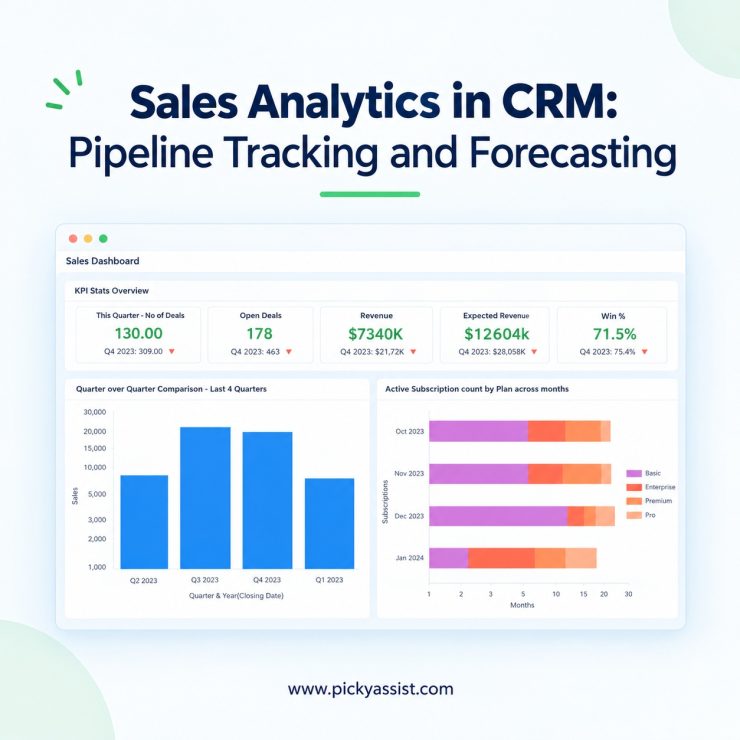
A founder opens the CRM software on Monday morning and sees 140 open deals. She still can’t say which ten will close this quarter. The data exists, but it sits in WhatsApp chats, email threads, and a half-updated spreadsheet. A good sales analytics software fixes this by showing where revenue is likely to come from, where it is stalling, and what your team should do next.
What Does Good Sales Analytics Software Look Like?
Good sales analytics software connects every customer conversation to a deal, shows where deals stall, and forecasts revenue from actual buyer activity rather than rep opinion.
In practice, that means four capabilities:
- Pipeline visibility: every deal, stage, and owner in one view
- Conversation context: the messages behind each deal, not just the status field
- Forecasting: revenue projections that update as deals move
- Reporting: dashboards each team member can adapt to their role
Many sales analytics tools only report on closed deals, which is too late to change the outcome. Founders need signals while deals are still open, when a follow-up can still save them.
Why Does Conversation Data Matter for Revenue Decisions?
Most buying decisions happen in conversation. A prospect asks about pricing on WhatsApp, goes quiet for four days, then returns with a question about onboarding. A traditional CRM records none of that unless a rep types it in.
A conversational CRM captures those interactions automatically and attaches them to the deal. Your reports then reflect what buyers did, not what reps remembered to log.
How can sales analytics software help teams forecast better and win more deals?
Sales analytics software maps each deal stage to a forecast category, such as pipeline, best case, commit, or closed. You can customize these categories to fit your sales cycle, and live rollups keep projections current. A unified pipeline view shows top opportunities and weekly changes, while flags and alerts point out deals with outdated next steps. Built-in AI dashboards track win rates, deal size, and days to close, so you can see whether sales are trending up or down and focus on the deals most likely to advance.
How Does Picky Assist Conversational CRM Handle Pipeline Management?
Picky Assist approaches sales analytics differently because the CRM sits on top of the conversation channels your customers already use. Messages from WhatsApp and other connected channels feed into one workspace, so each lead carries its full history.
For pipeline management, that gives your team:
- Stage tracking that updates as conversations progress
- Automation workflows that assign leads, trigger follow-ups, and flag deals with no recent activity
- Chatbot-based qualification that captures budget, timeline, and intent before a rep joins
- Team collaboration through shared lead records, notes, and clear ownership
The chatbot matters more than it first appears. When a bot qualifies leads at the first touch, your pipeline starts with cleaner data, and every report built on it becomes more reliable.
What is Revenue Intelligence, and Where Does It Fit?
Revenue intelligence means using deal and conversation signals to understand why revenue moves. It answers questions such as:
- Which lead sources produce deals that actually close?
- How long do deals sit in each stage before they stall?
- Which campaigns create pipelines, and which only create inquiries?
Because Picky Assist combines campaign automation with CRM records, you can trace a closed deal back to the broadcast, funnel, or chatbot flow that started it. Marketing spend then stops being a guess. Your team can double down on the channels that convert and cut the ones that don’t.
How Does AI-Driven Forecasting Improve Revenue Planning?
AI-driven forecasting estimates future revenue from patterns in your pipeline: deal age, stage progression, response speed, and past win rates. It does not replace judgment. It gives you a second opinion that doesn’t depend on optimism.
Say your team marks twelve deals as “likely to close.” A forecast model may show that only four have had buyer activity in the past week. That gap tells you where to focus, and it surfaces before the quarter ends, not after.
Forecasts are only as good as the data behind them. This is another reason conversation capture matters: more complete activity records lead to more dependable projections.
Why Do Customizable Dashboards Make Sales Analytics Usable?
Data only helps if people read it. A founder, a sales manager, and a support lead each need a different view.
Customizable dashboards in Picky Assist let each role focus on its own numbers:
- Founders: forecast versus target, pipeline value by stage, source performance
- Sales managers: rep activity, response times, stalled deals
- Marketing teams: lead volume and conversion by campaign
When each person sees only what they act on, review meetings get shorter and decisions get faster.
A Practical Example: An Education Counseling Team
Consider a counseling firm that receives 300 inquiries a month across WhatsApp and web forms. Before adopting a conversational CRM, counselors tracked leads in separate sheets, and managers couldn’t see who followed up on what.
After moving to a unified workflow, a chatbot qualifies each inquiry by course interest and intake date. Qualified leads go to the right counselor automatically, and the dashboard flags any lead untouched for 48 hours. The manager now sees which sources bring serious applicants and which only bring questions. That is the practical value of connected data.
How Do Spreadsheets, Standard CRMs, and Conversational CRMs Compare?
| Feature | Spreadsheets | Standard CRM | Conversational CRM |
|---|---|---|---|
| Conversation capture | Manual | Partial | Automatic |
| Pipeline tracking | Basic | Strong | Strong |
| Lead qualification | Manual | Forms | Chatbot-driven |
| Forecasting | Formula-based | Rule-based | Activity-based, AI-assisted |
| Integrations | Limited | Varies | Connected to messaging and campaigns |
How Should You Choose a Platform?
Ask five questions before committing:
- Does it capture conversations without manual entry?
- Can it qualify leads automatically?
- Does it connect campaigns to closed revenue?
- Can each team member customize their view?
- Does it integrate with the tools you already use?
If the answer to most is yes, you are looking at a platform that can support growth, not just record it.
Conclusion
Strong sales analytics depends on complete data, clear pipeline stages, honest forecasts, and dashboards your team will actually open. Conversation capture is the foundation, because it shows what buyers do rather than what reps report.
Picky Assist’s conversational CRM brings these pieces together: multi-channel conversations, chatbot qualification, automation workflows, team collaboration, integrations, and campaign automation in one workspace. If you are tired of guessing which deals will close, explore how Picky Assist can give your team a clearer revenue picture.
Frequently Asked Questions on Sales Analytics Software
Sales analytics software brings your pipeline, win rates, deal sizes, and lead sources into one live view. You can see which deals are moving, which have stalled, and which channels produce real revenue. It also forecasts what is likely to close based on buyer activity, so your team can focus on the right deals while there is still time to act.
A traditional CRM relies on manual data entry. A conversational CRM captures messages from channels like WhatsApp and attaches them to lead records, so the context behind every deal is preserved automatically.
Start with pipeline value by stage, lead-to-deal conversion rate, average sales cycle length, and response time. These four show whether leads are moving and whether your team is acting quickly.
It analyzes patterns such as deal age, stage movement, buyer responsiveness, and past win rates to estimate which deals are likely to close and when. Accuracy improves as more complete activity data accumulates.
Revenue intelligence uses deal and conversation data to explain why revenue rises or falls. It helps you identify high-performing lead sources, stalled stages, and campaigns that generate real pipelines.
Yes. Small teams often have the most to gain because they lack time for manual reporting. A dashboard that updates automatically gives founders a daily view without extra work.
Chatbots qualify leads at the first interaction by collecting details like budget, timeline, and requirements. Reps then spend time on prospects who are ready to talk, and the pipeline starts with cleaner records.
Use a platform where campaign automation and CRM records live together. When each lead carries its source, you can trace closed revenue back to the broadcast, funnel, or chatbot flow that created it.


Add comment