
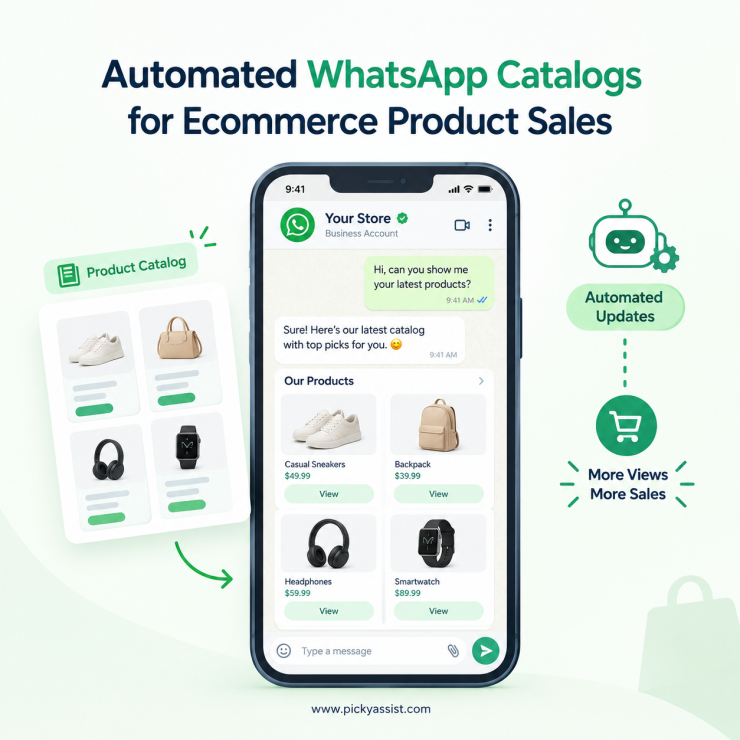
Ecommerce and CRM work best when every product question, order and follow-up lands in one customer record. For stores that sell on WhatsApp, using the automated catalog is where that record begins.
Picture a home decor seller. A shopper messages, “Is the brass lamp in stock?” The owner replies with a photo, a price and a payment link. Then the chat scrolls away. Three days later, nobody remembers that the buyer also asked about matching shades. The sale stalls, and nothing in the system shows why.
That is the gap between selling in chat and managing customers. A WhatsApp catalog narrows it, but only when it connects to a CRM. This guide explains how the two work together and what to look for.
Why Ecommerce and CRM Need the Same Conversation Channel?
Most online stores run two separate worlds. The storefront holds products and orders. The CRM holds contacts and notes. Customers don’t shop in separate worlds, though. They ask questions in chat, compare options and decide on the spot.
When ecommerce and CRM stay disconnected, three problems appear:
- Sales teams can’t see what a customer already viewed.
- Follow-ups depend on memory instead of rules.
- Repeat buyers are treated like strangers.
What is a WhatsApp Catalog?
A WhatsApp catalog is a product showcase inside your WhatsApp Business account. Each item can carry an image, name, price, description and link. Customers browse it without leaving the chat. Businesses on the WhatsApp Business API usually manage products through Meta’s Commerce Manager, and features such as carts can vary by region and setup.
How does a WhatsApp Catalog Work With a CRM?
Think of the catalog as the shop window and the CRM as the memory behind the counter. A typical flow looks like this:
- Entry: A shopper taps a click-to-chat ad, QR code or website button.
- Qualification: A chatbot asks what they need and shares a matching product or collection.
- Capture: The CRM saves the contact, source, products discussed and tags.
- Handover: An agent steps in for sizing, offers or payment questions.
- Follow-up: Automation nudges buyers who browsed but didn’t order, and thanks those who did.
Each step produces data. Over time, ecommerce and CRM together show which products start conversations, which ones close, and where buyers drop off.
What Should You Look For in the Best CRM for Ecommerce?
A CRM for ecommerce should do more than store names and phone numbers. For catalog-led selling, check these capabilities:
| Capability | Why CRM integrated catalogs matters for sales |
|---|---|
| Native WhatsApp inbox | Replies and history sit with the contact record |
| Product and interest tagging | Segments buyers by what they asked about |
| Chatbot automation | Answers repeat questions and shares products after hours |
| Workflow triggers | Starts follow-ups when a buyer goes quiet |
| Team assignment | Routes chats by product line or language |
| Integrations | Syncs orders and payments from your store |
Standalone CRM vs. Chat-Integrated CRM: Which Works Better?
| Factor | Spreadsheet or basic CRM | Chat-integrated CRM |
|---|---|---|
| Lead capture | Manual entry | Automatic from each chat |
| Product interest | Remembered or noted by hand | Tagged from chat activity |
| Follow-up | Manual reminders | Rule-based automation |
| Team visibility | Fragmented across phones | Shared inbox with full history |
| Reporting | Basic contact lists | Conversation-to-sale tracking |
The best ecommerce CRM for a WhatsApp-first store is usually the one your team opens every day. Chat-integrated tools tend to win because the CRM sits where the conversation happens. When you shortlist an ecommerce CRM, ask for a demo using your own products, not a sample store.
A Real Scenario: A Skincare Brand with 40 Products
A shopper sees an Instagram ad and taps through to WhatsApp. A chatbot asks about her skin type and sends a matching collection. She views a serum and a moisturiser, then goes quiet.
The CRM tags her “dry skin” and “serum viewed.” Two days later, an automated message shares a short routine guide and the same catalog link. She replies with a question about ingredients. An agent answers with the full chat history in view. She orders both items.
Four weeks later, a refill reminder goes out. No step needed a spreadsheet, and no one had to remember anything. This is ecommerce and CRM working as one system.
Common Mistakes to Avoid
- Uploading everything at once. Start with your top ten sellers and expand from there.
- Skipping tags. Without product or interest tags, follow-ups turn generic.
- Automating the whole conversation. Let chatbots handle FAQs and product sharing, but give buyers an easy route to a human.
How does the Picky Assist automated catalog work?
A regular WhatsApp catalog only displays products. Picky Assist runs the whole order on top of it. You manage products, collections and variations from one dashboard that syncs with your catalog, and customers browse, order and pay without leaving the chat. Payments run through UPI via Razorpay for Indian numbers, or PayPal and Stripe for international buyers. Inventory updates automatically and out-of-stock items switch off. Delivery integrations create shipments and send tracking updates, and GST-compliant invoices follow each order (India only). Customers can also start an order from a Meta ad or a product code.
Conclusion
Selling on WhatsApp is easy to start and hard to scale without records. Choose a tool that captures leads automatically, tags product interest, assigns chats to the right person and triggers follow-ups. Pair your catalog with that foundation, and ecommerce and CRM stop being separate projects.
Founders who treat ecommerce and CRM as one system gain something simple but powerful: they know why a customer bought, or didn’t. Start small. Add your top products, connect a chatbot, and watch which conversations convert. To see this setup in action, explore Picky Assist and build your first catalog-to-CRM flow.
FAQs on Ecommerce and CRM
A WhatsApp catalog is a product listing inside a WhatsApp Business account. It lets customers browse items, prices and descriptions without leaving the chat. Picky Assist offers this automated catalogs where businesses can display their products and users could get the product delivered to their location easily.
Yes. A CRM that integrates with the WhatsApp Business API can log catalog conversations, tag product interest and trigger follow-ups. Setup depends on the platform you use.
It keeps a record of each shopper’s questions and interests, so follow-ups are timely and relevant. It also routes chats to the right agent and shows where buyers drop off.
Picky Assist CRM with automated catalogs offers a built-in WhatsApp inbox, contact tagging, chatbot automation, workflow triggers, team assignment and integrations with your store or payment tools.
Yes. Picky Assist chatbot can ask a few questions, then send a matching product or collection. Complex or high-value queries can be passed to a human agent.
Use Picky Assist automation rule that triggers after a set period of inactivity. Send a helpful message, or a link back to the catalog displaying products, rather than a pushy reminder.
Track the source of each chat, the products discussed and the orders placed. A chat-integrated CRM can connect these in one view, so you can see which entry points and products convert best.


Add comment