
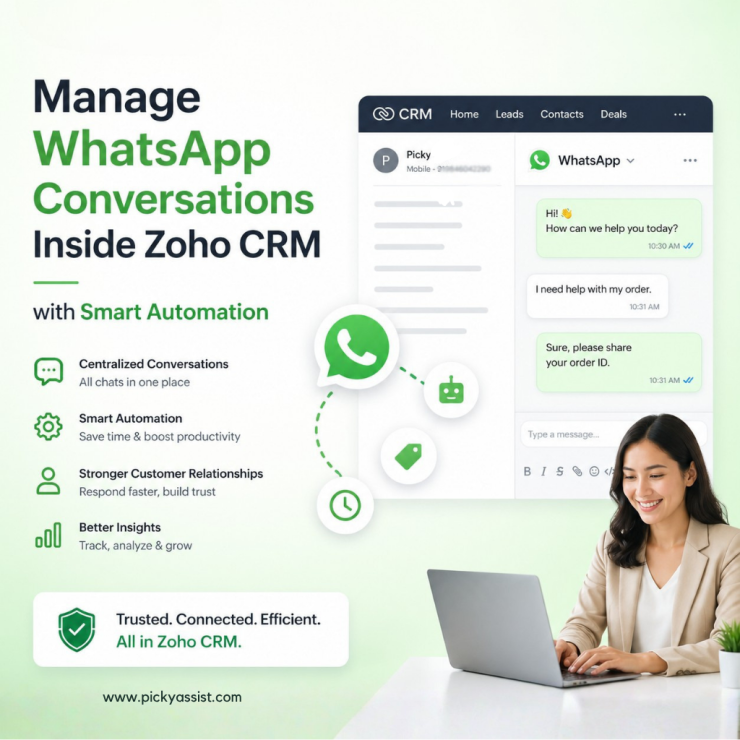
Customer communication has changed dramatically over the last few years. Buyers no longer want to wait for email responses or spend time on long support calls. They expect fast, personalized conversations on platforms they already use every day. For many businesses, that platform is WhatsApp. At the same time, sales and support teams rely on CRM systems to manage leads, customer records, and follow-ups. The challenge is that conversations often happen in one place while customer data lives somewhere else. This disconnect creates delays, missed follow-ups, duplicated work, and fragmented customer experiences. That is where a well-planned Zoho WhatsApp business API setup becomes valuable.
By connecting WhatsApp with Zoho CRM, businesses can centralize conversations, automate workflows, improve response times, and create a more connected customer journey. In this guide, we will break down how the integration works, why businesses are adopting it, the operational benefits it creates, and how Picky Assist helps businesses build scalable WhatsApp communication workflows inside Zoho environments.
What is Zoho WhatsApp Business API?
The Zoho WhatsApp business API refers to integrating WhatsApp Business API capabilities with Zoho applications such as Zoho CRM. Instead of handling customer conversations manually through personal devices or disconnected messaging tools, businesses can connect official WhatsApp messaging capabilities directly into their CRM workflows.
This allows teams to:
- Send and receive WhatsApp messages from within the CRM
- Track conversations alongside customer records
- Automate notifications and follow-ups
- Route conversations to team members
- Run broadcast campaigns
- Maintain centralized communication history
Unlike the standard WhatsApp Business app, the API-based approach is designed for business scalability, workflow automation, multi-agent collaboration, and CRM connectivity.
Why Businesses Need WhatsApp Integration with Zoho CRM
Many businesses already use Zoho CRM to manage leads and customer pipelines. However, without integrated messaging, communication becomes fragmented.
A typical sales process often looks like this:
- Leads enter the CRM
- Conversations happen on personal WhatsApp devices
- Sales teams manually update notes
- Follow-ups depend on memory
- Managers lack visibility into customer interactions
This creates operational inefficiencies and increases the risk of losing potential customers.
A proper Zoho CRM Whatsapp integration changes this dynamic by bringing communication and customer data into one connected workflow.
Benefits of Zoho and WhatsApp Integration
Centralized Customer Conversations
When businesses implement a proper Zoho integration with Whatsapp, conversations become accessible inside the CRM environment.
Instead of searching through multiple devices or chat histories, agents can view communication directly within customer records.
This improves:
- team collaboration
- communication consistency
- customer context visibility
- handover efficiency between departments
Faster Response Times
Speed matters in customer communication.
With Whatsapp integration with Zoho, teams can respond to leads faster because conversations are available directly inside their CRM workflows.
This reduces platform switching and shortens response delays.
Automated Follow-Ups
One of the biggest advantages of Whatsapp business integration with Zoho CRM is automation.
Businesses can automate:
- lead nurturing messages
- appointment reminders
- payment notifications
- onboarding sequences
- support updates
Automation reduces manual workload while improving customer engagement consistency.
Better Lead Tracking
With a structured Whatsapp Zoho CRM integration, conversations can automatically sync with customer records.
This gives teams better visibility into:
- lead status
- communication history
- engagement patterns
- response timelines
As a result, sales forecasting and follow-up management become more reliable.
Multi-Agent Collaboration
The standard WhatsApp Business app has limitations for growing teams.
Using the Zoho WhatsApp business API, businesses can create collaborative messaging environments where multiple agents manage conversations efficiently.
This is especially useful for:
- sales teams
- support departments
- customer success operations
- service businesses
How Picky Assist Supports Zoho WhatsApp Integration?
Picky Assist helps businesses connect WhatsApp communication workflows with Zoho systems in a more operationally efficient way.
Instead of using disconnected tools, businesses can create a streamlined communication environment where WhatsApp conversations become part of everyday CRM operations.
With Picky Assist, businesses can:
- connect WhatsApp with Zoho workflows
- centralize messaging operations
- automate customer communication
- manage broadcasts
- organize customer conversations
- improve internal collaboration
The goal is not just messaging connectivity. The real value comes from operational efficiency and customer communication management.
| Before Picky Assist | After Picky Assist |
|---|---|
| WhatsApp chats scattered across devices | Centralized chats inside Zoho CRM |
| Manual CRM updates after conversations | Automatic communication sync |
| Missed follow-ups | Automated reminders and workflows |
| Limited visibility into customer interactions | Full conversation tracking |
| Slow response management | Faster communication handling |
| Difficult broadcast management | Streamlined campaign messaging |
| Fragmented customer history | Unified customer communication timeline |
Use Cases for Zoho CRM Integration With WhatsApp
Different industries use Whatsapp for Zoho CRM in different ways depending on operational needs.
Lead Qualification
Businesses can automatically initiate WhatsApp conversations when new leads enter the CRM.
This helps sales teams qualify leads faster and improve response speed.
Customer Support
Support teams can manage customer conversations directly from CRM-linked workflows instead of juggling separate communication tools.
This improves support continuity and reduces communication gaps.
Appointment Reminders
Service businesses can automate reminder messages for appointments, consultations, or scheduled meetings.
This reduces no-shows and improves customer engagement.
Order and Payment Notifications
Businesses can use WhatsApp workflows for:
- order confirmations
- delivery updates
- payment reminders
- invoice notifications
This creates a more immediate communication experience compared to email-only workflows.
Re-Engagement Campaigns
With structured Whatsapp integration Zoho CRM workflows, businesses can run targeted campaigns for inactive customers or follow-up opportunities.
Difference Between WhatsApp Business App and WhatsApp Business API
Many businesses confuse the regular WhatsApp Business app with the API-based setup.
Here is the difference:
| WhatsApp Business App | WhatsApp Business API |
|---|---|
| Designed for small manual operations | Built for scalable business communication |
| Limited automation | Advanced workflow automation |
| Single-device limitations | Multi-agent support |
| Manual communication handling | CRM integration capabilities |
| Basic messaging functionality | Structured business messaging workflows |
Businesses that want proper Zoho CRM and Whatsapp integration typically require API-level functionality rather than the standard app setup.
What to Consider Before Choosing a Zoho WhatsApp API Solution?
Not every integration setup delivers the same operational value. Before implementing a Zoho Whatsapp API solution, businesses should evaluate several factors.
CRM Workflow Compatibility
The integration should support actual CRM workflows instead of acting as a disconnected chat layer.
Automation Capabilities
Look for automation support for:
- lead workflows
- follow-ups
- notifications
- campaign messaging
Conversation Management
Businesses should evaluate how conversations are assigned, tracked, and managed across teams.
Scalability
A growing business needs a solution that can support increasing message volume and multiple team members.
Reporting and Visibility
Communication visibility matters for sales management and customer service optimization.
Why CRM-Level Messaging Matters?
Messaging alone is not enough anymore.
The real business advantage comes from combining communication with structured customer data.
When businesses use Zoho CRM with Whatsapp, they create a more connected operational workflow where communication supports:
- lead conversion
- customer retention
- support management
- follow-up automation
- relationship tracking
This creates better operational consistency across teams.
Challenges Businesses Face Without Integration
Businesses that avoid structured integration often experience recurring operational problems.
Lost Customer Context
When conversations stay outside the CRM, customer history becomes fragmented.
Manual Administrative Work
Teams spend unnecessary time copying messages, updating notes, and organizing communication manually.
Missed Follow-Ups
Without automation, important customer interactions can easily be forgotten.
Poor Team Coordination
Disconnected communication systems reduce collaboration between sales and support teams.
How Picky Assist Helps Create Better Customer Communication Workflows?
Picky Assist focuses on helping businesses operationalize customer communication more effectively.
Instead of simply connecting platforms, the goal is to create structured communication systems that improve workflow efficiency.
This includes helping businesses:
- streamline customer messaging
- centralize communication history
- reduce manual processes
- automate repetitive communication tasks
- improve response management
For businesses already using Zoho CRM, this creates a more connected communication ecosystem.
Best Practices for Implementing WhatsApp CRM Integration
A successful Whatsapp integration with Zoho strategy requires more than technical setup.
Define Communication Workflows First
Businesses should map how conversations move through the customer journey.
Automate Carefully
Automation should improve customer experience, not create robotic interactions.
Maintain CRM Data Quality
Good communication workflows depend on organized customer records.
Train Teams Properly
Teams should understand how conversations are managed inside the CRM environment.
The Future of CRM and Messaging Integration
Customer communication is increasingly moving toward real-time messaging environments.
Businesses that continue separating CRM data from customer conversations may struggle with:
- slower response times
- inconsistent communication
- fragmented customer experiences
Integrated communication ecosystems will continue becoming more important for sales and support operations.
That is why businesses are increasingly investing in structured Zoho and Whatsapp integration strategies that combine messaging automation with CRM workflows.
Conclusion
Businesses today need faster, more connected customer communication systems.
A properly implemented Zoho WhatsApp business API workflow helps businesses centralize conversations, automate follow-ups, improve collaboration, and create better customer experiences inside their CRM environment.
For businesses already using Zoho CRM, integrating WhatsApp into CRM workflows can reduce operational friction while improving communication visibility and response management.
Picky Assist helps businesses create more organized and scalable WhatsApp communication workflows that align with real CRM operations rather than disconnected messaging processes.
As customer expectations continue evolving, businesses that connect communication with customer data will be better positioned to respond faster, manage relationships more effectively, and scale customer engagement operations efficiently.
FAQs on Zoho WhatsApp business API
1. What is Zoho WhatsApp business API?
The Zoho WhatsApp business API refers to integrating WhatsApp Business API capabilities with Zoho applications like Zoho CRM to manage customer communication directly within CRM workflows.
2. How does WhatsApp integration help Zoho CRM users?
It helps businesses centralize customer conversations, automate follow-ups, improve response times, and maintain complete communication history inside the CRM.
3. What is the difference between WhatsApp Business app and WhatsApp Business API?
The standard WhatsApp Business app is designed for smaller manual operations, while the API supports automation, multi-agent communication, and CRM integration capabilities.
4. Can businesses automate messages using WhatsApp integration with Zoho?
Yes. Businesses can automate reminders, customer notifications, lead nurturing messages, and workflow-based communication through structured integration setups.
5. Why do businesses need CRM integration with WhatsApp?
Without integration, conversations become fragmented across devices and platforms. CRM integration helps centralize communication and improve operational efficiency.
6. Is WhatsApp integration useful for customer support teams?
Yes. Support teams can manage conversations more efficiently, maintain communication history, and improve collaboration across agents.
7. What industries benefit from Zoho CRM WhatsApp integration?
Industries including healthcare, education, retail, finance, hospitality, consulting, and service businesses often benefit from integrated customer communication workflows.
8. How does Picky Assist support WhatsApp integration workflows?
Picky Assist helps businesses create structured communication workflows that connect WhatsApp messaging with CRM operations, automation processes, and customer engagement management.
Add comment