
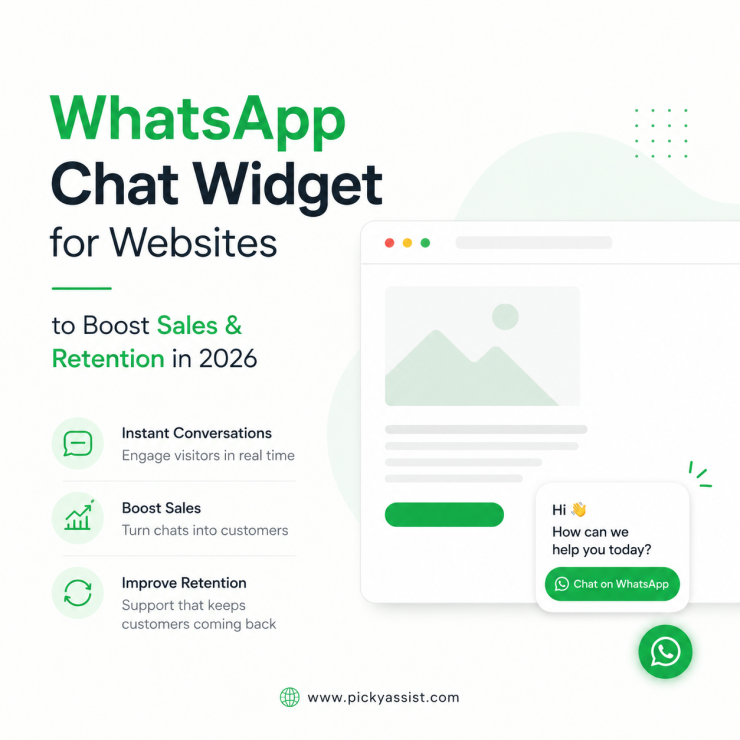
A visitor lands on your website. They browse your services, check your pricing and may have a question. And then they leave! Not because they were not interested, but because starting a conversation felt like too much effort. This is why more companies are adding WhatsApp for websites to their customer communication strategy!
Instead of asking visitors to leave your website and search for a way to contact you, businesses can create a direct path from website browsing to real-time conversation. But choosing the right approach is not only about adding a WhatsApp button. Businesses need to consider automation, customer experience, team management, and how conversations continue after the first message.
What is WhatsApp for Websites?
WhatsApp for websites refers to adding WhatsApp communication widget features directly into a business website so visitors can start conversations instantly. It allows customers to chat with a business through WhatsApp while browsing products, services, or information online.
Common examples include:
- WhatsApp chat buttons
- Floating WhatsApp widgets
- Click-to-chat links
- Automated enquiry flows
Here, the goal is simple. Make it easier for customers to reach your business. Instead of filling out a form and waiting, visitors can start a conversation immediately.
Add WhatsApp Widget Directly on to your Website & Let Clients Talk to you as they enter your website
Why are Businesses Adding WhatsApp to their Websites?
Modern customers expect convenience. They want answers quickly and prefer communication channels they already use daily. A website provides information, but a conversation helps customers make decisions.
For example:
A customer visits a real estate website. They are interested in a property but have questions:
- Is it available?
- What is the pricing?
- Can they schedule a visit?
A WhatsApp conversation allows them to ask instantly. This creates a smoother customer journey.
How WhatsApp Integration With Website Works?
A WhatsApp integration with a website connects your website visitors directly with your WhatsApp business account. Typically, the process works like this:
- A visitor clicks the WhatsApp button
- WhatsApp opens with a pre-filled message
- The customer starts a conversation
- The business receives the enquiry
- The team responds or automation handles the next step
This removes unnecessary steps between customer interest and business communication.
Benefits of Adding WhatsApp to Your Website
1. Turn Website Visitors Into Conversations
Many visitors leave websites without completing forms. The reason?
Forms require effort. Customers often prefer sending a quick message instead. Adding WhatsApp creates a simpler way for visitors to take action. A question can become a conversation. A conversation can become a sales opportunity.
2. Improve Customer Response Time
Customers value quick responses. When someone is actively exploring your website, they are already showing interest. A delay in response can reduce engagement.
A WhatsApp automation platform helps businesses create instant replies, collect customer information, and guide visitors even outside working hours. This allows teams to maintain engagement while handling conversations efficiently.
3. Capture More Customer Context
Traditional contact forms usually collect basic details:
- Name
- Phone number
- Message
WhatsApp conversations provide more context. Businesses can understand:
- Customer questions
- Preferences
- Requirements
- Buying intent
This helps teams create better responses.
4. Create Better Customer Experiences
Customers do not want complicated communication processes. They want simple interactions. A WhatsApp business solution helps businesses create a familiar communication experience directly from their website. Visitors can:
- Ask questions
- Request information
- Receive updates
- Continue conversations
WhatsApp for Websites vs Traditional Contact Forms
Traditional forms are useful, but they create a different customer experience.
| Traditional Website Forms | WhatsApp Website Communication |
|---|---|
| Customer submits details | Customer starts a conversation |
| Response may take time | Instant messaging |
| Limited interaction context | Real-time conversation |
| Requires waiting | Immediate engagement |
| Separate follow-up process | Ongoing chat history |
Both methods have value, but WhatsApp creates a more conversational experience.
Using WhatsApp API for Website Communication
Businesses that receive a high number of enquiries often need more advanced communication capabilities. A WhatsApp API for websites helps businesses connect website conversations with automation systems and customer management workflows. This enables businesses to support:
- Automated replies
- Customer routing
- Team conversations
- Notifications
- Follow-up messages
The API approach is useful for companies that need structured communication at scale.
Role of AI Chatbots in Website WhatsApp Conversations
Not every visitor needs immediate human assistance. Many questions are repetitive:
- What are your prices?
- What services do you offer?
- What are your working hours?
- How can I get started?
A chatbot automation tool can handle these initial interactions. For example: A visitor clicks WhatsApp on a website. The chatbot asks: “Are you interested in pricing, product details, or support?” Based on the answer, the conversation moves in the right direction. This helps businesses save time while keeping customers engaged.
WhatsApp Chat Integration on Website for Sales Teams
Sales teams often lose opportunities when website enquiries are not handled quickly. A visitor who is ready to buy today may not respond later. A WhatsApp chat integration on website helps sales teams:
- Receive enquiries instantly
- Qualify prospects
- Share product information
- Continue conversations
- Follow up effectively
This creates a smoother sales journey.
How Picky Assist Helps Businesses Use WhatsApp on Websites?
Adding WhatsApp to a website is only the first step. Businesses also need a way to manage conversations after customers reach out. Picky Assist helps businesses build connected customer communication workflows with:
- WhatsApp automation
- Chatbot creation
- Conversational CRM capabilities
- Multi-channel conversations
- Customer engagement workflows
- Team collaboration
- Campaign automation
- Integrations
Businesses can use Picky Assist to connect website visitors with structured conversations and automated workflows. The goal is to help teams respond faster, organize customer interactions, and create better engagement experiences.
How to Choose the Right WhatsApp Website Solution for Your Business?
Adding WhatsApp to a website may look simple, but the right setup depends on how your business communicates with customers. A small business may only need a direct chat option. A growing company may need automation, team access, customer tracking, and connected workflows. Before selecting a solution, consider these factors.
1. Ease of Customer Access
The purpose of adding WhatsApp to your website is to reduce friction. Visitors should be able to start a conversation quickly. A good setup should offer:
- Clear WhatsApp buttons
- Easy click-to-chat options
- Simple conversation entry points
- Mobile-friendly experience
The fewer steps customers need to take, the more likely they are to engage.
2. Automation and Workflow Support
Website visitors arrive at different stages of the buying journey. Some are exploring and need support, while some others are ready to purchase. Automation helps businesses guide different types of visitors.
Examples include:
- Welcome messages
- Product recommendations
- Lead qualification
- Customer follow-ups
- Support responses
3. Team Conversation Management
As customer messages increase, managing conversations manually becomes challenging. Multiple team members may need access to customer chats. A good system should support:
- Conversation assignment
- Team visibility
- Customer history
- Collaboration
Business Examples of WhatsApp on Websites
Example 1: SaaS Businesses
SaaS companies often have website visitors who are interested in their product but need more clarity before signing up. A visitor may want to know:
- Product features
- Pricing plans
- Integration options
- Trial availability
- Use cases
Instead of leaving the website, they can start a WhatsApp conversation instantly.
Businesses can use automated workflows to:
- Answer common product questions
- Share relevant resources
- Qualify potential customers
- Schedule product demos
- Connect prospects with sales teams
This helps SaaS companies turn website interest into meaningful product conversations.
Example 2: Online Stores
An online store visitor sees a product but has a question. Instead of leaving the website, they start a WhatsApp conversation. The business can help with:
- Product details
- Availability
- Recommendations
- Purchase decisions
Picky Assist also offers automated catalogs for businesses, where their products or services can be listed, so as to boost sales. Customers can browse products, order it, make a payment and get products delivered safely within the WhatsApp ecosystem. When customers place their order, the rest of the updates are made through WhatsApp.
Example 3: Service Businesses
A service company may receive enquiries about pricing, availability, or consultations. A WhatsApp workflow can collect initial details before connecting the customer with the right team member. The customer gets faster assistance, and the business gets better-quality enquiries.
Example 4: Educational Businesses
Students and parents often have multiple questions before enrolling. Website WhatsApp conversations can help answer:
- Course information
- Admission details
- Scheduling
- Requirements
This reduces delays in the decision-making process.
Common Mistakes Businesses Make When Adding WhatsApp to Websites
Only Adding a Button Without a Process
A WhatsApp button helps customers start conversations, but businesses also need a plan for handling those messages. Without proper workflows, enquiries can still get missed.
Using Automation Without Personalization
Automation should support conversations. Messages should feel helpful and relevant. A good customer experience balances automated responses with human support.
Not Tracking Customer Interactions
Website conversations contain valuable customer information. Businesses should organize this data to improve future communication.
Turn Website Visitors Into Customers
A website visitor is already showing interest. The difference between losing that visitor and creating a customer relationship often comes down to how easy it is to start a conversation. WhatsApp for websites helps businesses bridge that gap by connecting visitors directly with real-time communication.
The right solution should help businesses:
- Make conversations easier to start
- Respond faster
- Automate repetitive interactions
- Organize customer communication
- Improve sales and support experiences
Picky Assist helps businesses create connected communication journeys through WhatsApp automation, chatbot workflows, CRM capabilities, integrations, and customer engagement tools. For businesses looking to improve website conversions and customer communication, adding WhatsApp can become an important step toward creating better digital experiences.
FAQs About WhatsApp for Websites
1. What is WhatsApp for websites?
WhatsApp for websites allows businesses to add WhatsApp communication features to their website so visitors can start conversations directly with the business.
2. Why should businesses add WhatsApp to their website?
Businesses add WhatsApp to websites to make customer communication easier, improve response speed, capture enquiries, and create a smoother customer experience.
3. How does WhatsApp integration with websites work?
A website WhatsApp integration connects visitors to a WhatsApp chat through buttons, widgets, or click-to-chat links, allowing customers to start conversations instantly.
4. Can WhatsApp on a website automate customer replies?
Yes. Businesses can use automation workflows and chatbots to handle common questions, collect customer details, and guide conversations.
5. What is the WhatsApp API for website use?
The WhatsApp API for websites connects business websites with WhatsApp communication systems, allowing businesses to manage automated messages, workflows, and customer conversations.
6. Is WhatsApp better than website contact forms?
WhatsApp provides real-time conversations, while forms collect information for later follow-up. Many businesses use both depending on their customer journey.
7. How can WhatsApp help generate leads from a website?
WhatsApp reduces the effort needed to contact a business, helping visitors start conversations immediately and allowing companies to capture potential customer enquiries.
8. How does Picky Assist help with WhatsApp website communication?
Picky Assist helps businesses manage WhatsApp conversations using automation workflows, chatbots, CRM features, campaign tools, integrations, and team collaboration capabilities.
Add comment