
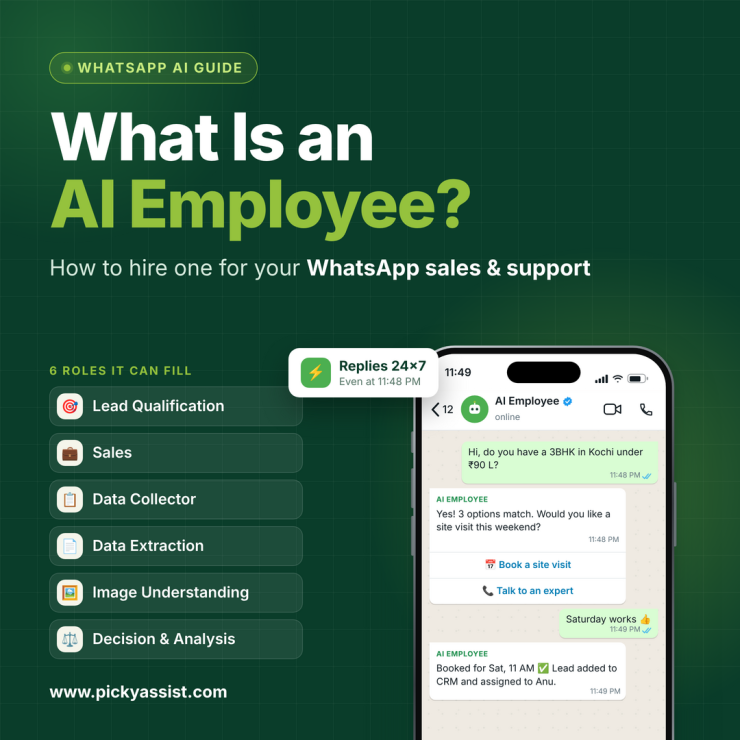
What if your best sales rep could hold every conversation at once, without losing track of a single lead? That is the promise behind the AI employee, a software worker that takes over the repetitive side of WhatsApp sales and support so your team can focus on closing and caring. The promise is real, but only when the role is set up properly. This guide explains what an AI employee does, how it differs from a chatbot, and how to hire one without losing the human touch.
What is an AI Employee?
An AI Agent or AI employee is a software worker assigned to a specific business role, such as lead qualification or customer support. It understands customer messages, draws on your business knowledge, takes actions in connected tools, and hands complex cases to a human.
The key word is role. You do not switch on a general tool and hope it helps. You define the job, the limits, and the success measure, just as you would for a new hire.
Some vendors call this an AI employee agent. Whatever the label, the difference from simple automation is the same. It works toward an outcome, such as a booked site visit or a resolved delivery query, instead of following one fixed script.
Comparing AI Employee, Chatbot and Human Agent
| Rule-based chatbot | AI Employee | Human agent | |
|---|---|---|---|
| How it responds | Fixed scripts and keywords | Understands intent and context | Judgment and empathy |
| Unexpected questions | Often fails | Handles many, within its knowledge | Handles all |
| Takes action in your tools | Limited | Updates CRM, assigns leads, sends details | Manual work |
| Availability | 24/7 | 24/7 | Shift-based |
| Best for | Simple menus | Repetitive, high-volume conversations | Negotiation, complaints, high-value deals |
The goal is not replacement. AI handles repetitive conversations so your people can spend their time on the ones that need them.
How Picky Assist AI Employee Works for Your Business?
There are six roles your digital workforce can fill on WhatsApp! It supports in qualifying leads and supporting customers to extract information and making decisions, your digital AI WhatsApp Agent can understand, act, and complete business tasks 24×7. See what all it can do on WhatsApp.
AI Lead Qualification Employee
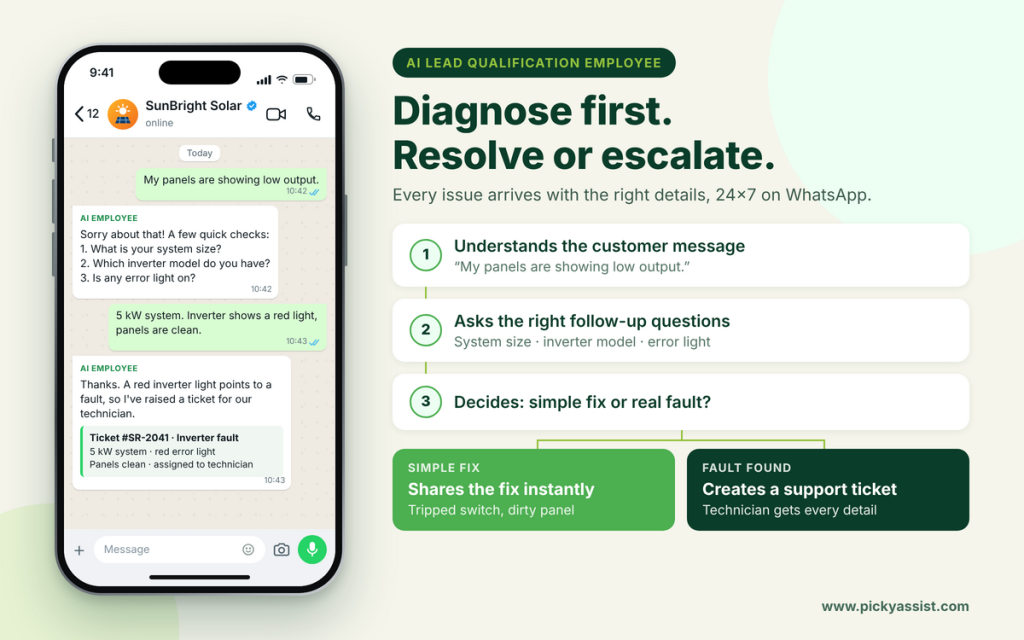
Understand customer messages, ask follow-up questions, find the information needed, and determine whether the issue can be resolved immediately or needs human support. Resolve the issue or create a support ticket for your team.
Use case in a solar installation company: A customer messages, “My panels are showing low output.” The assistant asks for the system size, the inverter model, and whether any error light is on. If the cause is something simple, such as a tripped switch or a dirty panel, it shares the fix right away. If it points to a fault, the assistant creates a support ticket with all the details, so the technician does not have to start with the same questions!
AI Sales Employee
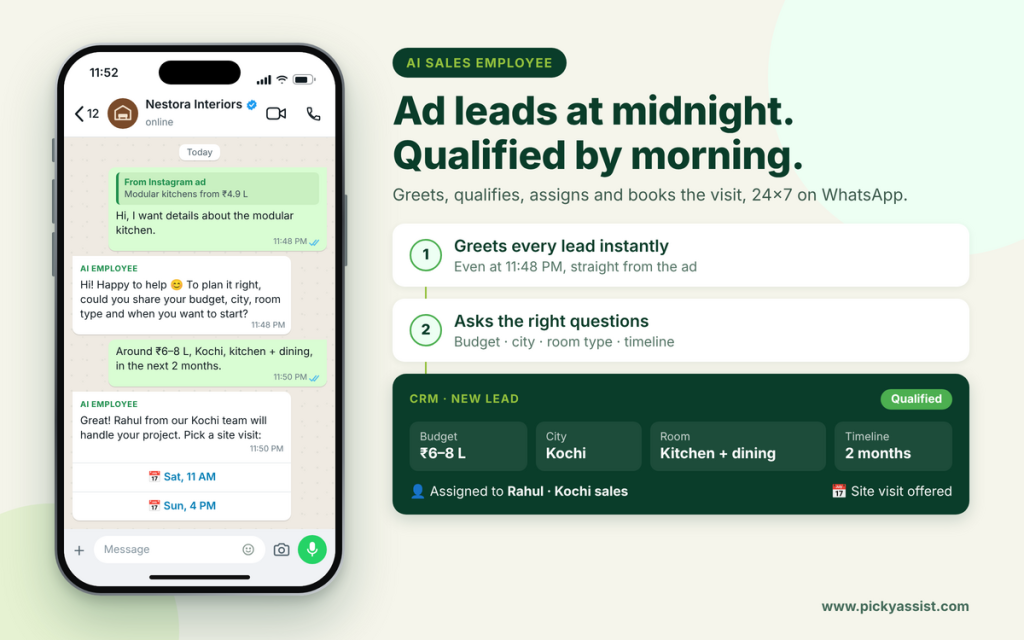
Chat to prospects, understand their requirements, ask the right follow-up questions, and win more customers, effortlessly. Add the lead to your CRM and automatically assign it to the right salesperson.
Use case in a home-interiors company: Leads arrive from ads at all hours. The assistant greets each one and asks about budget, city, room type, and timeline. It adds the lead to the CRM, assigns it to the salesperson for that city, and offers site-visit slots. Your team starts the morning with qualified conversations instead of a cold inbox.
AI Data Collector Employee
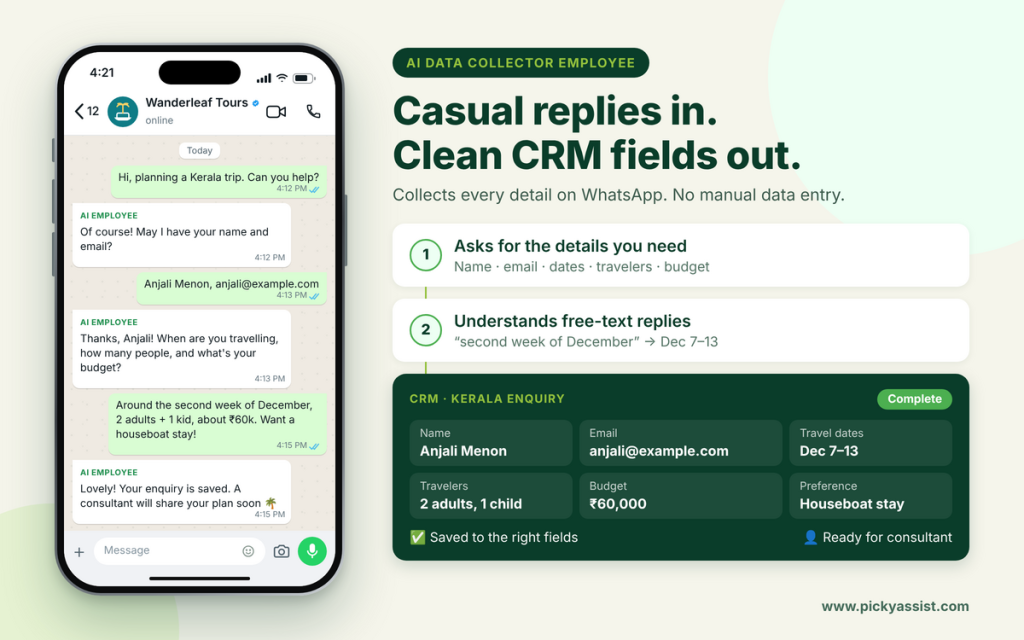
Ask customers for the required details, understand their responses, and organize information such as name, email, requirements, budget, preferences, and more. Store the structured information directly in your CRM without manual data entry.
Use case in a travel agency: A traveler asks about a Kerala trip. The assistant collects the name, email, travel dates, number of travelers, budget, and preferences, such as houseboat stays or hill stations. It understands free-text replies like “around the second week of December” and stores each answer in the right CRM field. The travel consultant opens a complete enquiry instead of a long chat to read through.
AI Data Extraction Employee
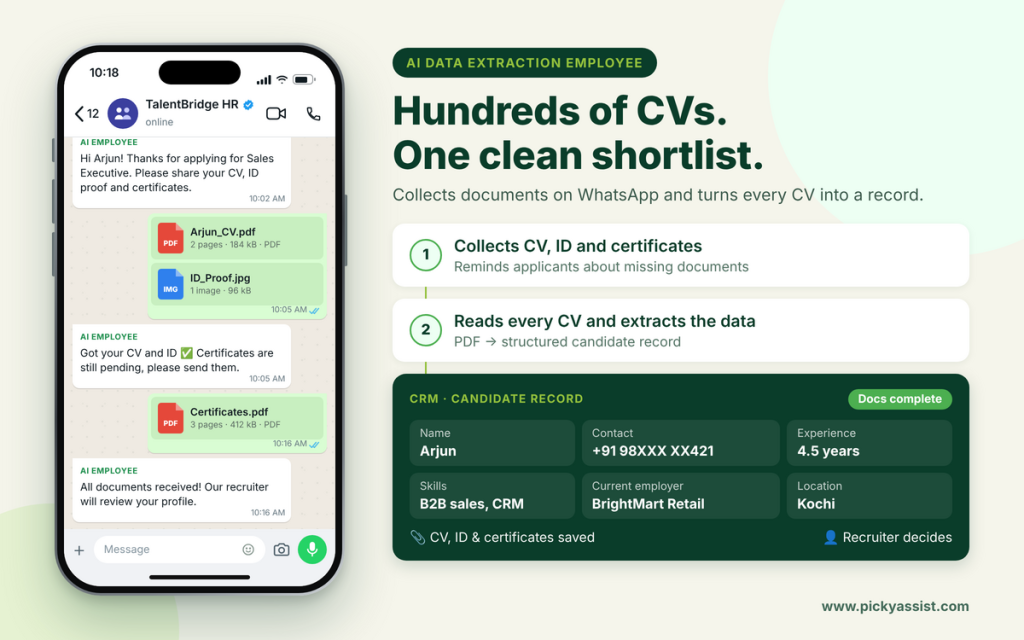
Read resumes, invoices, applications, reports, PDFs, and other documents and extract the information your business needs. Save the document and extracted data to your CRM or trigger the next business action.
Use case in HR hiring process: An HR team receives hundreds of applications for one role. The assistant asks each applicant on WhatsApp for a CV, ID proof, and certificates, and reminds anyone with missing documents. It then reads each CV and extracts the name, contact number, skills, total experience, current employer, and location into one structured record. Recruiters shortlist from a clean list instead of opening files one by one, and the hiring decision stays with them.
AI Image Understanding Employee
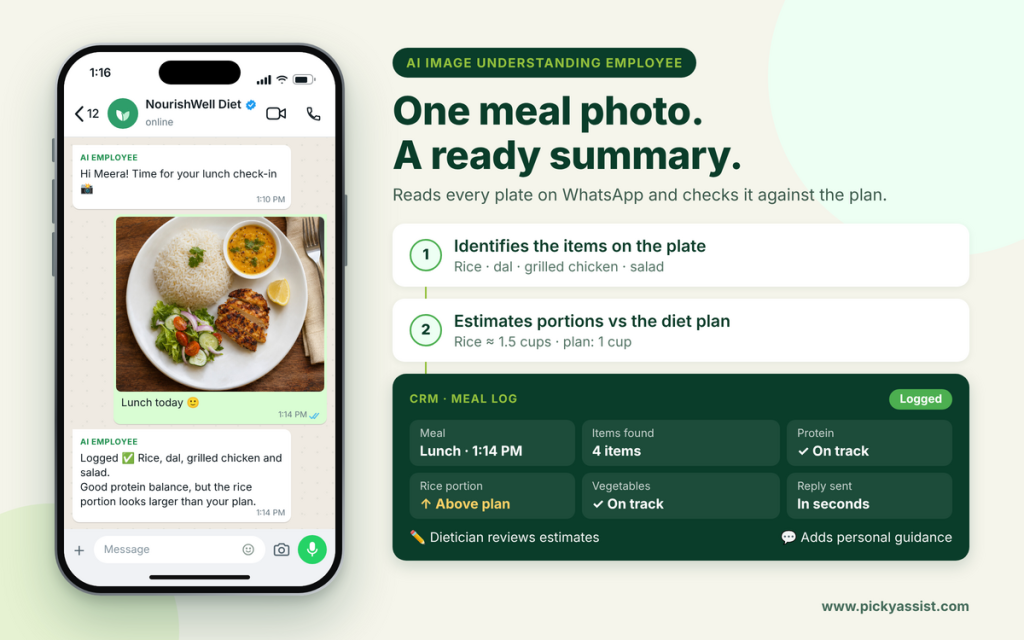
Analyze photos, screenshots, and other images to identify the information relevant to the job you’ve assigned. Convert the information into structured data and save it to your CRM.
Use case in a dietician’s check-ins: A dietician asks clients to send a photo of every meal. A client sends a lunch photo, and the assistant identifies the items on the plate, estimates portions, and compares the meal with the client’s diet plan. It logs the meal and replies quickly, for example, “Good protein balance, but the rice portion looks larger than your plan.” The dietician sees a ready summary, corrects any estimate that looks off, and adds personal guidance. The client receives a fast response, and the dietician spends time on advice instead of sorting photos.
AI Decision & Analysis Employee
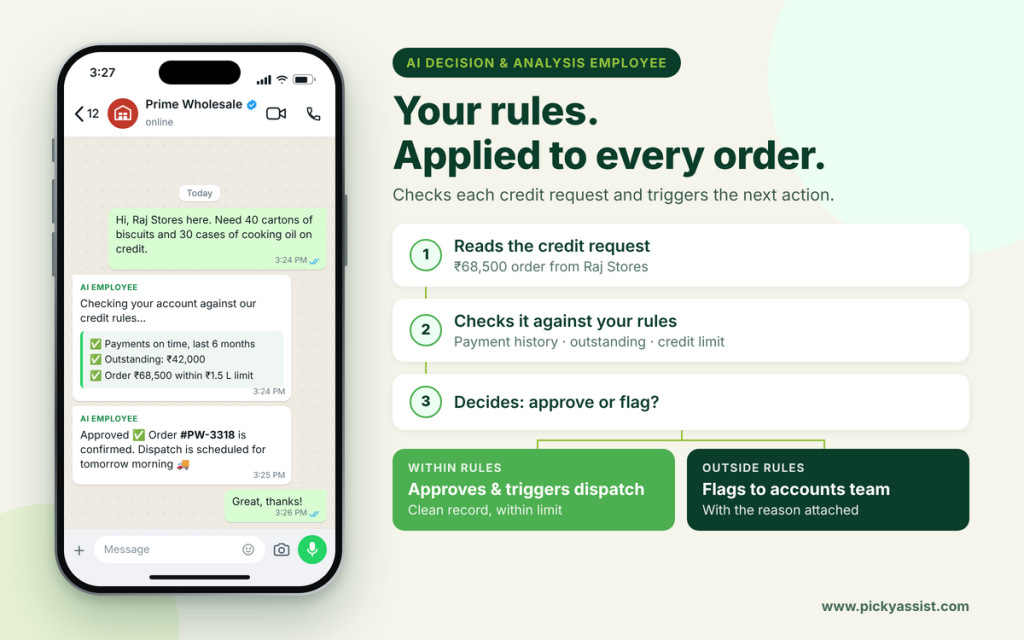
Give AI your data, criteria, and business logic. It can analyse the information and determine the appropriate outcome. Make a decision based on your defined criteria and automatically trigger the appropriate next action.
Use case in a wholesale distributor’s credit approvals: A retailer requests an order on credit. The assistant checks the retailer’s payment history and outstanding balance against the distributor’s own rules. If the retailer has a clean record and the order is within the agreed credit limit, it approves the order and triggers the dispatch. If not, it flags the request to the accounts team with the reason. The distributor sets the rules, and the assistant applies them consistently.
How to Hire Picky Assist AI Agents in 6 Steps?
- Pick one role. Start with a single job, such as lead qualification or order-status support. Narrow roles are easier to test. Even custom build AI agents as per your requirements. Build each one AI agent or AI employee that serves one particular role for easy management and updates.
- Write the job description. Define the goal, tone, and boundaries. Decide what it must never promise, such as discounts or refunds above a set limit.
- Give it your knowledge. Add FAQs, price lists, policies, and catalog details. Remove outdated documents first, because it will repeat what it reads.
- Connect your systems. Link your CRM, store, calendar, or spreadsheets so it can act, not only reply.
- Set handoff rules. Escalate when a customer sounds frustrated, a deal is high-value, a payment is disputed, or the answer is uncertain. The human agent should see the full conversation.
- Test, launch small, and review. Run real past conversations through it. Launch on one campaign or number, then read transcripts weekly and fix gaps.
Key Benefits of using AI Agents in Businesses
1. 24/7 Availability
AI employees work around the clock, including nights, weekends, and holidays. Customers get instant responses at any hour, so no lead or query waits until morning.
2. Lower Operational Costs
One AI employee can handle a volume of conversations that would otherwise need a team. There are no recruitment, training, or overtime costs, and costs don’t climb in step with growth.
3. Instant Scalability
Whether you receive 50 queries or 5,000 during a festive sale, AI employees handle the spike without delays or extra hiring. You scale up or down as demand changes.
4. Faster Response Times
Replies arrive in seconds, not hours. Speed directly affects conversions, since leads contacted within minutes are far more likely to convert.
5. Consistent Quality
AI employees follow your brand voice, policies, and workflows every time. There are no off days, no missed steps, and no variation between conversations.
6. Higher Productivity for Human Teams
By taking over repetitive work such as FAQs, lead qualification, follow-ups, and appointment reminders, AI employees free your people to focus on complex conversations, relationships, and strategy.
7. Better Lead Qualification and Conversion
AI employees can ask the right questions, qualify prospects, and route hot leads to sales in real time. Automated follow-ups also reduce the number of leads that slip through the cracks.
8. Multilingual Support
They can converse with customers in their preferred language, which helps businesses expand into new regions without building language-specific teams.
9. Data and Insights
Every conversation becomes structured data. Businesses can spot common questions, buying patterns, and drop-off points, then use those insights to improve products, campaigns, and service.
10. Improved Customer Experience
Faster answers, personalized responses, and smooth handoffs to human agents when needed lead to higher satisfaction and stronger loyalty.
11. Fewer Human Errors
Data entry, order details, and follow-up reminders are handled accurately and logged automatically in your CRM.
12. Easy Integration with Existing Tools
AI employees can connect with your CRM, payment systems, and messaging channels like WhatsApp, so they fit into your current workflow rather than replacing it.
What to Look for in an AI Employee Built-in Platform?
Choosing an AI employee platform comes down to operational fit, not feature count. People search for the best AI employee platform, but the right one for you is the one that passes these checks:
- Official WhatsApp Business API access, so you can automate without risking your number
- Role-level control over knowledge, tone, and boundaries
- A built-in shared inbox and CRM, so handoffs happen in one place
- Easy human takeover at any point in a chat
- Integrations with the tools your team already uses
- Clear analytics on response time, resolutions, and handoffs
- No-code setup, so your marketing or support lead can adjust it without a developer
Be cautious with AI employee software that sits outside your inbox and CRM. Your team ends up copying details between tools, and the time you saved disappears.
How to Scale AI Employees Without Losing Quality?
Once your first role performs well, scale AI employees one role at a time. A sensible order is lead qualification first, then appointment reminders, then order-status support, then re-engagement of old leads.
Three habits keep quality steady as you grow:
- Reuse one clean knowledge base instead of rebuilding it for each role.
- Apply the same handoff standard everywhere.
- Track each role separately. Useful measures are first-response time, share of chats resolved without a human, qualified leads, and handoff rate.
Mistakes to Avoid!
- Launching without a handoff path. Customers who cannot reach a person leave.
- Feeding it messy documents. Inconsistent source material produces inconsistent answers.
- Treating it as set-and-forget. Review transcripts regularly.
- Hiding that it is AI. Transparency builds more trust than pretending.
- Asking it to negotiate. Pricing discussions and complaints belong with your team.
Conclusion
Hiring a digital worker for WhatsApp is a decision about roles, not technology. Start with one clear job and give it clean knowledge. Connect it to your CRM, and keep a human one tap away. Choose a platform that offers official API access, a shared inbox, and no-code control, so you can improve it without waiting on developers.
If you want to see how this works on a real WhatsApp setup, explore Picky Assist. Build your first role, test it on live conversations, and add more only when the numbers justify it.
Frequently Asked Questions on AI employee in Automation
An AI employee is a software worker that performs a defined business role, such as qualifying leads or answering support queries. It understands messages, uses your business knowledge, takes actions in connected tools, and escalates to a human when needed. Unlike a script-based chatbot, it works toward an outcome businesses really want!
No. A rule-based chatbot follows fixed paths and fails when a customer goes off-script. An AI-driven digital worker interprets intent, uses context, and can update your CRM or send details. It is closer to a trained team member than a menu.
Start with one role! Set one role for each agent. Sales and support need different knowledge, tone, and handoff rules. Once the first role performs reliably, add the second with its own boundaries.
Costs usually combine a platform subscription, WhatsApp Business API messaging charges set by Meta, and setup time. Pricing varies by providers. Picky Assist offers AI agents at the best affordable price with minimum markups for businesses in India and abroad alike. If you compare plans against the hours of manual labor you would know AI costs less than employing human agents.
Support teams will be essential for negotiation and complaints if any in rare cases. Some customers even prefer to chat with a real human agent. In such cases the AI agents would redirect chats through hand-off features. Most teams find it frees staff for work that needs judgment.
Use a clean, current knowledge base and set clear limits on what it can promise. Add human handoff for uncertain or sensitive cases, and review transcripts weekly. Update the knowledge whenever your prices or policies change.
Add comment