
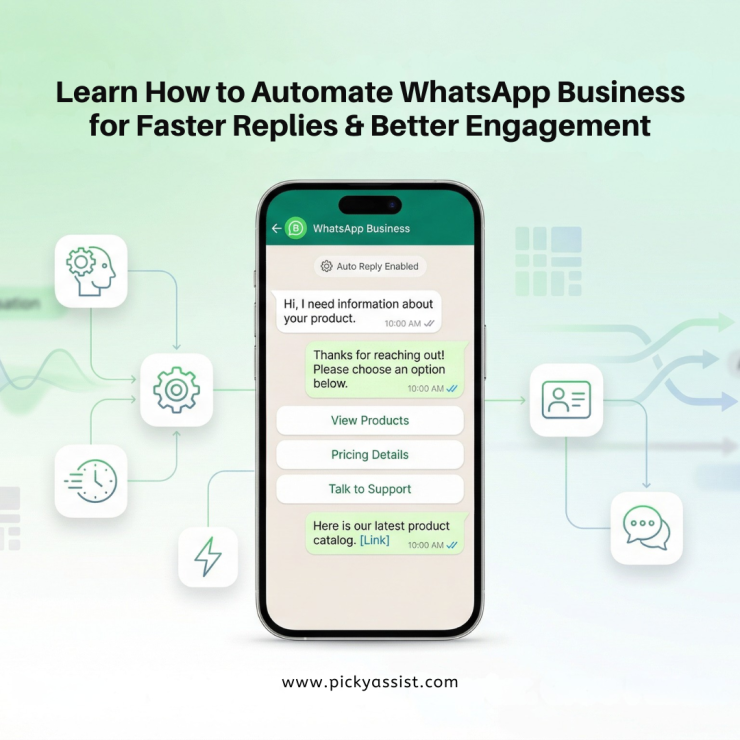
Businesses today rely heavily on instant communication. Customers expect quick replies, personalized responses, and real-time support. This is why many companies are now learning how to automate WhatsApp business to streamline conversations, handle large volumes of inquiries, and improve customer experience.
Automation helps businesses send instant responses, automate campaigns, manage leads, and provide 24/7 support without manually replying to every message. With the right tools such as a WhatsApp CRM and WhatsApp AI chatbot, businesses can scale communication while maintaining personalization.
In this comprehensive guide, you will learn how to automate WhatsApp business, set up chatbots, integrate CRM systems, and use automation features like catalogs, flows, and broadcasters.
What is WhatsApp Business automation?
WhatsApp automation refers to using software tools, chatbots, and CRM platforms to automatically send messages, respond to customer queries, manage leads, and run marketing campaigns on WhatsApp.
Instead of manually responding to every inquiry, businesses can automate workflows such as:
- Sending welcome messages
- Responding to frequently asked questions
- Sharing product information
- Sending order updates
- Broadcasting marketing campaigns
- Collecting customer information
Using tools like WhatsApp chatbot for business and CRM with WhatsApp integration, lets companies automate most of their routine conversations.
Why should businesses automate WhatsApp?
Learning how to automate WhatsApp business can significantly improve operational efficiency.
Faster Customer Response
Customers expect immediate responses. Automation ensures that inquiries receive instant replies using WhatsApp bots for business.
24/7 Customer Support
An AI WhatsApp chatbot can answer questions at any time, even outside business hours.
Better Lead Management
With a CRM for WhatsApp, businesses can capture leads, track conversations, and nurture prospects effectively.
Scalable Marketing Campaigns
Automation tools such as a broadcaster allow businesses to send messages to thousands of contacts simultaneously.
Improved Customer Engagement
Automated workflows ensure consistent communication and better customer relationships.
How to send automatic messages on WhatsApp business?
Many businesses search for how to send automatic messages on WhatsApp or how to send automatic messages on WhatsApp Business to improve response times.
There are multiple automation methods available.
Using WhatsApp Chatbots for Automation
Businesses that need advanced automation often implement a WhatsApp chatbot.
A WhatsApp chatbot for business can automatically respond to customer queries using predefined workflows or artificial intelligence.
What a WhatsApp Bot Can Do?
- Answer frequently asked questions
- Collect customer details
- Recommend products
- Schedule appointments
- Provide order updates
Many companies now use AI WhatsApp chatbot solutions to create natural, conversational interactions.
How to Create an Auto Message on WhatsApp Using Chatbots?
Setting up a chatbot involves several steps.
1. Choose a WhatsApp Automation Platform
Select a platform that supports WhatsApp API chatbot capabilities.
These platforms enable:
- Automated conversations
- CRM integration
- campaign broadcasting
2. Design Chatbot Conversations
Create automated conversation flows for:
- Greeting customers
- Collecting inquiries
- Providing support
- Guiding users through purchases
3. Train the AI Chatbot
An AI WhatsApp chatbot can learn from customer interactions and improve responses over time.
How to Auto Send Messages in WhatsApp Using CRM?
Businesses can configure automation rules in a CRM for WhatsApp to trigger messages automatically.
Examples include:
- Welcome message when a new lead contacts the business
- Reminder messages for appointments
- Follow-up messages after inquiries
- Order confirmation notifications
This automation ensures that every customer receives timely communication.
WhatsApp Broadcaster for Automated Campaigns
A broadcaster allows businesses to send messages to multiple contacts simultaneously.
This feature is widely used for:
- Promotions
- announcements
- product launches
- event reminders
Unlike manual messaging, a WhatsApp broadcaster can deliver campaigns to thousands of customers instantly. Businesses often combine broadcasting with WhatsApp CRM tools to track engagement and responses.
WhatsApp Catalog for Automated Product Sharing
The WhatsApp catalog feature allows businesses to showcase products directly within the chat interface.
Customers can:
- Browse products
- view pricing
- explore descriptions
- place inquiries
Automation tools can automatically share catalog items when customers ask about products.
For example, a WhatsApp chatbot for business can instantly send relevant product listings when a user asks about available items.
Using WhatsApp Flow for Automated Customer Journeys
WhatsApp Flow enables businesses to create structured customer journeys within conversations.
For example:
- Customer selects a product category
- Chatbot displays available items
- Customer chooses a product
- Automation collects delivery details
This structured interaction improves user experience and simplifies complex processes.
WhatsApp AI Chatbot for Advanced Automation
Artificial intelligence is transforming WhatsApp automation.
An AI WhatsApp chatbot can understand natural language and provide contextual responses.
Capabilities of AI Chatbots
- Intelligent question answering
- automated lead qualification
- personalized product recommendations
- multilingual support
These features make WhatsApp bot for business solutions extremely powerful for modern customer engagement.
Best Use Cases of WhatsApp Business Automation
Businesses across industries use automation in various ways.
Lead Generation
A WhatsApp chatbot collects customer information and qualifies leads automatically.
Customer Support
An AI WhatsApp chatbot handles common questions without human intervention.
Marketing Campaigns
A broadcaster sends promotions and announcements to large audiences.
Sales Automation
A CRM with WhatsApp integration manages customer interactions and tracks deals.
Appointment Scheduling
Automated reminders reduce missed appointments and improve service efficiency.
Common Mistakes to Avoid When Automating WhatsApp
Businesses should avoid these mistakes when implementing automation.
Over-Automation
Too much automation can feel impersonal. Always provide an option to connect with a human agent.
Poor Chatbot Design
A poorly designed WhatsApp bot can frustrate customers.
Ignoring CRM Integration
Without CRM for WhatsApp, businesses cannot track customer relationships effectively.
Sending Spam Messages
Automation should always respect user preferences and messaging policies.
Conclusion
Understanding how to automate WhatsApp business is becoming essential for companies that want to scale communication and improve customer engagement.
From simple auto-replies to advanced WhatsApp chatbot for business systems, automation enables businesses to handle large volumes of conversations efficiently.
By implementing tools such as WhatsApp CRM, AI WhatsApp chatbot, broadcasters, WhatsApp catalog, and WhatsApp flow, companies can create seamless customer experiences while reducing manual workload.
The right combination of automation and personalization allows businesses to transform WhatsApp into a powerful platform for marketing, customer support, and sales growth.
FAQs on WhatsApp Automation
1. How to send automatic messages on WhatsApp Business?
To send automatic messages on WhatsApp Business:
- Open WhatsApp Business
- Go to Business Tools
- Enable Greeting Message or Away Message
- Customize your automated response
For advanced automation, businesses use WhatsApp API chatbot platforms.
2. How to create an auto message on WhatsApp?
You can create auto messages by enabling greeting messages in WhatsApp Business or by designing automated workflows using a WhatsApp bot for business.
3. How to set up automatic responses on WhatsApp?
Automatic responses can be configured through:
- WhatsApp Business auto-reply settings
- WhatsApp chatbot platforms
- CRM with WhatsApp integration
These systems automatically respond to customer messages.
4. What is a WhatsApp chatbot?
A WhatsApp chatbot is an automated program that interacts with customers on WhatsApp, answering questions, providing information, and assisting with tasks.
5. What is a WhatsApp CRM?
A WhatsApp CRM is a customer relationship management platform integrated with WhatsApp messaging to manage leads, conversations, and sales pipelines.
6. What is a WhatsApp AI chatbot?
An AI WhatsApp chatbot uses artificial intelligence to understand customer queries and respond intelligently, improving customer support and engagement.
7. Can businesses automate marketing campaigns on WhatsApp?
Yes. Businesses use a broadcaster or WhatsApp CRM software to send automated marketing campaigns and promotional messages to large audiences.


Add comment