
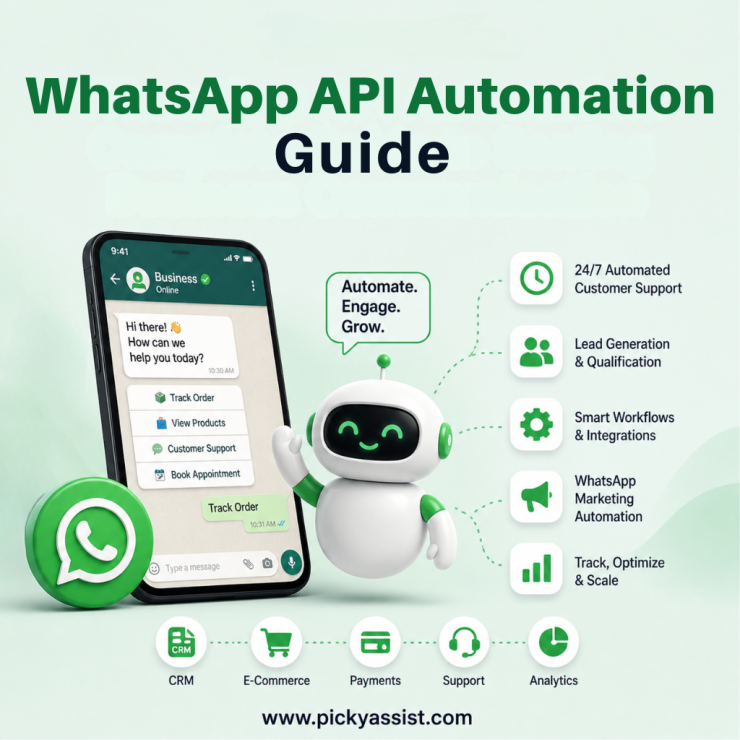
Customer expectations have shifted faster than most businesses anticipated. People no longer tolerate delayed responses, fragmented communication, or inconsistent experiences. They expect instant replies, contextual conversations, and seamless journeys across every touchpoint. This is where WhatsApp API automation becomes a serious competitive advantage.
Instead of treating WhatsApp as just another messaging app, forward-thinking businesses are transforming it into a high-performance communication engine, one that can handle support, marketing, lead nurturing, and transactions at scale. However, most companies still struggle with a fundamental question:
How do you move from basic messaging to structured, scalable automation, without adding complexity?
This guide breaks it down clearly, with practical insight into how WhatsApp API automation works, why it matters, and how platforms like Picky Assist make it actionable for real business growth.
What is WhatsApp API Automation?
WhatsApp API automation refers to using the official WhatsApp Business API to automate conversations, notifications, and workflows across the customer lifecycle.
Unlike the standard WhatsApp Business app, the API is designed for:
- High-volume messaging
- Multi-user access
- System integrations
- Workflow automation
This means businesses can:
- Send automated WhatsApp messages based on user actions
- Trigger responses through predefined workflows
- Integrate with CRM, billing, and support systems
- Manage thousands of conversations simultaneously
In simple terms, it transforms WhatsApp from a manual communication channel into an automated business system.
Why Are Businesses Moving Toward WhatsApp Automation?
The shift is not driven by trends. It’s driven by operational necessity.
1. Speed Is Now a Business Metric
Customers expect replies within minutes, not hours. Automation ensures instant engagement without increasing team size.
2. Conversations Drive Conversions
Unlike email or ads, WhatsApp interactions are direct and contextual. Businesses that automate WhatsApp messages can guide users from enquiry to purchase faster.
3. Manual Systems Don’t Scale
Handling conversations manually creates bottlenecks. With WhatsApp business automation, processes become predictable and scalable.
4. Customer Experience Is a Differentiator
Consistent, timely, and relevant communication builds trust and trust drives revenue.
How WhatsApp API Automation Works
To understand its real value, you need to look at the mechanics behind it.
Trigger-Based Communication
Automation starts with triggers. These can include:
- A user sending a message
- A form submission
- A purchase or cart abandonment
- A scheduled event
Each trigger activates a predefined workflow.
Workflow Logic and Message Flows
Instead of static replies, businesses create structured conversation flows:
- Ask qualifying questions
- Route users based on responses
- Deliver relevant information
- Move leads through a funnel
This is where a WhatsApp automation tool becomes essential, as it allows businesses to design and manage these flows without complexity.
System Integration
A strong WhatsApp automation API setup connects with:
- CRM systems
- Payment gateways
- E-commerce platforms
- Helpdesk tools
This ensures data flows seamlessly across systems, eliminating manual updates.
Key Capabilities of WhatsApp Business API Automation
1. Automated Customer Support
Handle FAQs, order tracking, and service queries instantly without human intervention.
2. Lead Capture and Qualification
Collect user details, filter high-intent leads, and route them to the right team.
3. Transactional Messaging
Send:
- Order confirmations
- Delivery updates
- Payment reminders
These automated WhatsApp messages improve transparency and trust.
4. Campaign and Engagement Workflows
With WhatsApp marketing automation, businesses can:
- Send targeted promotions
- Re-engage inactive users
- Run personalized campaigns
5. Follow-Up Automation
No more missed opportunities. Every enquiry can be nurtured with structured follow-ups.
Real-World Use Cases Across Industries
E-commerce
- Abandoned cart recovery
- Order updates
- Product recommendations
Healthcare
- Appointment scheduling
- Reminders
- Post-consultation follow-ups
Education
- Admission enquiries
- Fee reminders
- Course updates
Real Estate
- Lead qualification
- Property recommendations
- Site visit scheduling
Service Businesses
- Booking confirmations
- Service reminders
- Customer feedback collection
WhatsApp API Automation vs Traditional Messaging
| Capability | Manual WhatsApp | WhatsApp API Automation |
|---|---|---|
| Response Speed | Delayed | Instant |
| Scalability | Limited | High |
| Personalization | Manual | Automated |
| Integration | None | Full |
| Lead Tracking | Difficult | Structured |
The difference is not incremental. It’s transformational.
Challenges Businesses Face Without Automation
Before adopting automation, most businesses experience:
- Missed leads due to delayed responses
- Inconsistent communication
- High dependency on manual teams
- Limited visibility into conversations
- Poor follow-up processes
These issues directly impact revenue.
How to Implement WhatsApp API Automation Effectively
1. Define Clear Use Cases
Start with practical scenarios:
- Customer support
- Lead generation
- Order updates
2. Design Structured Workflows
Avoid overcomplication. Focus on clarity and logical progression.
3. Use a Reliable Platform
Managing the API directly can be complex. A platform like Picky Assist simplifies implementation.
4. Integrate with Existing Systems
Ensure your CRM and tools are connected to maintain data consistency.
5. Continuously Optimize
Track performance metrics:
- Response rates
- Conversion rates
- Drop-off points
Refine flows based on real data.
Where Picky Assist Fits in?
Implementing WhatsApp API automation is not just about access. It’s about execution.
Picky Assist is designed to bridge that gap.
What Makes It Relevant for Businesses
- No-code workflow builder for quick deployment
- CRM integration for structured lead management
- Broadcast and campaign tools for engagement
- AI chatbot capabilities for smarter conversations
- Centralized communication system for team collaboration
Instead of stitching multiple tools together, businesses get a unified system to manage communication, automation, and growth.
Best Practices for WhatsApp Automation Success
Keep Conversations Natural
Automation should feel human, not robotic.
Avoid Over-Messaging
Relevance matters more than frequency.
Segment Your Audience
Different users need different communication strategies.
Balance Automation with Human Support
Allow seamless escalation to human agents when needed.
Stay Policy-Compliant
Always ensure opt-ins and approved messaging formats.
Trends in WhatsApp Automation for Business
WhatsApp is no longer just a messaging platform. It’s evolving into a complete customer interaction layer.
With AI integration, automation will become:
- More contextual
- More predictive
- More personalized
Businesses that invest early in WhatsApp automation for business will not just improve efficiency, they will redefine customer experience.
Conclusion
WhatsApp API automation is not about replacing human interaction. It’s about removing friction from communication.
When implemented correctly, it allows businesses to:
- Respond instantly
- Engage meaningfully
- Scale efficiently
- Convert consistently
The real advantage lies in turning conversations into structured, measurable, and optimized workflows.
With the right platform, the transition becomes straightforward and the impact becomes immediate.
FAQs on WhatsApp API Automation
1. What is WhatsApp API automation used for?
It is used to automate customer communication, including support, notifications, lead generation, and marketing workflows through the WhatsApp Business API.
2. How is WhatsApp API different from the WhatsApp Business app?
The API supports automation, integrations, and scalability, while the Business app is designed for manual, small-scale communication.
3. Can small businesses use WhatsApp API automation?
Yes. With platforms like Picky Assist, even small businesses can implement automation without technical complexity.
4. Is coding required to use WhatsApp automation API?
Not necessarily. No-code platforms allow businesses to create workflows and automate messages without programming knowledge.
5. How much does WhatsApp API automation cost?
Costs depend on the platform and usage, including conversation-based pricing and service provider fees.
6. Can WhatsApp automation improve sales?
Yes. Faster responses, structured follow-ups, and personalized communication significantly increase conversion rates.
7. Is WhatsApp API automation secure?
Yes, when used through official providers, it follows strict data protection and compliance standards.
8. How long does it take to set up WhatsApp API automation?
With the right platform, basic automation can be implemented within a few hours to a few days.

Add comment