
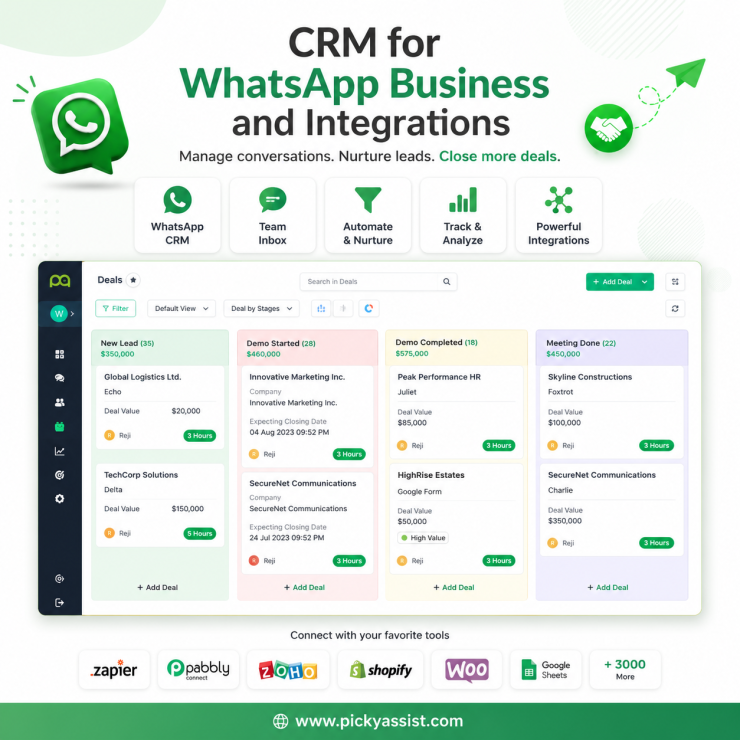
The first time a client tells us “we need a CRM for WhatsApp,” it’s rarely because they read about it. It’s because three team members are replying from the same number, someone just double-messaged a customer who’d already been quoted, and a lead from two weeks ago is sitting unread in a chat nobody remembers opening. That’s the actual trigger. The feature comes after the pain. A CRM for WhatsApp business connects your WhatsApp Business API number to a system that tracks every conversation as a contact record, assigning chats to team members, logging conversation history, tagging leads by stage, and triggering follow-ups automatically. It turns WhatsApp from a shared inbox into a pipeline you can actually manage, without losing the speed and read-rates that make WhatsApp better than email in the first place.
Why Does a Regular WhatsApp Number Stop Working?
WhatsApp Business App works fine until volume or team size crosses a threshold. In our experience running this for clients, that threshold usually shows up around 15–20 active conversations a day per agent, or the moment a second person needs access to the same number.
Past that point, three problems show up in a predictable order:
- No ownership. Anyone can reply to anyone. Two agents answer the same customer differently within minutes of each other.
- No memory. WhatsApp Business App keeps chat history, but it doesn’t tell you which stage a lead is in, what they were quoted, or when they need a nudge.
- No handoff. A lead who messaged sales now needs support. There’s no clean way to route that without someone manually forwarding screenshots.
A CRM integration with WhatsApp fixes this by treating every chat as a record with a status, an owner, and a history, the same way a sales CRM treats an email lead, except the conversation is happening in real time on a channel with far higher open rates than email.
What Does WhatsApp Business CRM Actually Do?
Strip away the marketing language and a WhatsApp business API CRM integration is doing four concrete jobs:
- Contact unification — every number that messages you becomes a contact record, not just a chat bubble that disappears when closed.
- Conversation assignment — chats route to a specific agent or team (sales, support, billing) based on rules you set, so nobody’s guessing who owns what.
- Pipeline tracking — leads move through stages (New → Contacted → Quoted → Won/Lost) the same way they would in Salesforce or HubSpot, except the activity feed is the actual WhatsApp thread.
- Automated follow-up — a lead that goes quiet for 48 hours triggers a reminder message or task, instead of falling through the cracks.
The mistake we see most often is businesses trying to bolt a generic CRM onto WhatsApp using a third-party sync tool. It technically works, but the sync usually lags by minutes, template message rules get ignored, and agents end up checking two screens instead of one. A CRM built around the WhatsApp API, where the conversational layer and the CRM layer are the same system, avoids that lag entirely, and it’s the approach Picky Assist’s CRM and Teambox modules are built on, routing and tagging chats inside the same window an agent is already replying from.
Where CRM Meets the WhatsApp API’s Own Rules?
This is the part generic CRM vendors gloss over: WhatsApp’s own messaging rules shape how your CRM can behave.
- The 24-hour service window. Once a customer messages you, you can reply freely in any format, any content, for 24 hours. After that window closes, you can only reach them again using a pre-approved message template.
- Template categories. Meta classifies outbound templates as Marketing, Utility, or Authentication. A CRM’s automated follow-up (say, “still interested in that quote?”) outside the 24-hour window has to be submitted as a template and approved, it can’t just be a freeform automation.
- Category drift. Templates that mix a transactional update with a promotional line (“Your order shipped! Also, 20% off today”) frequently get reclassified from Utility to Marketing, which changes both cost and delivery rules. A CRM that lets you draft templates without flagging this will get your automations quietly downgraded.
A CRM that’s aware of these constraints will warn you before a follow-up sequence breaks a rule. One that isn’t will let you build automations that silently fail once the 24-hour window closes.
Choosing a CRM for WhatsApp Business: What to Actually Check?
| What to check | Why it matters | Common failure if ignored |
|---|---|---|
| Native WhatsApp API connection (not a bridge/sync tool) | Real-time assignment and history, no lag | Agents work off stale data, double-reply |
| Team inbox with chat ownership rules | Prevents overlap on shared numbers | Two agents answer the same lead differently |
| Template-aware automation | Keeps follow-ups compliant post-24-hour window | Automations fail silently, no delivery |
| Tagging/pipeline stages built for chat, not email | Lets you track leads the way they actually move | Pipeline stalls because updates require manual entry |
| Reporting on response time and chat volume | Shows where bottlenecks actually are | Team feels busy but conversion doesn’t improve |
A Simple Framework Before You Switch!
Before evaluating vendors, answer three questions honestly:
- How many people touch the WhatsApp number today? One person rarely needs a CRM, a good chatbot or broadcaster might solve more. Three or more, and shared-inbox chaos is probably already costing you leads.
- Where do leads currently go to die? If it’s “forgotten after the first reply,” you need follow-up automation. If it’s “lost in handoff between sales and support,” you need routing rules.
- Do you send bulk or scheduled messages today? If yes, your CRM needs to understand template categories natively, this is where most integrations break first.
Best WhatsApp Business CRM Options Available in India in 2026
Most “best WhatsApp CRM” lists in India circle back to the same five or six names. Here’s how they actually differ once you look past the landing page:
| Platform | Best fit | What stands out | Where it gets tight |
|---|---|---|---|
| Picky Assist | Teams that want CRM, chatbot, and broadcast in one connected system rather than stitched-together tools. WhatsApp Commerce included. AII in One CRM | Native routing and pipeline tracking (Teambox) built inside the same window agents chat from no separate sync layer, so assignment and history stay real-time | Best suited to businesses ready to run CRM, automation, and broadcast as one workflow, not just a standalone inbox |
| AiSensy | High-volume broadcasters and D2C brands running frequent campaigns | Broad CRM and e-commerce integrations, no-code chatbot builder, fast API setup | Marketing template cost per message runs higher than several competitors; deeper CRM features often sit behind the Pro tier |
| WATI | Mid-market teams needing pre-built CRM connectors (Zoho, HubSpot, Salesforce) | Strong third-party CRM integration depth and a mature agent inbox | Headline pricing rarely reflects the final bill, extra agents, chatbot session caps, and integration add-ons stack up quickly at scale |
| Zoko | Shopify-first commerce brands | Deep native Shopify sync catalog, cart recovery, and in-chat checkout without middleware | Commerce-and-WhatsApp focused; limited reach outside Shopify and WhatsApp if you need broader omnichannel coverage |
| Interakt | D2C and e-commerce teams already inside the Shopify/Jio ecosystem | Backed by Jio Haptik, with real-time Shopify catalog sync and a separate Sales CRM module for pipeline tracking | Sales CRM is currently a single-tier product, so it’s a lighter fit for teams needing multi-stage, multi-team pipeline management |
The Next Step
None of these are wrong choices, they’re built for slightly different jobs. A Shopify-only D2C brand chasing cart recovery has different needs than a services business running sales and support out of the same number with a team of ten. The fastest way to narrow it down is to match the “best fit” column above against your actual setup, then trial two platforms against real chat volume before committing to a year of billing.
If you’re at the point where a shared WhatsApp number has turned into a shared mess, it’s worth mapping your actual chat volume and team size before picking a tool, the right fit depends more on those two numbers than on any feature list. Picky Assist’s CRM and Teambox setup was built around exactly this problem for growing WhatsApp teams, if you want a reference for how the routing and pipeline pieces fit together.
FAQ on CRM for WhatsApp Business
1. What is a CRM for WhatsApp business?
It’s a system that connects your WhatsApp Business API number to contact records, chat assignment, and pipeline tracking, so conversations are managed like leads instead of disappearing into a shared inbox.
2. Is WhatsApp Business App the same as a WhatsApp CRM?
No. WhatsApp Business App is a free messaging app with basic labels and catalogs, built for one or two users. A WhatsApp CRM sits on top of the WhatsApp Business API and adds team assignment, automation, and pipeline stages for larger teams.
3. Can I integrate my existing CRM with WhatsApp?
Yes, through the WhatsApp Business API, either via direct integration or a middleware tool. The tighter the integration, the less lag you’ll see between a chat happening and your CRM reflecting it, loosely synced tools often lag by several minutes.
4. Does a WhatsApp CRM cost more than regular WhatsApp messaging?
You pay for the CRM platform itself plus WhatsApp’s own conversation-based or template-based charges from Meta, which vary by country and template category. These are two separate costs, and vendors don’t always separate them clearly in pricing pages.
5. What happens to a WhatsApp CRM automation after the 24-hour window closes?
Any automated message sent after the 24-hour window must use a pre-approved WhatsApp template. A CRM that isn’t built around this rule will let a follow-up automation fail silently instead of falling back to a compliant template.
6. How is CRM integration with WhatsApp different from a chatbot?
A chatbot automates replies to incoming messages. A CRM tracks and organizes the humans and conversations behind those messages, who owns the lead, what stage they’re in, and when they need a manual follow-up. Most serious setups use both together.
7. Do small businesses need a WhatsApp business CRM?
Not always. A solo owner or two-person team usually gets more value from a chatbot or broadcast tool first. CRM becomes necessary once multiple people reply from the same number or lead volume makes manual tracking unreliable.



Add comment