
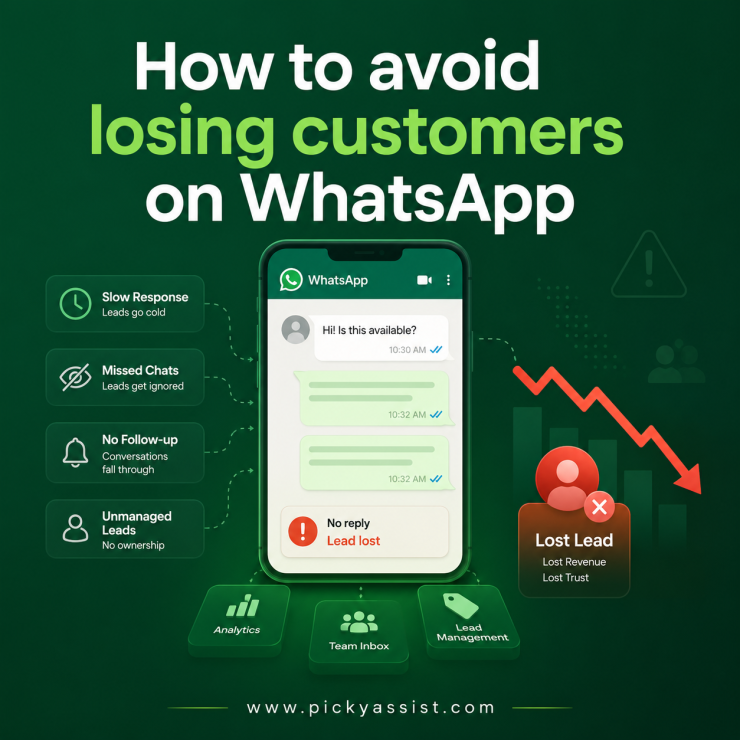
A client once showed us their WhatsApp number’s chat list sorted by “unread.” Forty-three chats. Some chats had gone unanswered for three weeks. Some leads asked, “Is this available?” but the team’s setup never flagged those messages for follow-up, so no one responded. That’s the actual problem WhatsApp lead management solves. It’s not about replying faster. It’s about giving every incoming chat a status, an owner, and a next action, so a lead can’t quietly disappear just because the conversation went quiet.
WhatsApp lead management is the practice of tracking every WhatsApp conversation as a lead record, with a stage, an assigned owner, and a scheduled follow-up, instead of treating chats as messages that close once read. Done properly, it combines a CRM with WhatsApp integration, tagging rules, and automated reminders so no inbound chat sits untouched past a set threshold, typically 24–48 hours for an active lead.
Why Do Leads Go Cold in WhatsApp Specifically?
Email leads go cold slowly, a lead sits in an inbox folder, visibly waiting. WhatsApp leads go cold silently. Once a chat is marked “read” or scrolls past the first screen, there’s no visual cue left that says “this person is still waiting.” That’s the core failure mode, and it’s structural, not a discipline problem.
Three patterns show up repeatedly when we audit a business’s WhatsApp chat list for the first time:
- The “read but not answered” gap. An agent opens a chat, reads the message, gets pulled into another task, and never replies. WhatsApp shows the customer two blue ticks, making it appear that the agent saw the message and chose to ignore it.
- The stage-less chat. A lead who asked about pricing three days ago is sitting in the same inbox view as a customer who bought yesterday. Nothing distinguishes “still deciding” from “done.”
- The owner-less handoff. A lead messages sales, gets referred to support for a technical question, and support has no context on what was already quoted, so the lead re-explains everything, which is often where they drop off.
Each of these has a specific fix, and none of them is “reply faster.”
The Core Components of WhatsApp Lead Management
Strip out the tooling and WhatsApp lead management is really four disciplines working together:
- Lead capture and tagging. Every new contact gets tagged at first touch; source (ad, website, referral), intent (pricing, support, general), and initial stage. Untagged leads are the single biggest reason CRM with WhatsApp integration fails to deliver, the data structure that makes follow-up possible was never built at the point of entry.
- Stage tracking. New → Contacted → Qualified → Quoted → Won/Lost, mapped to the actual conversation, not a separate spreadsheet someone has to remember to update.
- Ownership and routing. A lead has exactly one owner at any given time. Rules decide handoff by keyword, by team, by manual reassignment, but the ownership itself is never ambiguous.
- Follow-up automation bound to WhatsApp’s rules. A lead that goes quiet for a set window triggers a task or a template message, but only within what WhatsApp’s messaging rules actually allow.
That fourth point is where a lot of “lead management” setups quietly break.
The Rule Most Lead-Nurture Sequences Get Wrong
WhatsApp’s 24-hour service window lets you send anything, text, images, offers, for free, starting the moment a customer messages you. Once that window closes, any message you initiate has to use a pre-approved template, and Meta classifies those templates as Marketing, Utility, or Authentication.
Here’s the mistake we see constantly: a business builds a “lead went cold” follow-up sequence assuming they can message freely at any time. It works fine in testing, because testing happens inside the 24-hour window; and then breaks silently in production the moment a real lead’s window closes. The automated nudge either fails to send or gets blocked because it wasn’t submitted as an approved template.
A lead management setup that’s WhatsApp-aware handles this by design: follow-ups outside the window automatically switch to an approved template, and a marketing-flavored line (“don’t miss this offer!”) tacked onto what should be a neutral follow-up doesn’t get quietly reclassified and re-costed.
A Quick Framework: Audit Your Own WhatsApp Lead Funnel
Before evaluating any CRM with WhatsApp integration, run your own chat list through these four checks:
| Check | What you’re looking for | Things to watch out for |
|---|---|---|
| Tag test | Can you filter chats by lead stage right now? | If the only filter is “unread,” you have no pipeline, and just a queue |
| Owner test | Does every open lead have exactly one named owner? | Two people replying to the same lead, or nobody claiming it |
| Silence test | What’s your longest “read but no reply” gap this week? | Anything past 24 hours on an active lead is a leak |
| Handoff test | When a lead moves between teams, does the new owner see prior context? | Lead has to repeat themselves after a handoff |
If you fail two or more of these, the fix usually isn’t “hire more agents” ; it’s that the chat list itself has no structure underneath it.
CRM With WhatsApp Integration vs. a Standalone Inbox
A shared WhatsApp inbox solves visibility, everyone sees every chat. It doesn’t solve lead management, because visibility isn’t the same as ownership or stage tracking. A CRM with WhatsApp integration adds the layer a shared inbox is missing: contact records, pipeline stages, and rules that survive a team member being out sick or a lead going quiet for a week.
Picky Assist’s CRM turns every chat into a tagged, owned lead record within the same window where agents reply, eliminating the need to update a separate system afterward. If your team is still tracking lead stages in a spreadsheet next to the WhatsApp app, that gap is usually the first thing worth closing.
Is WhatsApp Alone Enough for Lead Management and Follow-Ups?
For a genuinely small operation, yes for a while. A solo founder or a two-person team handling a handful of leads a day can run the whole process inside WhatsApp Business App: manual labels for stage, starred chats for “needs follow-up,” and enough working memory to remember who’s waiting on what. We’ve seen this work cleanly up to roughly 10–15 active leads a day. Beyond that point, WhatsApp starts working against you, not because the app is bad, but because Meta didn’t design it to manage a sales pipeline.
Three specific limits show up first:
- Labels don’t scale past one person. WhatsApp Business App’s labels are local to the device and person using them — they don’t sync stage or ownership across a team. Two agents working the same number end up with two different mental models of what “follow-up” means, and neither is visible to the other.
- No automated silence detection. WhatsApp itself has no concept of “this lead has been quiet for 48 hours, flag it.” Someone has to remember to scroll back and check, which is exactly the discipline problem that causes leads to go cold in the first place.
- No reporting on where leads actually drop off. You can’t see, at a glance, how many leads stalled at “quoted” versus “contacted,” or how long the average follow-up gap is. Without that visibility, you’re optimizing lead management by feel instead of by data.
Here’s a simple way to check where you actually stand
| Your situation | Is WhatsApp alone enough? |
|---|---|
| 1 person, under ~15 leads/day, simple sales cycle | Usually yes — labels and discipline can carry you |
| 2+ people replying from the same number | No — ownership becomes ambiguous almost immediately |
| Leads need multi-stage follow-up (quote → negotiate → close) | No — WhatsApp has no native stage tracking or reminders |
| You need to report on conversion or drop-off by stage | No — WhatsApp gives you a chat history, not pipeline data |
| You’re already using labels but still losing track of leads | This is usually the exact signal that it’s time for a CRM with WhatsApp integration |
WhatsApp is the channel, not the system. It’s excellent at getting a message read fast, the read rates are the whole reason lead management on WhatsApp is worth doing carefully in the first place. But the moment more than one person is involved, or a lead needs more than one follow-up touch, the app’s native tools stop giving you enough structure to guarantee nothing slips. That’s the point where a CRM layer whether that’s Picky Assist’s CRM or another WhatsApp business CRM software, stops being a nice-to-have and starts being the thing standing between you and leads quietly going cold.
Next Step
If the silence test above turned up more gaps than you expected, the fix is rarely a bigger team, it’s giving your existing chat list a stage and an owner for every lead. That’s worth mapping out before you compare tools; routing, that usually need fixing first.
FAQs on WhatsApp Lead Management
1. What is WhatsApp lead management?
WhatsApp lead management is the process of tracking every WhatsApp conversation as a lead with a stage, an owner, and a scheduled follow-up, so inbound chats don’t go cold simply because they scroll out of view. It typically relies on a CRM with WhatsApp integration to apply structure to what would otherwise be a flat chat list.
2. How is WhatsApp lead management different from a shared team inbox?
A shared inbox gives every team member visibility into all chats, but it doesn’t assign ownership or track pipeline stages on its own. Lead management adds that structure; a shared inbox shows you the conversation; lead management tells you whose job it is to act on it and what happens next.
3. Can I manage WhatsApp leads without a CRM?
For a single person handling under roughly 15–20 chats a day, manual tracking (labels, a simple spreadsheet) can work. Past that volume, or with more than one person replying, manual tracking reliably breaks down, leads get answered twice or not at all.
4. What’s the best CRM with WhatsApp integration for lead management?
The right fit depends on team size, message volume, and whether you need deep e-commerce integrations or straightforward pipeline tracking. Look for native WhatsApp API integration (not a lagging third-party sync), clear ownership rules, and automation that respects WhatsApp’s 24-hour messaging window.
5. How often should I follow up with a WhatsApp lead before marking it lost?
There’s no universal number, but a common practitioner pattern is an initial follow-up within 24 hours of silence, a second at 72 hours, and a final check-in around day 7 before moving the lead to “lost” or “nurture.”
6. Does WhatsApp automation replace manual lead follow-up?
No. Automation handles the mechanical part, reminders, template-based nudges, stage updates but qualifying and closing a lead still needs a person once the conversation gets specific. Automation’s job is making sure a lead never goes silent by accident, not replacing the human conversation.
7. What causes WhatsApp lead automations to fail silently?
The most common cause is a follow-up message built to send outside WhatsApp’s 24-hour service window without being submitted as an approved template. It looks fine in testing, inside the window, and then fails in production once a real lead goes quiet past 24 hours.




Add comment