
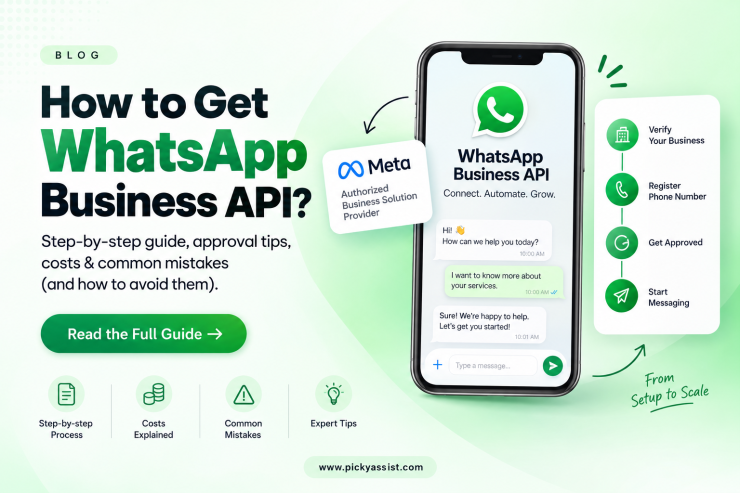
You can’t download the WhatsApp Business API from an app store. It’s not an app at all. To get access, you sign up through a Meta-authorized Business Solution Provider (BSP). Verify your business with Meta, register a phone number that isn’t already active on WhatsApp, and get your account approved before sending a single message. The whole process typically takes anywhere from a few hours to a few business days, depending on how quickly your business documentation clears verification.
That’s the short version. Here’s what actually happens at each stage, and where businesses tend to get stuck.
Why You Can’t Sign Up for WhatsApp Business API Directly?
The WhatsApp Business API is not a consumer product. Meta doesn’t offer a self-serve signup page the way it does for a Facebook Ad account. Instead, Meta requires businesses to go through an authorized BSP (sometimes called an ISV or Official Meta Partner), which handles onboarding, hosts the technical infrastructure, and provides the dashboard, CRM, or chatbot tools you actually use day to day. This is different from the free WhatsApp Business App, which is fine for a solo shop handling a few dozen chats a day but has no automation, no multi-agent inbox, and no way to send templated broadcasts at scale.
How to Get WhatsApp Business API?
1. Set up your Meta Business Portfolio: Link the WhatsApp Business app to a business portfolio and submit your business details for verification. This is where the legal documents come in, mismatched business names between your paperwork and your portfolio are the single most common cause of delayed approval.
2. Choose your path: You have two options from here:
- Direct (Cloud API): Manage access tokens, webhooks, and phone number configuration yourself through Meta. This suits teams with in-house developer resources.
- Via a BSP: Sign up with a partner platform; Wati or Picky Assist, and similar providers all work this way. It connects your Meta account automatically and layers a dashboard, CRM, or chatbot builder on top. Picky Assist, for instance, packages that connect with a conversational CRM, chatbot builder, and automated funnel tools in one place, which is the kind of bundling worth comparing across providers rather than setting up raw API access and buying tooling separately.
4. Register your phone number. Add your business number and verify it by text message OTP or phone call. If the number is already active on WhatsApp Messenger or WhatsApp Business App, you’ll need to either free it up first or use WhatsApp Coexistence to bring it across without losing its existing chat history.
5. Set your display name and get it approved. Meta reviews display names separately from business verification, checking that they match your actual brand rather than using generic or misleading terms.
6. Configure templates. If you plan to initiate conversations with customers rather than only reply to them, every outbound template; order updates, promotions, reminders, needs to be created and approved by Meta before it can be sent. On the BSP path, your provider typically handles this submission on your behalf.
Comparing Your WhatsApp Business API Access Routes
| Route | Setup Effort | Automation | Best For |
|---|---|---|---|
| WhatsApp Business App (free) | Minimal | None | Solo owners, low message volume |
| BSP-hosted API (Picky Assist) | Moderate, guided by provider | Full — chatbots, CRM, broadcasts | Growing teams, marketing-led businesses |
| Direct Meta Cloud API (self-hosted) | High, requires developer resources | Full, but self-built | Businesses with in-house engineering teams |
Most businesses without a dedicated developer team find the BSP route faster to launch and cheaper to maintain than self-hosting the Cloud API directly, since the provider absorbs the infrastructure and compliance overhead.
Check for these Mistakes that Delay Meta’s Approval
Business name mismatches between your registration documents and Facebook Business Manager are the top cause of rejected verifications. A close second is trying to register a phone number still active on personal WhatsApp. It must be fully deactivated from WhatsApp first. Businesses also frequently underestimate template approval turnaround, submitting promotional templates the day before a campaign rather than building in buffer time.
What does WhatsApp Business API Costs?
Meta itself doesn’t charge a flat licensing fee for API access. You pay per conversation, with rates varying by country and conversation category (marketing, utility, authentication, or service). On top of Meta’s conversation fees, your BSP charges its own platform fee, which is where chatbot builders, CRM, broadcast scheduling comes bundled in. Comparing that combined cost, not just Meta’s base rate, is the more useful number when evaluating providers like Picky Assist against alternatives.
FAQs on WhatsApp Business API
Business verification with Meta typically takes a few hours to a few business days. Delays usually come from document mismatches, not the review process itself.
No. The number must be deactivated from personal WhatsApp or WhatsApp Business App before it can be registered on the API.
Not if you go through a BSP like Picky Assist, they handle the technical integration. Self-hosting the Cloud API directly does require developer resources.
Meta charges per conversation rather than a flat fee, and your BSP adds its own platform charge on top for the tools and support it provides.
Add comment