
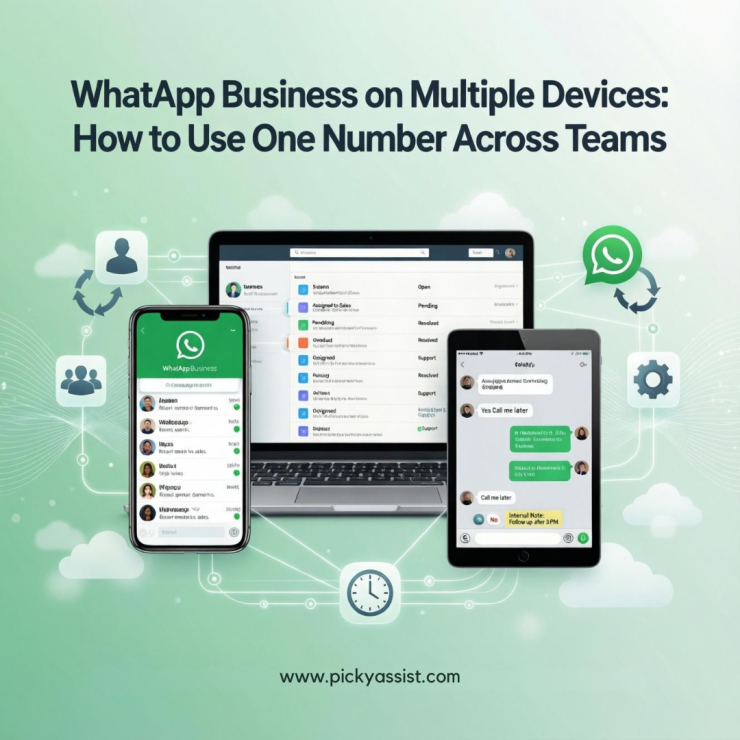
WhatsApp business on multiple devices is no longer a feature people are curious about, it is a necessity for companies that rely on WhatsApp for sales, support, and customer engagement. As businesses grow, the demand to manage conversations from more than one phone or system becomes operationally critical.
If you are searching for answers like:
- Can WhatsApp Business be used on multiple phones?
- How to link WhatsApp Business to another phone?
- Is WhatsApp Business multiple users the same number possible?
- Can WhatsApp Business be used on multiple devices?
This comprehensive guide explains everything in detail, clearly, accurately, and aligned with official platform capabilities.
Why do Businesses need WhatsApp Business on Multiple Devices?
In the early stages of a business, one person managing chats from a single phone might work. However, as inbound conversations increase, response time expectations tighten. Customers expect near-instant replies. Sales teams need access. Support teams must collaborate. Marketing campaigns drive volume.
This is where businesses start looking to use WhatsApp Business on multiple devices.
The requirement typically arises when:
- A founder and sales manager both need access.
- Customer support works in shifts.
- Multiple agents must respond under the same business number.
- An agency manages WhatsApp for a client.
- A growing brand handles high daily chat volume.
Without structured multi-device access, teams attempt inefficient workarounds such as sharing OTPs or repeatedly logging in and out. These approaches are unstable and create unnecessary risk. The correct approach depends on your scale and your long-term operational goals.
Can WhatsApp Business be used on Multiple Devices?
Yes, a WhatsApp Business account can be used on multiple devices, but the method matters.
Meta introduced Linked Devices and WhatsApp Business Companion Mode to allow users to open WhatsApp Business on multiple devices securely.
Under the official app setup:
- One primary phone registers the business number.
- Up to four additional devices can be linked.
- Linked devices sync messages independently without requiring the primary phone to stay online.
This means you can use WhatsApp Business on multiple phones and desktops simultaneously, within defined limits.
WhatsApp Business Companion Mode Explained
One of the most searched queries is whether the same WhatsApp Business can run on two phones. The answer lies in WhatsApp Business Companion Mode.
Companion Mode allows a secondary phone to act as a linked device rather than a new registered instance. This supports scenarios such as:
- WhatsApp Business on 2 phones.
- WhatsApp Business on two phones for a small team.
- WhatsApp Business has more than one device for shared access.
When set up properly, chats remain synchronized. Both devices can send and receive messages. However, only one phone remains the primary registered device tied to the phone number. This solves the question: Can WhatsApp Business be used on multiple phones? Yes, but through official linking, not duplicate registration.
How to Link WhatsApp Business to Another Phone?
Many businesses ask how to link WhatsApp Business to another phone without losing chats or getting logged out. The process is straightforward when done correctly. On the primary device, open WhatsApp Business and navigate to the Linked Devices section. Choose the option to link a new device. This will activate the scanner.
On the secondary phone, install WhatsApp Business. Instead of entering the phone number, select the option to link a device. This will display a QR code. Scan the QR code using the primary device. This is the official WhatsApp Business link device QR code method. It is secure and supported.
Understand that WhatsApp does not support linking a device with a phone number directly for simultaneous sessions. Entering the same phone number again will transfer the session rather than duplicate it.
What You Should Not Do?
A common misconception is that you can register the same business number independently on multiple phones. WhatsApp does not support this.. Attempting to do so will log out the previous session.
Therefore:
- You cannot verify the same number separately on two phones.
- You cannot create parallel primary sessions.
- You should not use unofficial or modified apps to bypass restrictions.
When people search for WhatsApp Business in multiple phones, they need linked access, not re-registration.
Scaling for Teams
When a business grows beyond two or three people, Companion Mode may not be sufficient. At this stage, companies look for structured solutions to support WhatsApp Business multiple users with the same number. The app version supports shared access through linked devices, but it does not offer:
- Role-based permissions
- Conversation assignment on Teambox
- Performance tracking per agent
- CRM integration
- Workflow automation
If you need full team functionality, the scalable solution is WhatsApp Business API.
With API-based platforms, businesses can operate business WhatsApp on multiple devices through a centralized dashboard. Agents log in via browser or platform interface. No phone dependency exists. The number remains stable, secure, and structured.
This is how enterprises manage WA Business multiple devices efficiently.
Business Accounts vs Multiple Devices
Many business owners confuse multiple devices with multiple accounts. Using WhatsApp Business on multiple devices means one number accessed from several linked devices.
Running WhatsApp multiple accounts means separate numbers, each registered independently.
It is possible to operate multiple WhatsApp Business accounts on one phone, but only if each account uses a different phone number. However, Some Android devices support dual apps. iPhones have more limitations.
For those asking about two WhatsApp Business accounts on one iPhone, it is only feasible if you use different numbers and compatible app configurations. iOS does not natively allow cloning the same app for identical numbers.
When the App isn’t Enough!
Use Companion Mode if you need WhatsApp Business on two phones. If your goal includes:
- WhatsApp Business multiple users same number
- Automation
- CRM integration
- Sales tracking
- Broadcast management at scale
Then WhatsApp Business API becomes the correct choice. The API removes device dependency entirely. It allows structured management of WhatsApp Business in multiple devices without manual linking limitations.
WhatsApp Business Premium: Does it Help?
WhatsApp Business Premium offers enhanced features such as custom links and advanced business profile tools in select regions. However, it does not fundamentally change multi-device capabilities. Premium is beneficial for branding and link customization. It is not a replacement for API when it comes to scaling team access.
Security and Operational Best Practices
When you use WhatsApp Business on multiple phones, maintaining security is essential. Enable two-step verification. Periodically review linked devices and remove inactive sessions. Avoid sharing OTP codes across teams. Always use official linking processes. Improper access control leads to operational instability and possible account issues.
Conclusion
To conclude, the answer to whether WhatsApp Business can be used on multiple devices is clearly yes. You can open WhatsApp Business on multiple devices through Linked Devices and Companion Mode and can operate WhatsApp Business on 2 phones. You can access the same WhatsApp Business on two phones securely.
However, the method depends on your scale. For small teams, the app with Companion Mode is sufficient. For growing teams requiring structured workflows, WhatsApp Business API is the long-term solution. Choosing the right setup ensures stability, scalability, and professional communication.
FAQs on WhatsApp Business
1. Can WhatsApp Business be used on multiple devices?
Yes. A WhatsApp Business account can be used on multiple devices through the Linked Devices feature. One primary device and up to four additional linked devices are supported.
2. How to link WhatsApp Business to another phone?
Open Linked Devices on the primary phone and scan the WhatsApp Business link device QR code from the secondary phone.
3. Can I use WhatsApp Business on 2 phones with the same number?
Yes, but only through Companion Mode or WhatsApp Business API. Direct duplicate registration is not supported.
4. What is WhatsApp Business multiple users same number setup?
For structured multi-agent access with chat assignment and tracking, WhatsApp Business API is recommended.
5. Can I run multiple WhatsApp Business accounts on one phone?
Yes, if each account uses a different phone number. Device compatibility varies by operating system.
6. Is WhatsApp Business Premium required for multi-device access?
No. Linked Devices supports multiple devices without requiring Premium. Premium adds branding enhancements.

Add comment