
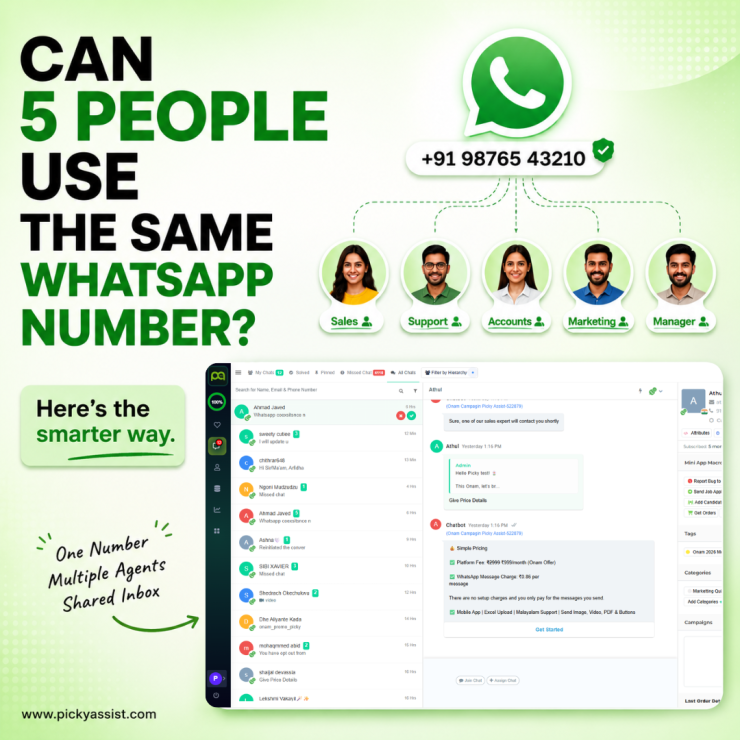
One of the first problems we see after a business starts getting serious WhatsApp enquiries is simple: one phone, one WhatsApp account, and five employees trying to answer customers. That setup quickly creates duplicate replies, missed leads, and the classic “I thought you were handling it” problem. WhatsApp Business agents are team members who handle customer conversations through a shared business WhatsApp setup. For businesses that need WhatsApp Business multiple agents, the WhatsApp Business Platform is generally more suitable than asking everyone to share one phone or account login.
What Are WhatsApp Business Agents?
A WhatsApp Business agent is a team member who can access and respond to customer conversations through a business messaging system. Instead of giving every employee access to the same physical phone, businesses can connect WhatsApp to a shared inbox where agents receive, assign, and resolve conversations.
For example, a company receiving 300 enquiries a day could have:
| Team | Responsibility |
|---|---|
| Sales | New enquiries and lead qualification |
| Support | Existing customer issues |
| Accounts | Payment-related questions |
| Manager | Escalations and supervision |
The important distinction is that agents are users of the business messaging system, not separate WhatsApp numbers for every employee.
Can WhatsApp Business Have Multiple Agents?
Yes, but the method depends on which WhatsApp product you use.
The WhatsApp Business app supports limited multi-device/team usage, but it becomes restrictive when several employees need structured access, assignment, reporting, automation, and permissions.
For a larger team, the WhatsApp Business Platform can connect the business number to a shared inbox or WhatsApp CRM.
| Requirement | Business App | Business Platform + Shared Inbox |
|---|---|---|
| Multiple Team Members | Limited | Yes |
| Shared Customer Conversations | Basic | Yes |
| Conversation Assignment | Limited | Yes |
| Agent Permissions | Limited | Advanced |
| Automation | Basic | Advanced |
| CRM Integration | Limited | Yes |
| Team Reporting | Limited | Yes |
| Chatbot + Human Handoff | Limited | Yes |
How Does Multiple-Agent WhatsApp Support Work?
The basic workflow looks like this:
Customer sends WhatsApp message → shared inbox receives it → conversation is assigned → agent replies → automation or human follow-up continues.
The assignment can be manual or automated.
For example, you could route:
- Sales enquiries → Sales Team
- Order questions → Customer Support
- Payment issues → Accounts
- High-value leads → Senior Sales Agent
This eliminates a major operational failure: multiple agents replying to the same customer without knowing someone else already responded.
WhatsApp Business Multiple Agents: What You Actually Need?
If you are setting up WhatsApp for five or more employees, don’t start by asking, “How do we add five people?” Start with these four questions:
1. Who receives the conversation?
Every incoming chat should enter a controlled shared inbox rather than disappearing into individual phones.
2. Who owns the conversation?
Assign a clear owner. An agent should know whether they are responsible for the next response.
3. What happens when the agent is unavailable?
Create reassignment or escalation rules. Otherwise, a conversation can remain stuck with an employee who is on leave.
4. When should automation take over?
Simple questions such as pricing, business hours, order status, or FAQs can often be handled automatically before reaching an agent.
This is where combining multiple agents with WhatsApp automation becomes significantly more useful than simply giving more employees access.
Common Mistakes When Adding WhatsApp Agents
Sharing one phone between employees
This works until customer volume increases. Agents compete for access, conversations get missed, and there is little accountability.
Giving every agent unrestricted access
Not every employee needs access to every conversation or customer record. Role-based permissions become important as the team grows.
Ignoring conversation ownership
A shared inbox without assignment rules can become another crowded group chat. Every important conversation needs a responsible agent or team.
Automating without human handoff
A chatbot should not trap customers inside automation. Businesses need a clear path from bot → agent when the customer needs human assistance.
Measuring only response time
A fast reply isn’t necessarily a good customer experience. Track resolution time, missed conversations, transfers, and lead conversion alongside response speed.
How Many WhatsApp Agents Do You Need?
There is no universal agent-to-customer ratio because workload depends on conversation complexity. A useful starting point is to measure active conversations per agent, not total contacts.
If 1,000 customers message you in a month but most require one simple answer, your staffing requirement will differ dramatically from a business where every conversation requires quotations, negotiation, payment checks, or technical support.
Start with your actual conversation volume for 2–4 weeks, then identify peak periods and average handling time before adding more agents.
How to Set Up WhatsApp Business for Multiple Agents Using the WhatsApp Business API? (Shared Team Inbox)
Best for growing or large businesses that need multiple agents, automated chat routing, role-based permissions, and one shared WhatsApp number.
- Verify your business: Complete business verification through Meta Business Suite.
- Choose a WhatsApp solution: Connect your account through an official WhatsApp Business Solution Provider or platform such as Respond.io or Picky Assist.
- Connect your number: Add and verify your WhatsApp Business number from the provider’s setup dashboard.
- Invite agents: Add team members using their email addresses and give them access to the shared inbox.
- Set roles and routing: Define agent permissions and automatically route conversations to the right team or agent.
- Test before going live: Send test messages to confirm that assignment, notifications, permissions, and agent replies work correctly.
This setup lets multiple team members manage customer conversations from one WhatsApp number without sharing a single phone.
Can Picky Assist Help Manage Multiple WhatsApp Agents?
Yes. Picky Assist can provide a shared WhatsApp environment where teams can manage conversations alongside automation, routing, chatbots, and customer information. The practical advantage is that adding agents doesn’t have to mean adding more complexity. A business can use automation for repetitive queries while routing conversations that require judgment to the appropriate human agent.
FAQs on WhatsApp Business Agents
Yes, businesses can enable team access depending on the WhatsApp product and connected business solution. For larger teams, a shared inbox connected to the WhatsApp Business Platform provides more structured multi-agent management.
For basic use, WhatsApp Business provides multi-device capabilities. For larger teams requiring assignments, permissions, reporting, and automation, connect the business number to a WhatsApp Business Platform-based shared inbox.
Technically, multiple team members may have access to the same conversation, but operationally it is better to assign ownership. This prevents duplicate or contradictory responses.
Yes. The available number of users and capabilities depend on whether you use the WhatsApp Business app or the WhatsApp Business Platform through a business messaging solution.
Yes. A single business number can be managed by multiple authorized agents through an appropriate shared inbox or WhatsApp Business Platform setup.
Yes, business messaging platforms can support conversation assignment and routing. Businesses can route chats manually or create rules based on departments, enquiry types, or other customer information.
Yes. A chatbot can handle initial questions and transfer conversations to human agents when necessary. This allows agents to focus on conversations that actually require human intervention.
The Business app can work for smaller operations, but businesses with larger teams usually benefit from the WhatsApp Business Platform, shared inboxes, automation, and CRM integration.
Add comment