
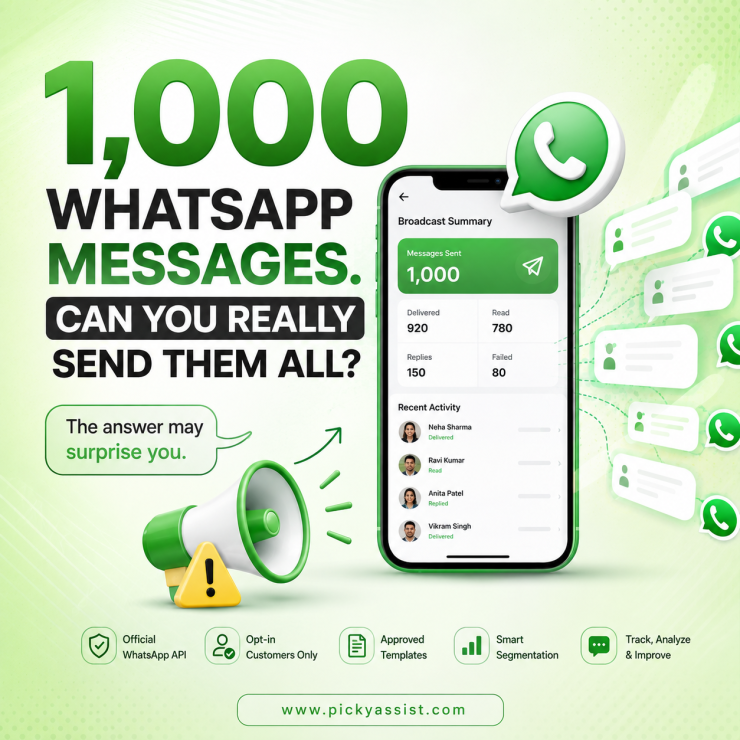
A common mistake we see when businesses try to message 1,000 customers is treating WhatsApp like email: upload a list, press send, and move on. That approach can create delivery, quality, and compliance problems. The WhatsApp Business app is not designed for reliably sending one broadcast to 1,000 contacts. For larger, business-initiated campaigns, use the WhatsApp Business Platform through a WhatsApp API account, where approved message templates, opt-ins, messaging limits, and business quality rules apply.
Can you send 1,000 messages from WhatsApp Business?
Yes, but the method matters. There are two practical approaches:
| Method | Best for | Sending 1,000 messages |
|---|---|---|
| WhatsApp Business App | Small customer lists | Not ideal as a single campaign |
| WhatsApp Business Platform/API | Marketing, notifications, automation | Designed for scalable messaging |
The Business app is primarily intended for smaller businesses managing customer conversations manually. The WhatsApp Business Platform is built for businesses communicating with customers programmatically at scale. If your requirement is genuinely 1,000 personalized messages, the API route is usually the better operational choice.
How to Send 1000 WhatsApp Messages at Once?
1. Use a WhatsApp API Account
A WhatsApp API account, now generally referred to as the WhatsApp Business Platform, allows businesses to connect WhatsApp with messaging software, CRM systems, chatbots, and automation tools.
Instead of manually selecting contacts, your platform can send messages to an eligible customer segment and track delivery, replies, and failures.
For example, a retailer could send an offer to 1,000 opted-in customers while dynamically inserting their name, product, appointment information, or other approved variables.
2. Make sure Customers have Opted in
Sending 1,000 messages does not mean sending 1,000 unsolicited messages.
Your contact database should have a legitimate WhatsApp opt-in. Keep evidence of where and how customers agreed to receive messages.
This becomes especially important for promotional campaigns. A large number of blocks or negative feedback can damage your messaging quality and affect future delivery.
3. Create an Approved Message Template
When a business starts a conversation outside the applicable customer-service window, WhatsApp requires an approved template for business-initiated messaging.
The template must accurately represent its purpose. Promotional content should not be disguised as a utility notification simply to obtain approval.
For example:
Hi {{1}},
Your exclusive offer is available until {{2}}.
View your offer: {{3}}
The exact template category and eligibility depend on the message content and current WhatsApp rules.
4. Segment the 1,000 contacts
Don’t automatically send the same message to everyone.
A better campaign might divide 1,000 contacts into:
- 400 recent customers
- 250 inactive customers
- 200 high-value customers
- 150 new leads
Each segment can receive a more relevant message.
This usually produces a better business outcome than maximizing the number of messages sent.
5. Send through an automation platform
Once your WhatsApp API account and template are ready, a business messaging platform can handle the campaign.
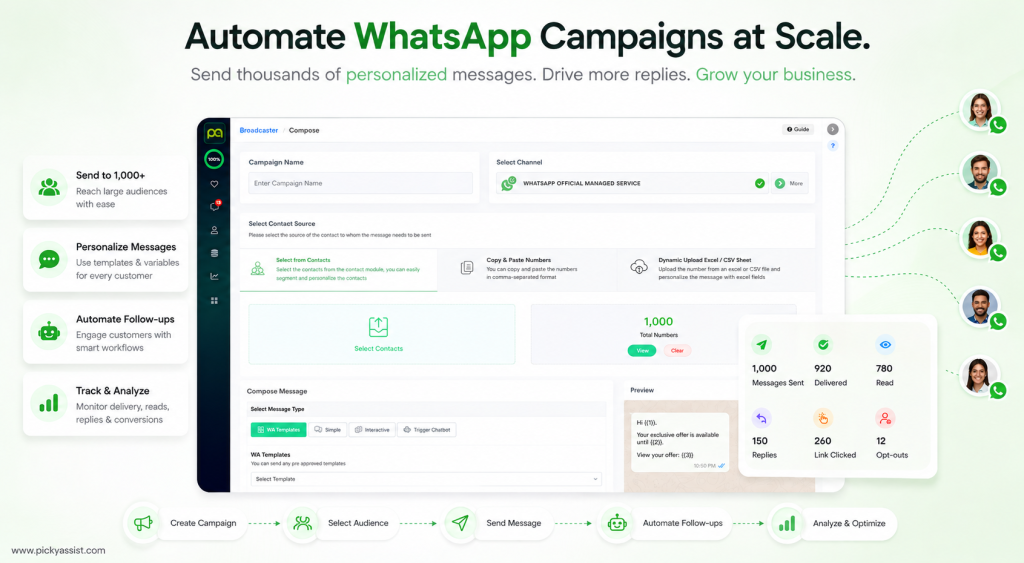
For example, Picky Assist can combine WhatsApp broadcasting with customer segmentation, automated follow-ups, and conversational workflows, so the campaign does not end with the initial message.
The important distinction is this: sending 1,000 messages is the easy part; managing the responses is where business automation creates value.
What happens after you send 1,000 messages?
Track more than the number of messages submitted. A useful campaign report should distinguish between:
- Messages sent
- Messages delivered
- Messages read
- Customer replies
- Links clicked
- Customers who opted out or complained
- Leads or purchases generated
Don’t assume a 1,000-message campaign means 1,000 delivered messages. Some numbers may be invalid, unavailable, blocked, or otherwise ineligible. Also, avoid promising a fixed WhatsApp open or response rate. Performance varies significantly by industry, audience quality, message relevance, offer, timing, and campaign history.
Common Mistakes when Sending 1,000 WhatsApp Messages
- Using unofficial bulk-sending software: Automation that bypasses WhatsApp’s official infrastructure can create account and delivery risks.
- Sending without consent: A purchased or scraped database is not the same as a permission-based customer list.
- Using one generic message: Relevance matters more than raw volume.
- Ignoring replies: A campaign that generates 100 conversations can quickly overwhelm a team without a shared inbox or automated routing.
- Sending too frequently: Even legitimate contacts may block or report a business if messaging becomes excessive.
A Better 1,000-message Campaign Framework
Before pressing send, check:
- Audience: Do these 1,000 people have a valid WhatsApp opt-in?
- Purpose: Is the message marketing, utility, or another supported category?
- Template: Has the required template been approved?
- Segmentation: Does everyone actually need the same message?
- Capacity: Can your team handle incoming replies?
- Automation: Should follow-ups or FAQs be automated?
- Measurement: What business result defines success?
This framework prevents a common operational mistake: optimizing for messages sent instead of customers converted or served.
Frequently Asked Questions on
You can communicate with 1,000 customers, but the WhatsApp Business app is not the right tool for treating that as one large automated campaign. For scalable business messaging, the WhatsApp Business Platform/API is the more appropriate solution.
Broadcasting through the Business app has practical restrictions and is designed for smaller-scale communication. Businesses that need larger, automated campaigns should evaluate the WhatsApp Business Platform rather than trying to work around app limitations.
For a reliable automated campaign to 1,000 customers, a WhatsApp Business Platform/API setup is generally the appropriate approach. It also enables integrations with CRM systems and automation tools.
Yes, provided the campaign follows WhatsApp’s business messaging requirements, including appropriate customer consent and approved templates where required. Promotional messaging should not be treated like an unrestricted SMS blast.
Yes. API-based WhatsApp messaging can use approved template variables to personalize messages at scale. Personalization can include information such as a customer’s name, appointment details, or offer information.
Use the official WhatsApp Business Platform, message customers who have opted in, use compliant templates, segment your audience, and monitor customer feedback. Avoid unsolicited bulk messaging and unofficial sending methods.
Add comment