
Most of the build “WhatsApp AI agent” projects I have watched fail didn’t fail because the AI was bad. They failed because someone connected an LLM to the WhatsApp Business API, tested it on five happy-path questions, shipped it, and then spent the next three weeks firing support tickets at their own bot. The AI wasn’t the hard part. The plumbing was.
To build a WhatsApp AI chatbot, you need three things working together, verified WhatsApp Business Platform access, a connected knowledge source the AI can pull accurate answers from, and a handoff rule that routes a conversation to a human the moment the bot’s confidence drops. You can assemble this yourself with the Meta API and an LLM, or use a WhatsApp automation platform that already has the messaging and compliance layer built, and just plug in your business data and prompts.
The rest of this guide walks through what actually goes into that build, what it costs in 2026, and where the projects I’ve seen go sideways.
What “Building a WhatsApp AI Agent” Actually Means?
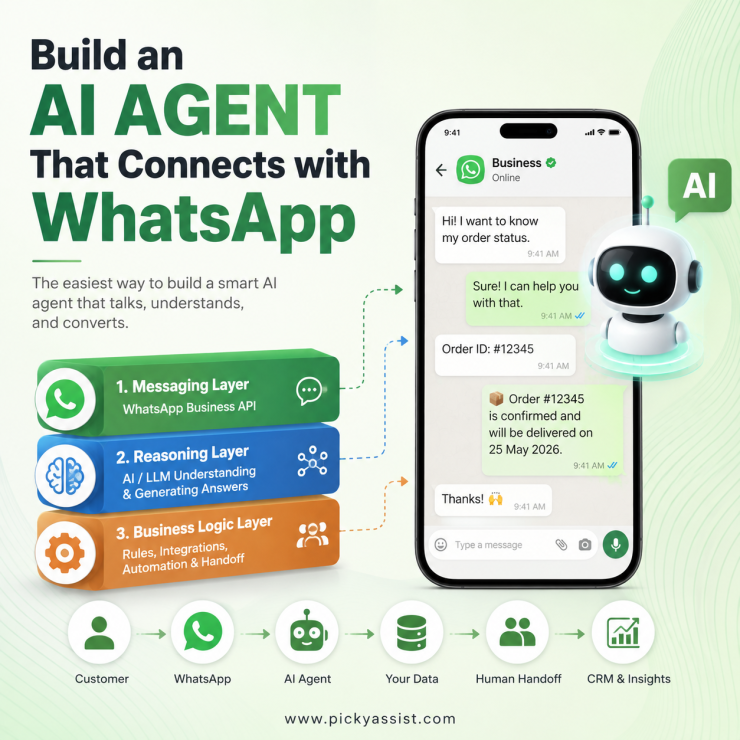
A WhatsApp AI agent isn’t a single feature; it’s three systems stacked on top of each other:
- The messaging layer. This is your connection to the WhatsApp Business Platform: a verified WhatsApp Business Account (WABA), phone number, and API access through Meta or a Business Solution Provider (BSP).
- The reasoning layer. This is the AI model; usually an LLM, that reads the incoming message, decides what the customer wants, and generates a response, ideally grounded in your actual product data instead of guessing.
- The business logic layer. This is the part almost everyone underbuilds: rules for what the AI is and isn’t allowed to answer, when it hands off to a human, how it logs a lead into your CRM, and what happens outside business hours.
A WhatsApp AI chatbot that only has layer one and two will answer questions fluently and confidently get half of them wrong. The business logic layer is what turns a chatbot into something you can actually trust with real customers.
What You Need Before You Write a Single Prompt?
Before any AI conversation design work, confirm these are in place:
- A verified WhatsApp Business Account (WABA), connected either directly through Meta’s API or through a BSP. Direct Meta access requires more engineering; a BSP gives you a dashboard, template management, and support.
- A structured knowledge source. PDFs and Scattered Google Docs work poorly. A clean FAQ sheet, product catalog, or help-center export gives the AI something reliable to ground answers in and dramatically cuts down on hallucinated responses.
- Approved message templates, if you plan to message customers outside the 24-hour service window (which you will, for reminders, cart nudges, or re-engagement). Templates go through Meta’s approval queue and get rejected often enough that this is worth building in early, not the week before launch.
- A defined escalation path — A real person or team who gets pinged when the AI hits a question it shouldn’t answer alone (refunds, complaints, anything legally sensitive).
- Analytics on message categories, because as you’ll see below, category and country determine your cost per message, and an AI agent that doesn’t distinguish between a free service reply and a paid marketing template will surprise you on the bill.
Three Ways to Actually Build One
| Approach | Best for | Time to launch | Ongoing effort |
|---|---|---|---|
| Build direct on Meta’s API + your own LLM integration | Teams with in-house engineering and specific compliance needs | 4–8+ weeks | High — you own uptime, template management, and prompt/knowledge updates |
| WhatsApp automation platform with built-in AI agent tools | Most SMBs and mid-market teams who want to move fast without hiring engineers | 1–5 days | Low-to-medium — you manage the knowledge base and conversation rules, not the infrastructure |
Platforms like Picky Assist already handle WABA connections, template compliance, and conversation routing, so you can focus on training the AI agent with your business knowledge, your FAQs, product data, and escalation rules—instead of building and wiring the infrastructure from scratch. If your team doesn’t have a developer on standby for template rejections and webhook debugging, this is usually the faster and cheaper path to something reliable.
A Practical Build Framework
- Define the agent’s job in one sentence. “Answer order-status and shipping questions, and hand off anything else” is a buildable scope. “Handle customer support” is not.
- Connect and verify your WABA. Complete Meta’s business verification before you build anything else — it’s often the slowest step and the one people forget to start early.
- Load a clean knowledge base. Structure your FAQs and product data so the AI retrieves specific answers instead of generating them from general knowledge.
- Write the Rules first, the personality second. Decide what the agent must never say (pricing guarantees, medical or legal advice, refund promises) before you decide how friendly its tone should be.
- Set the handoff trigger . A common threshold I use with clients: after two consecutive low-confidence responses, or any message containing complaint language, route to a human.
- Get templates approved in parallel, not after testing. Approval can take anywhere from minutes to a couple of days.
- Run a closed pilot with 20–50 real conversations before opening it to full volume. Read the transcripts yourself, this is where you will find the questions your knowledge base doesn’t actually cover.
- Monitor and retrain weekly for the first month. Customer phrasing surprises every AI WhatsApp chatbot in week one. Budget time for it.
What It Actually Costs in 2026?
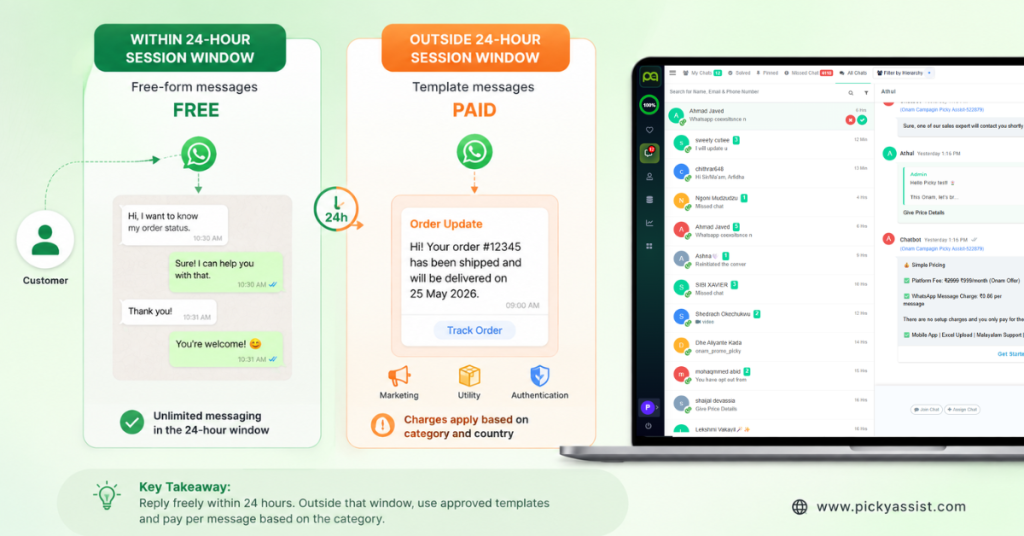
WhatsApp moved from conversation-based pricing to per-message pricing on July 1, 2025, and this now directly shapes how an AI agent should be designed. Under the current model, you’re only billed for delivered template messages. Marketing, Utility, and Authentication categories each carry their own rate, and rates vary by the recipient’s country. Service messages, the free-form replies your AI sends within an open 24-hour customer service window and remain free, with no cap.
In practice, that means an AI agent that mostly responds inside conversations customers initiate (the common pattern for support and sales bots) can run at a very low direct messaging cost. The expense shows up when the agent proactively reaches out, reminders, re-engagement and abandoned-carts since those go out as paid Marketing or Utility templates.
As a rough, illustrative benchmark, US marketing template rates sit around $0.025 per delivered message, with utility and authentication rates typically running well below that; exact figures vary by country and change periodically. So check Meta’s current WhatsApp Business Platform pricing documentation before budgeting. On top of Meta’s base rate, most BSPs and platforms add their own fee or subscription, so get the full number, not just Meta’s line item, before you commit to a volume estimate.
Common Mistakes That Break WhatsApp AI Agents
- Letting the AI answer from general knowledge instead of your data. This is the single biggest cause of confidently wrong answers about pricing, stock, or policies.
- No fallback for “I don’t know.” An AI for WhatsApp that guesses rather than escalates erodes trust fast, customers remember the wrong answer, not the 20 right ones before it.
- Ignoring the 24-hour window in the design. If your agent needs to follow up after the window closes, that follow-up must be an approved template, plan the message copy and get it approved before you need it, not during a live conversation.
- Skipping the pilot phase. Real customer phrasing is messier than test scripts. A two-week pilot with real traffic catches gaps a demo never will.
- Treating launch as the finish line. The businesses that get the most out of an AI chatbot for WhatsApp are the ones who review transcripts and retrain monthly, not the ones who set it up once and walk away.
FAQ on Building WhatsApp AI Agent
No. If you build directly on Meta’s raw API, you’ll need engineering resources for the integration and ongoing maintenance. If you use a WhatsApp automation platform with built-in AI agent tools, most of the setup is configuration, connecting your knowledge base and building chatbots are possible with visual no-code chatbot builders.
A platform-based chatbot can be build and can go live in a few days after your WhatsApp Business Account is verified and your knowledge base is ready. A custom build on Meta’s API directly typically takes four to eight weeks, depending on integration complexity.
Replies within an open 24-hour customer service window are free. Messages your agent sends outside that window; reminders, promotions, re-engagement; go out as paid template messages, billed by category and recipient country.
Yes, if it’s built with that integration in mind. The AI needs a connected data source; an API, CRM sync, or structured database; to answer account-specific questions like order status accurately; without it, it can only answer from static FAQ content.
Meta approves message templates (the reusable formats used outside the 24-hour window), not individual AI-generated replies. Free-form AI responses sent within an active conversation window don’t go through template approval.



Add comment