
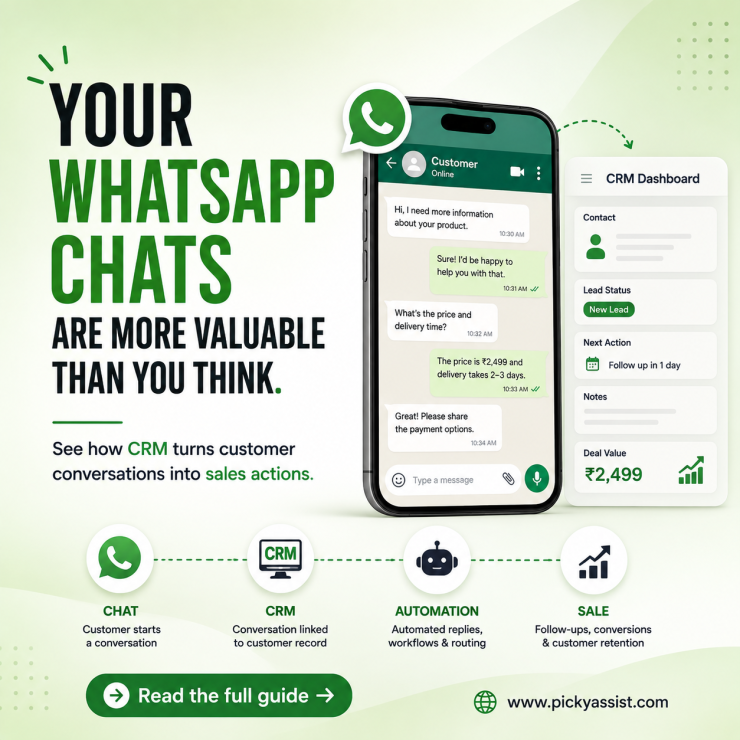
A common CRM problem appears when a sales team starts using WhatsApp heavily: customer conversations happen in WhatsApp, while customer records remain inside the CRM. A salesperson may know that a prospect asked for a quotation yesterday. The CRM may show the lead, but not the conversation that explains what the prospect actually wants. CRM with WhatsApp solves this gap by connecting customer conversations with CRM records, workflows, sales activities, and support processes.
A good setup can capture conversations, assign chats, automate routine responses, trigger follow-ups, and give teams shared visibility.
What is a CRM with WhatsApp?
A CRM with WhatsApp connects WhatsApp Business messaging with customer relationship management functions. It allows businesses to manage customer conversations alongside lead data, sales activities, support interactions, and follow-ups.
A WhatsApp CRM can go beyond storing chats. Depending on the platform, it can connect conversations with automation, contact fields, pipelines, chatbots, broadcasts, and human-agent workflows.
Meta itself provides business messaging tools that let businesses manage WhatsApp conversations alongside Messenger and Instagram through Meta Business Suite.
How does a WhatsApp CRM work?
The basic workflow looks like this:
Customer message → WhatsApp Business Platform → CRM/contact record → automation or agent → follow-up → conversion
When someone contacts a business, the CRM can identify or create the corresponding contact. The conversation can then be routed according to factors such as lead source, product interest, location, or support requirement.
For example, a customer asking about pricing could trigger a qualification flow. A qualified lead could then move to a salesperson, while a routine order-status question could receive an automated response.
What should a CRM with WhatsApp integration include?
Not every integration provides the same depth of functionality. Before choosing a platform, examine these capabilities.
| Capability | Why it matters |
|---|---|
| Shared inbox | Lets multiple agents manage customer conversations |
| Contact synchronization | Keeps customer records connected to conversations |
| Lead assignment | Routes conversations to the right salesperson |
| Chatbot automation | Handles repetitive questions before human handoff |
| Follow-up automation | Prevents leads from being forgotten |
| Customer segmentation | Enables relevant messaging |
| Template management | Supports approved business-initiated messages |
| Analytics | Shows response, conversion, and workflow performance |
| Integrations | Connects WhatsApp with ecommerce, forms, payments, and other systems |
| Human handoff | Moves complex conversations from automation to agents |
The right feature set depends on whether your priority is sales, support, marketing, commerce, or all four.
WhatsApp Business CRM vs traditional CRM
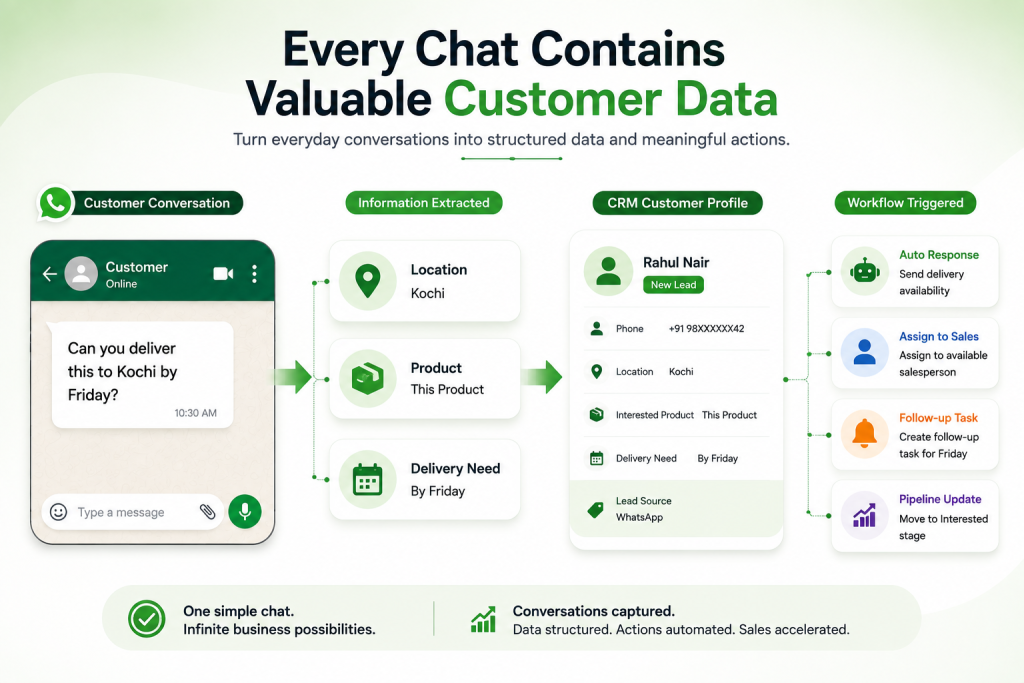
A traditional CRM primarily organizes customer information and business processes. A WhatsApp business CRM adds a conversation layer to that system. This matters because customer intent often appears inside conversations before it becomes structured CRM data.
For example:
“Can you deliver this product to Kochi by Friday?”
That message contains location, product interest, and a delivery requirement. A capable conversational CRM can turn such information into structured customer data or workflow triggers. The CRM therefore becomes more than a database. It becomes a system for turning conversations into business actions.
When should a business use CRM for WhatsApp?
Consider a sales team handling dozens or hundreds of customer conversations. Without centralized management, several problems can appear:
- Leads remain inside individual employees’ phones.
- Follow-ups depend on memory.
- Managers cannot easily see conversation status.
- Customers repeat information to different agents.
- Sales opportunities become difficult to track.
- Support questions compete with sales conversations.
Real-world Scenario: 300 WhatsApp Messages a day
Scenario: A business receives around 300 customer messages daily.
Initially, three employees answer questions manually. They copy important leads into a spreadsheet and remind themselves to follow up later.
The process eventually breaks.
A lead asks for pricing at 10 a.m. Another customer asks about delivery at 11 a.m. An existing customer needs support at noon. By afternoon, several conversations need follow-up.
With a WhatsApp CRM, the workflow can change:
- Capture the incoming conversation.
- Identify or create the customer record.
- Ask automated qualification questions.
- Tag the customer’s requirement.
- Assigning sales-ready leads to an agent.
- Trigger relevant follow-ups.
- Escalate complex issues to humans.
- Track the outcome inside the CRM.
The objective is not to automate every conversation. The objective is to automate predictable work while keeping humans involved where judgment matters.
Where Businesses often get it Wrong?
WhatsApp automation has operational boundaries.
Business-initiated messaging on the WhatsApp Business Platform uses message templates, and businesses must follow Meta’s applicable messaging policies. Template content, category, variables, and approval status therefore matter.
The customer-service window also matters when designing workflows. Businesses should not assume that an old conversation can always be restarted with a normal free-form message.
For outbound campaigns, template selection and messaging eligibility should be checked before automation goes live.
Common Mistakes
1. Treating WhatsApp as the CRM
Why it happens: Teams already spend their day on WhatsApp.
Consequence: Customer information remains scattered across chats and employees.
Better approach: Use WhatsApp as the communication channel and the CRM as the customer-management layer.
2. Automating before defining the workflow
Why it happens: Businesses start with a chatbot because it looks easy to deploy.
Consequence: Customers enter loops or reach irrelevant responses.
Better approach: Map the customer journey first, then automate repetitive stages.
3. Sending the same message to every contact
Why it happens: Segmentation requires more setup.
Consequence: Messages become irrelevant and can damage customer experience.
Better approach: Segment customers by lifecycle stage, intent, product, or previous interaction.
4. Designing automation without human handoff
Why it happens: Teams focus on reducing agent workload.
Consequence: Complex conversations become frustrating.
Better approach: Define clear escalation triggers and transfer conversations with relevant context.
How to choose the right WhatsApp CRM?
Ask these questions before committing to a platform:
- Does it use the WhatsApp Business Platform rather than an unofficial workaround?
- Can multiple agents manage conversations?
- Can conversations connect to CRM records?
- Can it automate qualification and follow-ups?
- Can agents take over conversations when needed?
- How does it handle templates and approvals?
- Can it connect with existing business systems?
- Can managers measure workflow performance?
- Can the platform scale as contact and conversation volume grows?
For businesses building a broader automation workflow, Picky Assist combines WhatsApp conversations with chatbots, broadcasting, automated funnels, and conversational CRM capabilities.
The Practical Takeaway
WhatsApp integration is most valuable when customer conversations have become part of the sales or support process. The strongest implementation does not simply place WhatsApp inside a CRM.
It connects conversation → customer data → automation → human action → measurable outcome.
Start with the workflows causing the most manual work. Automate predictable interactions, keep humans responsible for exceptions, and measure what happens after every conversation.
FAQs on CRM with WhatsApp
A CRM with WhatsApp connects WhatsApp business conversations with customer records, sales workflows, support processes, and automation. It helps teams manage conversations while maintaining structured customer information.
Yes. Businesses can connect WhatsApp Business Platform messaging with CRM systems through supported integrations or business messaging platforms. The available functionality depends on the CRM and integration method.
Yes. A WhatsApp CRM can provide a shared workspace where multiple agents manage conversations according to permissions, assignments, and business workflows. This reduces dependence on individual employees’ phones.
Yes. Depending on the platform, businesses can trigger follow-ups based on customer actions, lead stages, forms, purchases, or conversation events. Outbound messaging must still follow applicable WhatsApp Business Platform requirements.
It can be useful when WhatsApp has become an important sales or support channel. The value increases when a business needs multiple agents, structured follow-ups, customer segmentation, or automation.
No. A well-designed WhatsApp CRM should automate repetitive interactions while giving customers access to human agents for complex, sensitive, or high-value conversations.
Add comment