
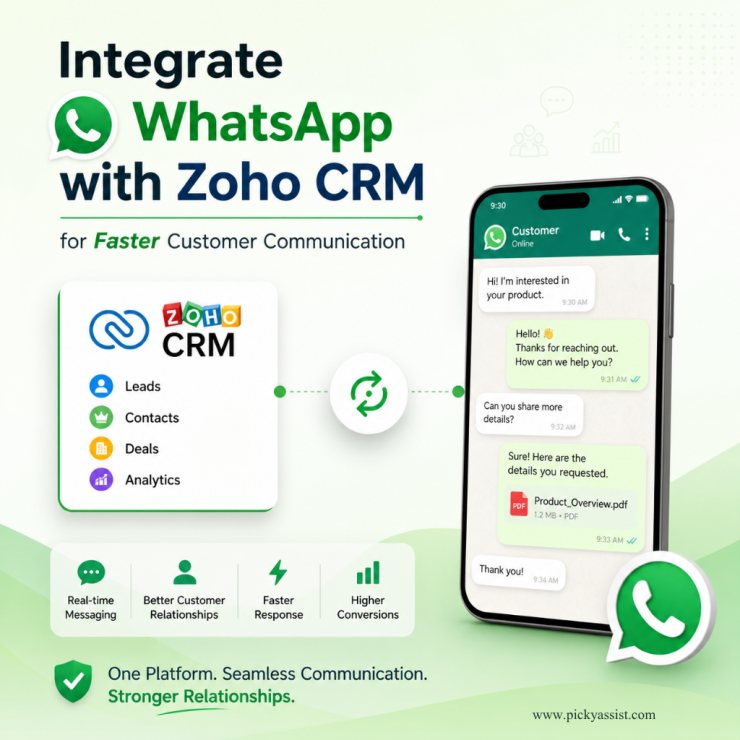
If you own a business, you should think how effectively you could engage your customers. But what if you are still managing customer conversations across multiple platforms and struggling with delayed responses? As customers increasingly prefer instant messaging over emails and phone calls, businesses are searching for how to integrate WhatsApp with Zoho CRM to centralize communication, automate follow-ups, and improve customer engagement.
In this guide, you will learn how to integrate WhatsApp with Zoho CRM, the key benefits of integration, and how businesses can use automation to create faster and more connected customer communication workflows.
Why Do Businesses Need to Integrate WhatsApp With Zoho CRM?
Modern customers expect immediate communication. If a lead sends a WhatsApp message and does not receive a quick response, businesses risk losing potential conversions. This is why companies are looking for ways to connect Zoho CRM and WhatsApp so as to create more connected customer communication workflows.
Instead of managing WhatsApp conversations separately from CRM operations, businesses can centralize customer interactions and lead data in one place.
This improves:
- response speed
- lead tracking
- customer engagement
- follow-up management
- workflow automation
- communication visibility
A well-structured WhatsApp and Zoho CRM integration helps businesses connect conversations directly with customer records.
What is Zoho WhatsApp integration?
When businesses integrate WhatsApp with Zoho CRM, WhatsApp communication becomes connected with CRM workflows and customer records.
This allows businesses to:
- send and receive WhatsApp messages within Zoho CRM workflows
- automate customer engagement
- sync conversations with lead records
- trigger automated notifications
- manage customer follow-ups efficiently
- improve communication tracking
A properly configured Zoho CRM WhatsApp integration reduces communication gaps and improves operational efficiency.
How WhatsApp and Zoho CRM Work Together?
To better understand how to integrate WhatsApp with Zoho CRM, consider this example:
- a lead submits an enquiry
- Zoho CRM automatically triggers a WhatsApp message
- customer replies sync directly into CRM records
- sales teams continue conversations from one centralized system
This creates faster, more organized customer engagement workflows.
Benefits of Integrating WhatsApp With Zoho CRM
Businesses that integrate WhatsApp with Zoho CRM often experience major improvements in customer communication and sales efficiency.
Faster Customer Responses
WhatsApp enables businesses to respond quickly to leads and customers, improving engagement rates significantly.
Centralized Customer Conversations
Customer chats remain connected to CRM records, helping teams maintain complete communication visibility.
Better Lead Management
Sales teams can automate follow-ups and respond faster using workflow triggers.
Improved Customer Experience
Customers receive quicker and more personalized communication.
Automation Opportunities
Businesses can automate:
- lead follow-ups
- appointment reminders
- payment notifications
- support updates
- sales engagement workflows
What You Need Before You Integrate WhatsApp With Zoho CRM?
Before setting up the integration, businesses usually need:
- a Zoho CRM account
- WhatsApp Business API access
- an integration platform
- approved WhatsApp templates
- workflow automation setup
This is where platforms like Picky Assist become valuable for businesses.
WhatsApp Business API for Zoho CRM Integration
Many businesses confuse the standard WhatsApp Business App with the WhatsApp Business API.
If you want to properly integrate WhatsApp with Zoho CRM, businesses typically require WhatsApp Business API access.
The API enables businesses to:
- automate messaging
- manage high conversation volumes
- support multiple agents
- integrate with CRM systems
- trigger workflow automation
This becomes essential for businesses handling large-scale customer communication.
Why Businesses Use WhatsApp Business API With Zoho CRM
The standard WhatsApp Business App has limitations for growing businesses.
However, when businesses integrate WhatsApp Business API with Zoho CRM, they gain access to scalable communication features such as:
- multi-agent communication
- chatbot automation
- CRM synchronization
- broadcast messaging
- workflow automation
This makes it highly effective for sales and support teams.
How to Integrate WhatsApp With Zoho CRM?
Here is a practical step-by-step breakdown of how to integrate WhatsApp with Zoho CRM.
1. Set Up WhatsApp Business API Access
Businesses first need access to the WhatsApp Business API through an official provider.
Picky Assist helps businesses connect WhatsApp Business API with Zoho CRM for scalable communication workflows.
2. Connect WhatsApp With Zoho CRM
Using an integration platform, businesses connect WhatsApp communication with CRM workflows and customer records.
3. Configure CRM Workflows
Businesses can create workflows for:
- lead creation triggers
- automated follow-ups
- customer engagement sequences
- support notifications
4. Set Up Automation
Businesses can automate messages for:
- new leads
- reminders
- abandoned enquiries
- customer support updates
5. Sync Conversations With CRM Records
Customer conversations become automatically linked with CRM records for better visibility and tracking.
How Picky Assist Helps Businesses Integrate WhatsApp With Zoho CRM ?
Picky Assist helps businesses simplify WhatsApp and Zoho CRM integration through automation and centralized communication management.
Businesses can use Picky Assist for:
- WhatsApp Business API integration
- CRM workflow automation
- chatbot automation
- lead nurturing workflows
- broadcast messaging
- customer support communication
This helps businesses create better alignment between customer conversations and CRM operations.
Real Business Use Cases for WhatsApp and Zoho CRM Integration
Businesses across industries use WhatsApp CRM integration for different operational goals.
Sales Follow-Ups
Sales teams automatically send WhatsApp follow-ups when leads enter specific CRM stages.
Appointment Reminders
Businesses send automated reminders directly through CRM workflows.
Customer Support Updates
Support teams provide faster updates and communication.
Lead Qualification
Chatbots help qualify leads automatically before sales engagement.
Payment Notifications
Businesses send payment reminders and confirmations through WhatsApp.
Common Mistakes Businesses Make During Integration
Many businesses approach WhatsApp CRM integration incorrectly.
No Automation Strategy
Simply connecting WhatsApp to Zoho CRM is not enough. Businesses need structured workflows.
Poor Message Timing
Sending excessive messages can reduce engagement quality.
Weak Lead Segmentation
Personalized communication improves customer engagement significantly.
Using Non-Scalable Systems
Manual workflows become difficult to manage as businesses grow.
Best Practices for Integrating WhatsApp With Zoho CRM
Personalize Customer Communication
Avoid generic messaging whenever possible.
Use Automation Strategically
Automation should improve customer experience, not create spam-like interactions.
Use CRM Data Effectively
Customer data should drive segmentation and communication workflows.
Track Performance Metrics
Businesses should monitor response rates, engagement, and workflow performance regularly.
Why WhatsApp and Zoho CRM Integration Matters?
Customer expectations continue evolving toward messaging-first communication.
Businesses that integrate WhatsApp with Zoho CRM gain significant advantages through faster response times, better communication visibility, and stronger engagement workflows.
Instead of fragmented conversations, businesses create centralized and structured customer communication systems connected directly with CRM operations.
Conclusion
Understanding how to integrate WhatsApp with Zoho CRM is becoming increasingly important for businesses that want faster, smarter, and more connected customer communication. A properly implemented integration improves lead management, automation capabilities, customer engagement, and operational efficiency.
However, successful integration requires more than simply connecting two platforms. Businesses need scalable automation, centralized workflows, and structured engagement systems.
Platforms like Picky Assist help businesses build efficient WhatsApp communication systems integrated directly with Zoho CRM workflows.
As customer communication increasingly shifts toward messaging-first engagement, businesses that combine CRM intelligence with WhatsApp automation will create stronger customer experiences and faster growth.
FAQs on
1. How to integrate WhatsApp with Zoho CRM?
Businesses can integrate WhatsApp with Zoho CRM using WhatsApp Business API providers and integration platforms like Picky Assist.
2. Why should businesses integrate WhatsApp with Zoho CRM?
Integration helps businesses centralize communication, automate workflows, improve response times, and manage customer conversations more efficiently.
3. Do businesses need WhatsApp Business API for Zoho CRM integration?
Yes. Most advanced WhatsApp CRM integrations require WhatsApp Business API access for automation and scalable communication.
4. Can businesses automate WhatsApp messages through Zoho CRM?
Yes. Businesses can automate reminders, follow-ups, notifications, and customer engagement workflows.
5. What are the benefits of WhatsApp and Zoho CRM integration?
Benefits include faster communication, better lead management, centralized conversations, workflow automation, and improved customer experience.
6. How does Picky Assist support WhatsApp integration with Zoho CRM?
Picky Assist helps businesses automate communication workflows, manage WhatsApp Business API operations, and connect messaging directly with Zoho CRM systems.
Add comment