
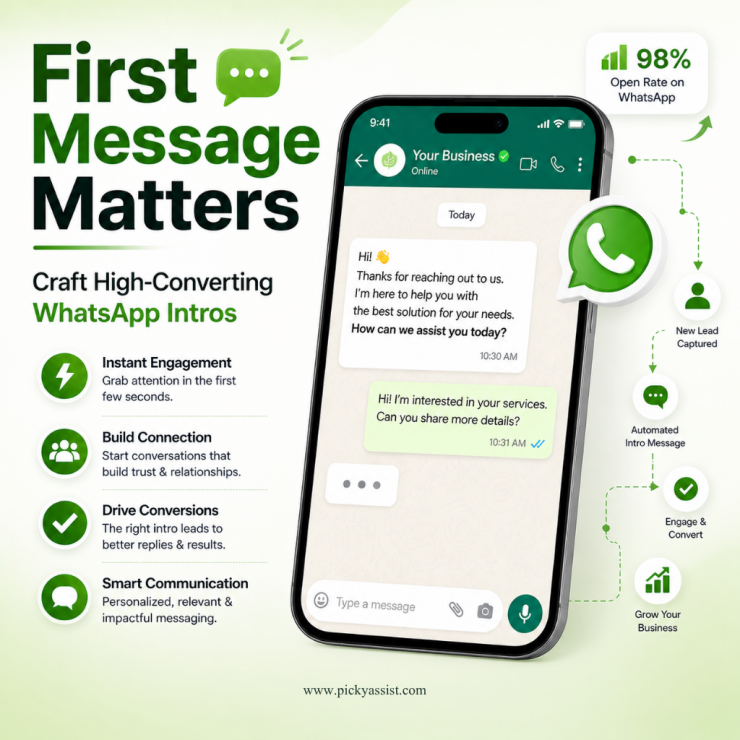
The first few seconds after a user opens a WhatsApp chat determine the future of your customer relationship. Unlike email, where a subject line does the heavy lifting, a WhatsApp business introduction message lands directly in a space reserved for family and friends. This proximity offers an incredible opportunity for brands, but it also carries a high risk of being perceived as intrusive if the tone is off.
For modern businesses, the goal isn’t just to say “hello”, it’s to initiate a frictionless dialogue. Whether you are a solopreneur or a scaling enterprise using Picky Assist, your opening note must balance professionalism with the conversational warmth that WhatsApp demands.
Why Your First WhatsApp Message is Your Most Important?
Data consistently shows that WhatsApp boasts open rates as high as 98%. However, high open rates don’t always translate to high engagement. If your introduction message to a client on WhatsApp feels like a generic broadcast, you risk being muted or blocked.
A well-crafted introduction serves three primary purposes:
- Identity Verification: Immediately tells the user who you are and why you are messaging them.
- Expectation Setting: Informs the user how and when you will communicate.
- Actionable Value: Provides a clear path forward (a link, a question, or a resource).
We can achieve this through automated broadcast commonly used in businesses for brand promotion where first introductory messages plays a huge role.
The Anatomy of a High-Converting Introduction Message
To move beyond a simple “Hi,” a strategic introduction WhatsApp message should follow a specific framework.
1. The Contextual Greeting
Always start by identifying the source of the lead. Did they download a whitepaper? Did they fill out a contact form? Mentioning this context prevents the message from feeling like “cold spam.”
2. The Value Proposition
State clearly what you do in one sentence. Avoid industry jargon. Instead of saying “We provide end-to-end digital transformation,” try “We help local bakeries automate their delivery schedules.”
3. The Low-Friction Call to Action (CTA)
Don’t ask for a 30-minute meeting in the first message. Instead, ask a simple “Yes/No” question or provide a helpful resource.
Templates: WhatsApp Message for Business Introduction
Different scenarios require different tones. Here are several templates optimized for conversion and clarity.
General Business Inquiry
“Hi [Name]! Thanks for reaching out to [Company Name]. I’m [Your Name], and I’ll be your dedicated point of contact. We’ve received your inquiry regarding [Product/Service]. Would you like me to send over our latest pricing catalog?”
Introduction to a New Client
When moving a relationship from a lead to an active client, the introduction WhatsApp message to the client needs to feel welcoming and organized.
“Hello [Name], welcome to the [Company Name] family! I’m [Your Name], your account manager. I’ll be using this thread to send you project updates and answer any quick questions. To get started, could you share your preferred time for our onboarding call?”
Company Introduction for Cold/Warm Leads
A company introduction message on WhatsApp works best when it focuses on a specific pain point.
“Hi [Name], I’m [Your Name] from [Company Name]. We noticed you’re looking to improve your [specific process]. We’ve helped similar brands increase efficiency by 20%. Is this something you’re currently prioritizing?”
Managing Group Dynamics: The Admin WhatsApp Group Introduction Message
If you are starting a community or a project-specific group, the admin WhatsApp group introduction message is vital for setting ground rules and maintaining order.
“Welcome everyone! I’m [Name], the admin for this group. This space is dedicated to [Purpose of Group].
A few quick rules:
- Keep discussions relevant to [Topic].
- No promotional spam.
- Group hours are 9 AM – 6 PM.
Feel free to introduce yourself below!”
How Picky Assist Elevates Your WhatsApp Strategy?
Sending a manual introduction message on WhatsApp is fine for five leads a day. But what happens when you have five hundred? This is where Picky Assist transforms your communication from a manual chore into a strategic engine.
Automated Workflows and Personalization
With Picky Assist’s Connector tools, you can trigger a business introduction message on WhatsApp the moment a lead enters your CRM. Using “Spintax” and dynamic attributes, every message feels unique to the recipient, avoiding the “bot-like” feel that triggers spam filters.
Smart Routing
When a client replies to your introduction WhatsApp message, Picky Assist can automatically route the conversation to the right department, Sales, Support, or Success, ensuring the user never has to repeat themselves.
Sequences and Drip Campaigns
An introduction is just the start. Picky Assist allows you to schedule follow-ups if the user doesn’t respond to the initial message, ensuring no lead falls through the cracks.
Compliance and Best Practices for WhatsApp Messaging
To maintain a high “Quality Rating” on the WhatsApp Business API, you must adhere to several key principles:
- Opt-in is Non-Negotiable: Ensure users have explicitly agreed to receive WhatsApp messages.
- Opt-out Clarity: Always provide a way for the user to stop receiving messages (e.g., “Reply STOP to unsubscribe”).
- Avoid the “Wall of Text”: Keep your WhatsApp business introduction message under 60 words whenever possible.
- Use Interactive Buttons: Use the API features to include “Quick Reply” buttons. This makes it easier for the user to engage with one tap.
Why Conversational Commerce is the Future of Sales?
An introduction message on WhatsApp is no longer just a digital handshake; it is the entry point for conversational commerce. By using a platform like Picky Assist, you can integrate payments, catalogs, and automated FAQ handling directly into the chat interface.
Instead of directing a user to a website (where they might drop off), you keep them in the app they already use and trust. This reduced friction is the “secret sauce” for higher conversion rates in 2026.
Conclusion
Mastering the introduction message on WhatsApp requires a blend of empathy, timing, and technology. By focusing on the user’s needs and providing immediate value, you transform a notification into a relationship. With the right strategy and a powerful tool like Picky Assist, your business can scale these personal touches to thousands of customers without losing the human element.
Frequently Asked Questions on Introductory Messages on WhatsApp
1. What is the best time to send a business introduction message on WhatsApp?
The best time is usually within the first 5 minutes of a lead’s inquiry. If it is a cold or warm outreach, aim for mid-morning (10 AM to 11 AM) in the recipient’s local time zone to avoid the early morning rush and the lunch hour.
2. Can I use automation for my introduction message to a client on WhatsApp?
Yes, and for scaling businesses, it is recommended. Using the WhatsApp Business API via Picky Assist allows you to automate the first message while still using dynamic variables (like the client’s name or industry) to keep it personal.
3. How do I prevent my WhatsApp introduction message from being marked as spam?
Always ensure you have a clear opt-in. Additionally, make your message relevant and personalized. Avoid using too many links or “salesy” language like “BUY NOW” in the very first interaction.
4. What should be included in a WhatsApp business introduction message?
It should include your name, your company name, a brief mention of how you got their contact info (context), and a clear, low-friction next step or question.
5. Is a company introduction message on WhatsApp better than an email?
For urgent matters or high-engagement service industries, WhatsApp is superior due to its high open rates. However, for long-form technical documentation, email remains the standard. A hybrid approach often works best.
6. How long should an introductory WhatsApp message be?
Keep it concise. Ideally, it should be viewable on a mobile screen without the user needing to scroll. Aim for 3-4 short sentences or about 50-70 words.
7. Can I send an introduction message on WhatsApp to someone not in my contacts?
If you are using the WhatsApp Business App or API, you can message users who are not in your contacts, provided they have opted in or initiated the conversation. Frequent messaging of “cold” numbers can lead to account bans.
8. What is the role of Picky Assist in WhatsApp introductions?
Picky Assist acts as a bridge between your CRM and WhatsApp. It automates the sending of messages, manages replies via a unified inbox, and uses AI to ensure your introduction messages are sent at the optimal time for conversion.

Add comment