
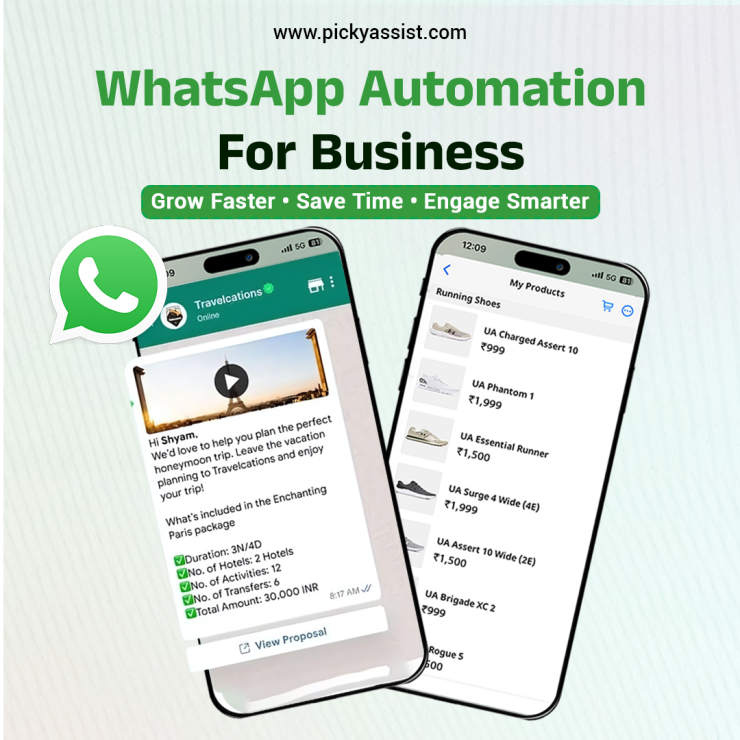
Businesses are always searching for smarter ways to connect with customers, save time, and grow faster. More than 2 billion individuals actively use WhatsApp, establishing it as one of the foremost platforms for communication. For organizations, it represents a channel that can be standardized, automated, and integrated into existing workflows. The implementation of WhatsApp automation for business ensures consistent message delivery, reduced manual intervention, and enhanced operational efficiency.
In this blog you can understand what WhatsApp automation is, why it matters, and how you can use it to fuel business growth.
What is WhatsApp Business automation?
WhatsApp automation is the process of sending messages, notifications, and responses automatically through pre-set workflows or chatbots. Instead of manually replying to every message, businesses can rely on automation to respond instantly, manage a large number of conversations, and create more personalized experiences for customers.
You may need to send appointment reminders, shipping updates, answer customer enquiries, or need to follow up after purchases. Automation allows your business to stay responsive around the clock!
Why WhatsApp Automation Matters for Growth?
Modern businesses often face challenges such as slow response times, unanswered messages, or frustrated customers who lose interest. Here WhatsApp automation for business becomes the perfect choice. Its benefits include:
- Instant Responses: No more keeping customers waiting—automation gives them quick answers.
- Cost Efficiency: Lower operational costs by reducing customer service manpower.
- Better Engagement: Share promotions, updates, and offers that keep your audience involved.
- Scalability: Manage hundreds or even thousands of conversations without stress.
- Higher Satisfaction: Faster, more personalized service encourages customers to return.
How to Use WhatsApp Automation for your Business?
1. Automated Welcome Messages
First impressions matter. By sending an automated welcome message, you can greet customers warmly the moment they connect with you, setting a professional and friendly tone right from the start.
2. Order Confirmations and Shipping Updates
Instead of relying on emails that may go unread, use WhatsApp to automatically send order confirmations and delivery updates. Customers love receiving real-time information about their purchases.
3. Appointment Scheduling and Reminders
For service-based businesses like clinics, salons, or coaching centers, automated reminders help reduce no-shows. A quick reminder such as “Your appointment is scheduled for tomorrow at 10 AM” can boost efficiency and enhance customer satisfaction.
4. Customer Support and FAQs
Set up automated chatbot responses to quickly answer common customer enquiries such as “What are your working hours?” or “Where’s my order?” It reduces time spent for both your staff and your customers.
5. Personalized Promotions and Campaigns
With automation tools, you can divide your audience into segments and share targeted offers. Re-engaging customers who haven’t shopped recently with a special discount is an effective strategy to bring them back.
Tools to Enable WhatsApp Automation
To get started with WhatsApp automation for business, you will need either the WhatsApp Business API or a trusted Business Solution Provider (BSP). A Platform like Picky Assist is a popular option that makes automation setup simple even if you don’t have technical expertise.
These tools integrate with e-commerce stores or CRMs. For example, if a customer abandons their cart, automation by Picky Assist can instantly remind them to complete their purchase via WhatsApp.
Best Practices for WhatsApp Automation
While automation is powerful, it should be used thoughtfully. Keep these tips in mind:
- Keep It Natural: Write messages in a conversational tone so they don’t feel robotic.
- Personalize Content: Use customer names and tailor offers to their interests.
- Don’t Spam: Send only relevant messages to avoid frustrating your audience.
- Stay Compliant: Always get customer consent before sending promotional updates, in line with WhatsApp policies.
- Refine Constantly: Track performance, gather feedback, and improve your automation flows over time.
Current Scenario
With AI advancing rapidly, WhatsApp automation for business is becoming smarter every year. Businesses can now combine automation with AI-driven chatbots for even more personalized conversations and targeted upselling opportunities. Those who partner with Business Solution Providers (BSP) like Picky Assist will always gain a strong competitive edge.
Final Thoughts
WhatsApp is more than just a messaging app it’s a powerful tool for building relationships and growing your business. By embracing WhatsApp automation for business, you can reduce manual work, engage customers effectively, and deliver experiences that keep them coming back. You may have a small business or an established brand, the right automation strategy can set you on the path to sustainable growth.
FAQs on WhatsApp Automation for Business
1. What is WhatsApp automation for business?
WhatsApp automation for business refers to using chatbots, workflows, and automated messaging systems to handle customer communication without manual intervention. It helps businesses send instant replies, notifications, reminders, and promotional messages efficiently.
2. How does WhatsApp automation help businesses grow?
It improves response speed, reduces operational workload, and enhances customer experience. Faster communication and personalized engagement lead to higher conversions, better retention, and scalable growth.
3. Is WhatsApp automation suitable for small businesses?
Yes, small businesses benefit significantly from automation. It allows them to handle high volumes of enquiries, maintain consistent communication, and compete with larger brands without increasing team size.
4. What types of messages can be automated on WhatsApp?
Businesses can automate welcome messages, order confirmations, delivery updates, appointment reminders, follow-ups, customer support replies, and promotional campaigns.
5. Do I need technical knowledge to set up WhatsApp automation?
Not necessarily. Platforms like Picky Assist provide no-code or low-code solutions, making it easy to create automation workflows without advanced technical skills.
6. What is the difference between WhatsApp Business App and WhatsApp Business API?
The WhatsApp Business App is designed for small-scale manual communication, while the WhatsApp Business API enables automation, integrations, multi-user access, and large-scale messaging for growing businesses.
7. Can WhatsApp automation be integrated with CRM systems?
Yes, WhatsApp automation can be integrated with CRM platforms to centralize customer data, track conversations, automate follow-ups, and improve lead management.
8. Is WhatsApp automation secure and compliant?
Yes, when implemented correctly. Businesses must follow WhatsApp’s policies, including obtaining user consent before sending messages and avoiding spam. Using an official Business Solution Provider ensures compliance.
9. How can WhatsApp automation improve customer support?
Automated chatbots can instantly answer common queries, provide order updates, and guide customers, reducing wait times and improving overall support efficiency.
10. Can WhatsApp automation increase sales?
Absolutely. Automated follow-ups, abandoned cart reminders, and personalized offers help re-engage customers and drive more conversions.
11. How do I do WhatsApp automation for my business?
Choose a WhatsApp Business API provider like Picky Assist, set up chatbot workflows for common interactions, and integrate it with your CRM or website. Then test, monitor, and optimize to improve engagement and conversions.
12. What industries can benefit from WhatsApp automation?
Almost every industry can benefit, including e-commerce, healthcare, education, real estate, travel, and service-based businesses that rely on customer communication.

Add comment