
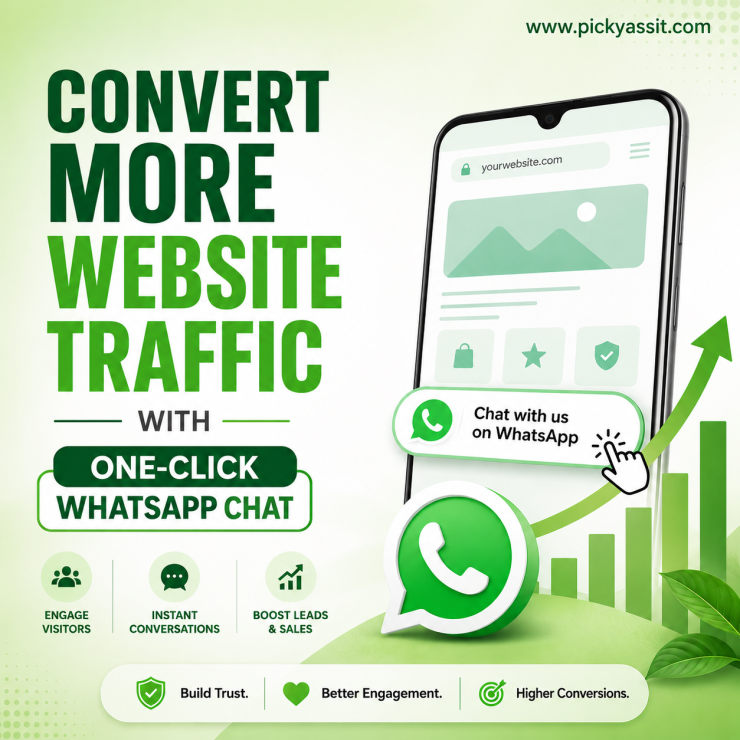
Most website traffic is silent. Visitors browse, compare, hesitate, and leave without ever filling out a form or starting a conversation. For businesses spending heavily on ads, SEO, and landing pages, this gap between interest and engagement is where revenue quietly disappears. A WhatsApp chat widget changes that dynamic.
Instead of forcing users into forms or slow email funnels, it enables instant conversation through WhatsApp, right from the website. That small shift fundamentally changes how leads are captured, qualified, and converted.
When implemented properly, a WhatsApp chat widget becomes more than a button on a page. It becomes a real-time conversion layer between your website traffic and your sales team.
For businesses using platforms like Picky Assist, this layer can be connected directly to automation, CRM workflows, and lead management systems, turning casual visitors into structured opportunities.
This guide breaks down how a WhatsApp chat widget works, why it matters, where it fits into modern customer journeys, and how businesses can use it to improve conversions without increasing ad spend.
What is a WhatsApp Chat Widget?
A WhatsApp chat widget is a clickable interface embedded on a website that allows visitors to start a WhatsApp conversation instantly with a business.
Instead of filling out forms or waiting for callbacks, users click the widget and are redirected to WhatsApp Web for Business or the mobile app, where they can continue the conversation in real time.
Unlike traditional live chat systems, this approach connects directly to WhatsApp, the platform customers already use daily, removing friction from the engagement process.
In practical terms, it acts as a bridge between website intent and conversational conversion.
Why Businesses Are Moving Toward WhatsApp Chat Widget Integration?
Customer behavior has changed significantly. People expect instant communication, not delayed responses or complex form submissions. A chat widget aligns with this expectation by:
- Reducing response friction
- Increasing engagement rates
- Enabling real-time communication
- Supporting mobile-first users
- Improving lead quality
More importantly, it fits naturally into how customers already interact with businesses online. When visitors see a familiar WhatsApp option instead of a generic chat box, they are more likely to initiate a conversation.
How a WhatsApp Chat Widget Works?
The workflow is simple but highly effective.
1. Visitor Lands on Website
Traffic arrives through:
- Google search
- Paid ads
- Social media campaigns
- Product pages
- Landing pages
2. Widget Appears on Screen
A floating or embedded chat button is visible, usually in the bottom corner.
3. User Clicks and Opens WhatsApp
The click redirects the user to:
- WhatsApp Web for desktop users
- WhatsApp mobile app for smartphone users
4. Pre-Filled Message is Triggered
Businesses can configure pre-filled messages such as:
- Product inquiries
- Support requests
- Order tracking
- Booking requests
5. Conversation Begins
The customer connects directly with the sales or support team in real time. This eliminates delays and significantly increases conversion probability.
WhatsApp Chat Widget vs Traditional Website Forms
Most businesses still rely heavily on forms to capture leads. However, comparison reveals a clear gap in performance.
Forms:
- Require multiple fields
- Feel slow to users
- Have lower completion rates
- Delay response cycles
WhatsApp Chat Widget Within Platform:
- One-click interaction
- Familiar communication channel
- Immediate engagement
- Higher conversion intent
The key difference is psychological: users prefer conversations over submissions.
Strategic Role of Chat Widget in Modern Customer Journeys
A widget is not just a support tool. It plays a critical role across the entire funnel.
Top of Funnel: Lead Capture
Visitors exploring your website can instantly ask questions instead of leaving due to uncertainty.
Middle of Funnel: Qualification
Sales teams can quickly assess:
- Budget
- Requirements
- Purchase intent
- Product interest
Bottom of Funnel: Conversion
Direct communication reduces hesitation and accelerates decision-making.
This makes it particularly powerful for high-intent industries like:
- E-commerce
- Real estate
- Education
- Healthcare
- SaaS
Use Cases Where WhatsApp Chat Widget Delivers High Impact
E-commerce and Product Discovery
For online stores, especially those using WhatsApp WooCommerce workflows, customers often have questions before purchasing.
A widget helps them:
- Ask product-related questions
- Confirm availability
- Understand pricing or offers
- Get recommendations
This directly supports WhatsApp online shopping experiences by reducing cart abandonment.
Service-Based Businesses
Agencies, consultants, and service providers benefit from instant lead qualification.
Instead of waiting for form submissions, teams can:
- Discuss requirements immediately
- Schedule calls faster
- Filter irrelevant leads early
SaaS and Tech Companies
For software businesses, the widget acts as a guided conversion tool.
Visitors can:
- Request demos
- Ask integration questions
- Clarify pricing plans
This reduces friction in decision-making cycles.
Local Businesses
Restaurants, clinics, coaching centers, and real estate firms use chat widgets to:
- Handle inquiries in real time
- Confirm availability
- Manage bookings
Features of an Effective Chat Widget
Not all widgets are built equally. A high-performing setup should include:
Custom Trigger Messages
Businesses can define contextual messages based on pages or actions.
For example:
- Product page → “I want details about this product”
- Pricing page → “Can you explain your plans?”
Multi-Agent Routing
Conversations should be distributed across teams based on:
- Availability
- Department
- Lead type
CRM Integration
When connected to systems like Picky Assist, every conversation becomes part of a structured customer profile.
This helps teams track history and improve follow-ups.
Automation Capabilities
Automated replies can handle:
- FAQs
- Initial greetings
- Lead qualification steps
Mobile Optimization
Since WhatsApp is mobile-first, widget interactions must be seamless across devices.
WhatsApp Chat Widget vs Web for Business
Many businesses confuse the widget with WhatsApp Web for Business.
Here’s the distinction:
- WhatsApp Web for Business is a browser-based extension of WhatsApp accounts.
- A WhatsApp chat widget is a website interface that triggers WhatsApp conversations.
In short:
The widget initiates conversations. WhatsApp Web for Business manages them.
How WhatsApp Chat Widget Improves Conversion Rates
Conversion improvement comes from reducing friction. It helps by:
- Removing form fatigue
- Enabling instant interaction
- Reducing drop-offs
- Increasing trust through real conversation
When users can ask questions immediately, hesitation drops significantly.
This is especially important for high-value purchases where clarity drives decision-making.
Integrating WhatsApp Chat Widget with Picky Assist
Picky Assist extends the functionality of a basic widget by connecting it to automation, CRM systems, and business workflows.
With Picky Assist, businesses can:
- Capture leads from website conversations
- Automate responses based on intent
- Assign chats to sales teams
- Track conversation history in CRM
- Trigger follow-up sequences
- Manage customer journeys across WhatsApp
This transforms the widget from a simple chat entry point into a full conversational conversion system.
Instead of just answering messages, businesses can design structured engagement flows that guide users from inquiry to purchase.
Common Mistakes Businesses Make with WhatsApp Chat Widget
Even though implementation is simple, mistakes can reduce effectiveness:
Overusing Generic Messages
Messages like “Hi, how can we help?” lack context and reduce engagement quality.
Poor Placement on Website
Widgets hidden or poorly positioned reduce visibility and clicks.
No Follow-Up System
Without structured follow-ups, leads often go cold after initial interaction.
Lack of CRM Integration
Disconnected conversations lead to lost customer history and inefficient communication.
Conclusion
A WhatsApp chat widget is no longer just a support feature. It has become a critical conversion tool for modern digital businesses.
By enabling instant conversations, reducing friction, and aligning with customer behavior, it bridges the gap between website traffic and real business outcomes.
When combined with platforms like Picky Assist, it evolves into a structured system for lead capture, automation, CRM integration, and customer lifecycle management.
For businesses focused on improving conversion efficiency without increasing acquisition costs, this is one of the most practical and impactful upgrades available today.
FAQs on WhatsApp Chat Widget
1. What is a WhatsApp chat widget used for?
A WhatsApp chat widget allows website visitors to start a WhatsApp conversation instantly with a business, improving engagement and lead conversion.
2. How does a WhatsApp chat widget improve conversions?
It reduces friction by replacing forms with instant messaging, allowing users to connect quickly and get answers in real time.
3. Can a WhatsApp chat widget work on mobile websites?
Yes, it works seamlessly on mobile devices and opens the WhatsApp app directly for faster communication.
4. Is a WhatsApp chat widget better than live chat tools?
For many businesses, yes. It uses WhatsApp, a familiar platform, which increases trust and response rates compared to traditional live chat systems.
5. Can I use WhatsApp chat widget for e-commerce stores?
Yes, it is widely used in WhatsApp WooCommerce setups and helps customers ask product-related questions before purchase.
6. Does the WhatsApp chat widget support automation?
Yes, when integrated with platforms like Picky Assist, it can trigger automated messages, workflows, and CRM actions.
7. What is the difference between WhatsApp chat widget and WhatsApp Web for Business?
The widget is a website interface that initiates chats, while WhatsApp Web for Business is used to manage those conversations.
8. How does Picky Assist enhance WhatsApp chat widget functionality?
Picky Assist connects widget conversations to CRM systems, automates workflows, assigns leads, and helps manage customer journeys efficiently.

Add comment