
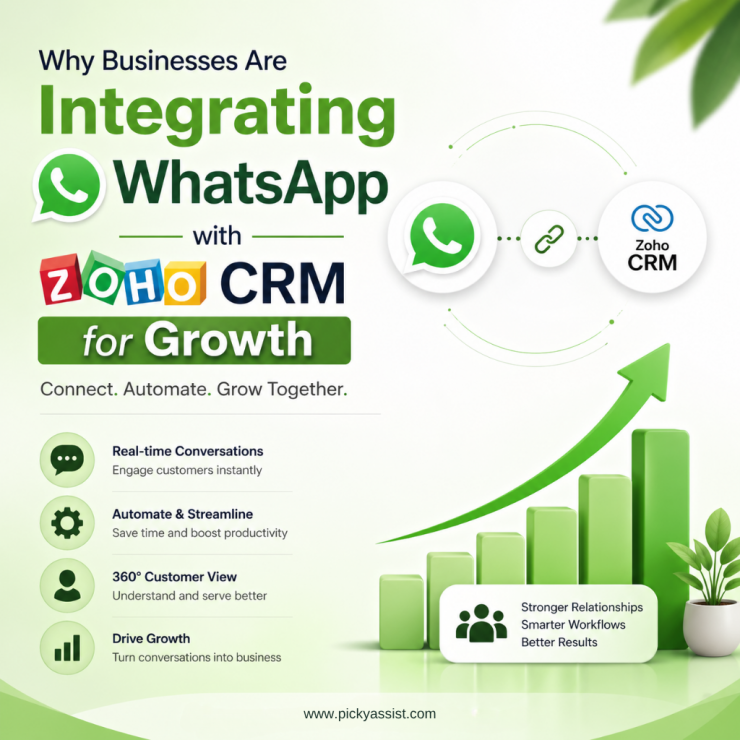
The market today now expects fast, personalized responses on platforms they already use daily; and for most businesses, that platform is WhatsApp. At the same time, sales and support teams rely on Zoho CRM to manage leads, follow-ups, and customer relationships. The problem is that conversations often happen on WhatsApp while customer data stays inside the CRM. This disconnect leads to missed follow-ups, slower responses, and fragmented customer experiences. That is why businesses are increasingly investing in WhatsApp integration with Zoho CRM.
By connecting WhatsApp with Zoho CRM, businesses can centralize conversations, automate communication, improve response times, and create a more organized customer engagement workflow.
What is WhatsApp Integration with Zoho CRM?
WhatsApp integration with Zoho CRM connects WhatsApp Business API capabilities directly with Zoho CRM workflows. Instead of handling customer conversations manually through personal devices, businesses can manage WhatsApp communication inside their CRM environment. This allows teams to:
- Send and receive WhatsApp messages from Zoho CRM
- Track conversations alongside customer records
- Automate follow-ups and notifications
- Assign chats to team members
- Run broadcast campaigns
- Maintain centralized communication history
Unlike the standard WhatsApp Business app, API-based integration supports automation, multi-agent collaboration, and scalable business communication.
Why do Businesses need WhatsApp Integration with Zoho CRM?
Without integration, customer communication becomes scattered.
Sales teams often manage conversations from personal devices while manually updating CRM notes later. This creates delays, inconsistent follow-ups, and poor visibility into customer interactions.
A proper Zoho CRM WhatsApp integration solves this by bringing customer conversations and CRM data into one connected workflow.
Faster Customer Responses
Speed matters in sales and support.
With WhatsApp and Zoho CRM integration, teams can respond faster without switching between multiple platforms.
Centralized Communication
Customer conversations remain connected to CRM records, making it easier for teams to access communication history and customer context.
Automated Follow-Ups
Businesses can automate:
- lead nurturing messages
- appointment reminders
- payment notifications
- onboarding updates
- support follow-ups
This improves consistency while reducing manual work.
Better Lead Tracking
Businesses gain visibility into:
- communication history
- lead engagement
- response timelines
- follow-up activity
This helps improve sales management and customer engagement tracking.
Multi-Agent Collaboration
Unlike the standard WhatsApp Business app, API integration supports multiple team members managing conversations collaboratively.
How Picky Assist Helps Businesses?
Picky Assist helps businesses build structured WhatsApp communication workflows inside Zoho CRM.
Instead of managing conversations through disconnected tools, businesses can centralize messaging operations and automate customer engagement processes.
With Picky Assist, businesses can:
- connect WhatsApp with Zoho CRM workflows
- automate customer communication
- centralize conversations
- manage broadcast messaging
- improve internal collaboration
- reduce manual follow-up work
The goal is not just integration. The real value comes from creating faster, more organized communication workflows that improve operational efficiency.
Before vs After Using Picky Assist
| Before Picky Assist | After Picky Assist |
|---|---|
| WhatsApp chats scattered across devices | Centralized conversations inside Zoho CRM |
| Manual CRM updates | Automated conversation sync |
| Missed follow-ups | Automated reminders and workflows |
| Limited visibility into customer communication | Full conversation tracking |
| Slow response handling | Faster response management |
| Disconnected customer history | Unified communication timeline |
Common Use Cases for WhatsApp Zoho CRM Integration
Lead Qualification
Automatically start WhatsApp conversations when new leads enter Zoho CRM.
Customer Support
Manage support conversations directly from CRM-connected workflows.
Appointment Reminders
Automate reminders for consultations, meetings, or bookings.
Order and Payment Updates
Send:
- order confirmations
- delivery notifications
- payment reminders
- invoice updates
Re-Engagement Campaigns
Run targeted follow-up campaigns for inactive leads or customers.
What to Look for in a Zoho CRM WhatsApp Integration Solution
Businesses looking for scalable Zoho CRM and WhatsApp integration typically require API-based solutions. Before choosing a solution, businesses should evaluate:
Workflow Compatibility
The integration should support real CRM workflows.
Automation Features
Look for support for reminders, lead workflows, and automated communication.
Scalability
The system should support growing teams and higher communication volumes.
Conversation Visibility
Businesses need proper tracking and conversation management across teams.
Why CRM-Level Messaging Matters?
Messaging alone is no longer enough.
The real business advantage comes from combining customer communication with CRM data.
When businesses integrate WhatsApp with Zoho CRM, they create connected workflows that improve:
- lead conversion
- customer retention
- follow-up consistency
- communication visibility
- support management
Challenges Businesses Face Without Integration
Businesses without structured integration often experience:
- fragmented customer conversations
- missed follow-ups
- slow response times
- manual administrative work
- weak team collaboration
Over time, these issues reduce operational efficiency and customer experience quality.
Best Practices for Successful Integration
Define Workflows First
Map customer communication journeys before implementation.
Use Automation Strategically
Automation should improve responsiveness without feeling robotic.
Keep CRM Data Organized
Clean CRM data improves communication workflows.
Train Teams Properly
Teams should understand how conversations are managed inside the CRM.
Conclusion
Businesses today need faster and more connected customer communication systems. A strong WhatsApp integration with Zoho CRM helps businesses centralize conversations, automate follow-ups, improve collaboration, and create better customer experiences. For businesses already using Zoho CRM, integrating WhatsApp communication can reduce operational friction while improving visibility and response management.
Picky Assist helps businesses build scalable, organized, and automation-driven communication workflows that connect WhatsApp conversations directly with CRM operations.
FAQs on WhatsApp integration with Zoho CRM
1. What is Zoho WhatsApp integration?
It connects WhatsApp Business API with Zoho CRM so businesses can manage customer conversations directly inside Zoho CRM modules. Customer details, support queries, follow-ups, and conversation history are automatically connected to the CRM dashboard, giving teams complete visibility into every interaction.
2. Why do businesses need Zoho CRM WhatsApp integration?
It helps centralize conversations, automate follow-ups, improve response times, and maintain better communication visibility.
3. Can businesses automate messages using WhatsApp integration with Zoho CRM?
Yes. Businesses can automate reminders, follow-ups, onboarding messages, and customer notifications.
4. Is WhatsApp integration useful for customer support teams?
Yes. Support teams can manage conversations more efficiently while maintaining communication history inside CRM workflows.
5. Can multiple team members manage customer conversations?
Yes. API-based integration supports collaborative multi-agent communication management.
6. Which industries benefit from WhatsApp Zoho CRM integration?
Industries such as healthcare, education, hospitality, retail, consulting, and service businesses benefit from CRM-connected communication workflows.
7. How does Picky Assist help businesses for WhatsApp Zoho Integration?
Picky Assist helps businesses automate customer communication, centralize conversations, and connect WhatsApp workflows with Zoho CRM operations.
Add comment