
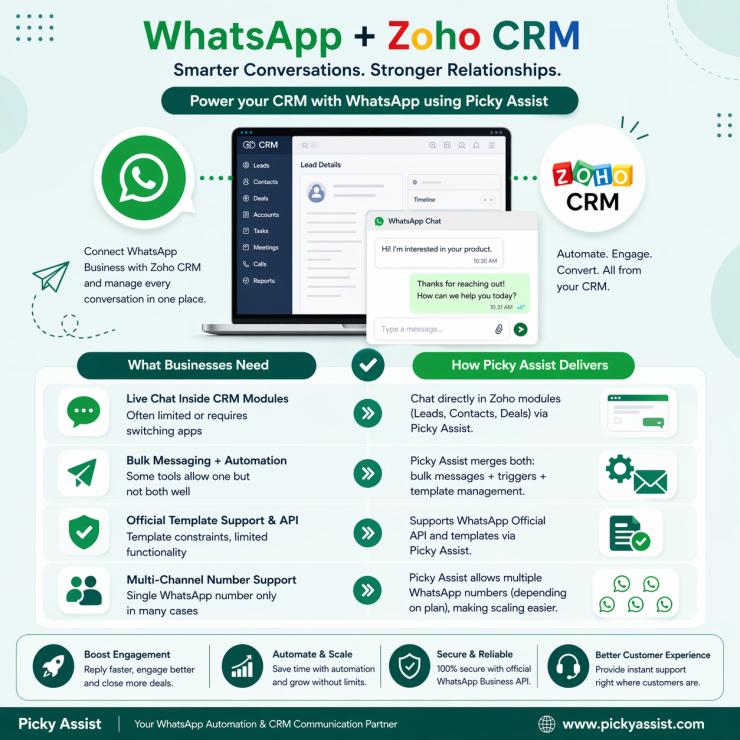
Customer communication has changed dramatically over the last few years. Email response times are slower, phone calls often go unanswered, and customers increasingly prefer instant messaging for business interactions. That is exactly why businesses are rapidly adopting Zoho WhatsApp integration strategies to centralize conversations, automate engagement, and manage customer communication directly inside their CRM workflows.
When businesses connect WhatsApp with Zoho CRM, teams can manage leads, automate follow-ups, track conversations, and improve customer response times without switching between multiple platforms.
For sales teams, support departments, and growing businesses, integrating WhatsApp with Zoho CRM creates a far more connected customer experience.
In this guide, we will break down how to integrate WhatsApp Business with Zoho CRM, the benefits of integration, how automation improves workflows, and how platforms like Picky Assist help businesses scale WhatsApp communication inside Zoho environments.
Why Do Businesses Need Zoho WhatsApp Integration?
Modern customers expect fast communication.
If a lead sends a message through WhatsApp and waits hours for a reply, the opportunity may disappear immediately.
That is why businesses increasingly rely on Zoho and WhatsApp integrated workflows to manage customer conversations more efficiently.
Instead of handling WhatsApp separately from CRM operations, businesses can centralize communication and customer data in one system.
This improves:
- response speed
- lead tracking
- customer engagement
- sales follow-ups
- automation workflows
- communication visibility
A proper Zoho CRM WhatsApp integration setup allows businesses to connect customer conversations directly with CRM records.
What is Zoho CRM WhatsApp Integration?
Zoho and WhatsApp together when integrated allows businesses to connect WhatsApp communication with Zoho CRM workflows.
This enables businesses to:
- send and receive WhatsApp messages inside CRM workflows
- automate customer engagement
- sync customer conversations with CRM records
- trigger automated notifications
- manage leads more efficiently
- improve follow-up tracking
With a strong WhatsApp Zoho integration, businesses reduce communication gaps while improving operational efficiency.
How WhatsApp and Zoho CRM Work?
Let’s understand it better with an example so businesses like yours’s can relate!
- a lead submits an inquiry
- the CRM automatically triggers a WhatsApp message
- customer replies sync into CRM records
- sales teams continue conversations from a centralized workflow
This creates faster and more organized customer engagement.
Benefits of Integrating WhatsApp Business With Zoho CRM
Businesses using Zoho and WhatsApp integration workflows often see major improvements in customer communication efficiency.
Here are some of the biggest advantages.
Faster Customer Communication
WhatsApp allows businesses to respond quickly to leads and customers. This improves engagement significantly.
Centralized Customer Conversations
With WhatsApp for Zoho CRM, businesses can keep customer communication connected to lead or contact records. Teams gain better visibility into customer interactions.
Better Lead Management
Sales teams can follow up faster using automated workflows and messaging triggers.
Improved Customer Experience
Customers receive faster and more personalized communication.
Automation Opportunities
Businesses can automate:
- lead follow-ups
- appointment reminders
- payment notifications
- support updates
- sales engagement workflows
What is Needed for Zoho WhatsApp Business Integration?
Before setting up Zoho WhatsApp business integration workflows, businesses usually need:
- Zoho CRM account
- WhatsApp Business API access
- integration platform or connector
- approved messaging templates
- automation workflows
This is where providers like Picky Assist become valuable.
Understanding Zoho WhatsApp API Integration
Businesses often confuse standard WhatsApp Business apps with API-based integration.
A proper Zoho WhatsApp API setup usually involves connecting the WhatsApp Business API with CRM workflows.
The API enables businesses to:
- automate messaging
- scale conversations
- manage multiple users
- integrate with CRM systems
- trigger workflow automation
This is essential for businesses handling large communication volumes.
Why Do Businesses Use WhatsApp Business API With Zoho CRM?
The standard WhatsApp Business app has limitations. However, Zoho WhatsApp business API integration allows businesses to scale customer communication more efficiently.
Benefits include:
- multi-agent access
- automation support
- chatbot workflows
- CRM synchronization
- broadcast messaging
- advanced workflow automation
This makes it ideal for sales-driven and customer support teams.
How to Integrate WhatsApp Business With Zoho CRM?
Here is a practical breakdown of the integration process.
Set Up WhatsApp Business API Access
Businesses first need access to the WhatsApp Business API through an official provider. Picky Assist is the best provider you can trust for integrating Zoho and WhatsApp, as it enables scalable messaging capabilities.
Connect WhatsApp With Zoho CRM
Using an integration platform, businesses connect WhatsApp communication workflows with CRM records.
This creates a working WhatsApp integration with Zoho environment.
Map CRM Workflows
Businesses configure workflows such as:
- lead creation triggers
- follow-up automation
- support notifications
- customer engagement sequences
Configure Automation
Businesses can automate messaging workflows for:
- new leads
- reminders
- abandoned inquiries
- customer support updates
Sync Conversations
Customer conversations become linked to CRM records for better visibility.
How Picky Assist Helps With Zoho CRM WhatsApp Integration?
Picky Assist helps businesses simplify and scale WhatsApp Zoho CRM integration workflows through automation and centralized communication management. Businesses can use Picky Assist to support:
- WhatsApp Business API integration
- CRM communication workflows
- automated customer engagement
- chatbot automation
- lead nurturing
- broadcast messaging
- customer support workflows
For businesses using Zoho CRM, this creates stronger communication alignment between customer conversations and CRM operations.
Real Use Cases for Zoho CRM and WhatsApp Integration
Businesses across industries use Zoho CRM and WhatsApp integration for different operational goals.
Sales Follow-Ups
Sales teams automatically send WhatsApp follow-ups when leads enter specific CRM stages.
Appointment Reminders
Businesses send automated reminders through WhatsApp directly from CRM workflows.
Customer Support Updates
Support teams send status updates and responses faster.
Lead Qualification
Chatbot workflows help qualify leads automatically.
Payment Notifications
Businesses send payment reminders and confirmations directly through WhatsApp.
Common Mistakes Businesses Make During Integration
Many businesses approach integration incorrectly. Here are common mistakes.
No Automation Strategy
Simply connecting WhatsApp to CRM is not enough. Businesses need workflow planning.
Poor Message Timing
Over-messaging customers reduces engagement quality.
Weak Lead Segmentation
Personalization matters for customer engagement.
Using Non-Scalable Systems
Manual communication workflows become difficult as businesses grow.
Best Practices for WhatsApp Business Integration With Zoho CRM
Businesses should follow strategic implementation practices for better results.
Personalize Communication
Avoid generic messaging.
Automate Carefully
Automation should improve customer experience, not create spam-like interactions.
Use CRM Data Intelligently
Customer data should drive segmentation and messaging workflows.
Track Engagement Metrics
Businesses should monitor response rates and workflow performance.
Why WhatsApp CRM Integration Matters for Modern Businesses?
Customer expectations continue changing. Businesses that respond quickly and communicate efficiently gain significant advantages. A strong WhatsApp business integration with Zoho CRM setup allows businesses to centralize communication while improving customer engagement workflows.
Instead of disconnected conversations, businesses gain structured communication visibility linked directly with CRM operations.
Conclusion
Integrating WhatsApp Business with Zoho CRM helps businesses create faster, smarter, and more connected customer communication workflows.
A proper Zoho WhatsApp connection improves lead management, customer engagement, automation capabilities, and operational efficiency.
However, successful implementation requires more than basic connectivity.
Businesses need scalable automation, centralized communication workflows, and structured engagement systems.
That is where, Picky Assist help businesses build effective WhatsApp communication workflows integrated with Zoho CRM operations.
As customer communication increasingly shifts toward messaging-first engagement, businesses that combine CRM intelligence with WhatsApp automation will create stronger customer experiences and faster response-driven growth.
FAQs on Zoho Integration with WhatsApp
1. What is Zoho WhatsApp integration?
Zoho WhatsApp integration connects WhatsApp communication with Zoho CRM workflows to help businesses manage customer conversations, automate engagement, and improve communication visibility.
2. Can WhatsApp be integrated with Zoho CRM?
Yes. Businesses can integrate WhatsApp with Zoho CRM using WhatsApp Business API providers and integration platforms like Picky Assist.
3. What are the benefits of Zoho CRM WhatsApp integration?
Benefits include:
- centralized communication
- faster lead response times
- workflow automation
- improved customer engagement
- better conversation tracking
4. What is the difference between WhatsApp Business App and WhatsApp Business API?
The standard app supports basic communication, while the API enables scalable automation, CRM integrations, multi-agent access, and workflow automation.
5. Why do businesses use WhatsApp Business API with Zoho CRM?
Businesses use the API for scalable messaging, automation, CRM synchronization, and customer engagement workflows.
6. Can businesses automate WhatsApp messages from Zoho CRM?
Yes. Businesses can automate reminders, follow-ups, notifications, and engagement workflows through integrated systems.
7. How does Picky Assist support WhatsApp integration with Zoho CRM?
Picky Assist helps businesses automate customer communication, manage WhatsApp Business API workflows, and integrate messaging with CRM operations.
8. Is WhatsApp integration useful for sales teams?
Yes. Sales teams can manage leads, automate follow-ups, and improve customer engagement through integrated WhatsApp CRM workflows.
Add comment