
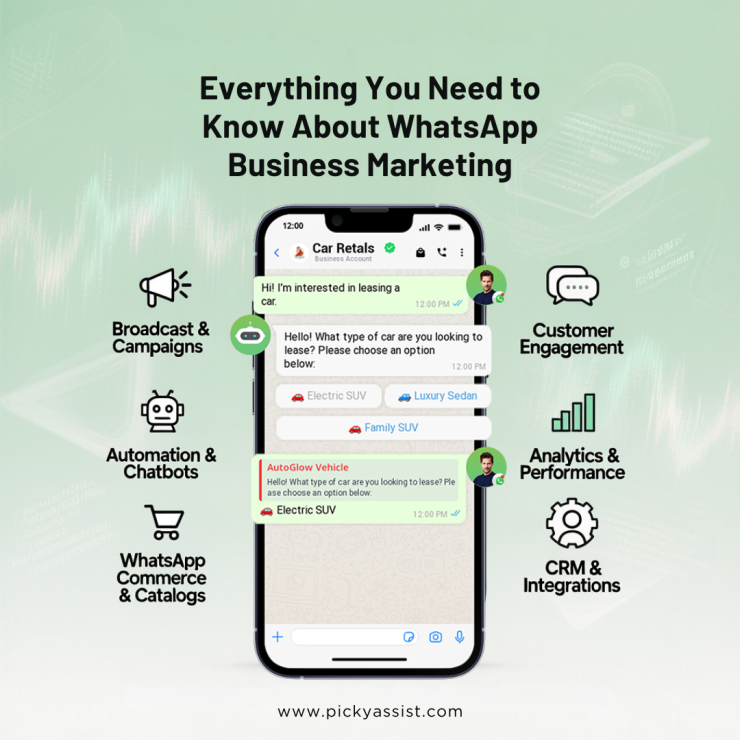
WhatsApp has become one of the most powerful marketing channels for businesses today. With message open rates significantly higher than email and SMS, brands are increasingly asking how to use WhatsApp Business for marketing in a way that is effective, compliant, and scalable.
This guide explains everything you need to know, from setup and strategy to automation, broadcasting, and real-world use cases, so you can turn WhatsApp into a high-performing marketing engine.
Why is WhatsApp Business Powerful for Marketing?
Before understanding how to use WhatsApp Business for marketing, it’s important to know why it works so well.
WhatsApp enables:
- Direct, one-to-one communication with customers
- Instant message delivery and responses
- Rich media sharing (images, videos, PDFs, catalogs)
- High engagement and trust compared to traditional channels
Unlike social media ads or emails, WhatsApp conversations feel personal, which is exactly what modern customers expect.
Step 1: Set Up WhatsApp Business the Right Way
The first step in learning how to use WhatsApp Business for marketing is proper setup.
Create a Professional WhatsApp Business Profile
- Business name and category
- Description with your value proposition
- Business hours
- Website and contact details
- Verified brand identity (if available)
A complete profile builds trust and improves response rates.
Step 2: Build an Opt-In Audience (Critical for Marketing)
Marketing on WhatsApp is permission-based. You must collect user opt-ins.
Effective opt-in methods:
- Website chat widgets
- Click-to-WhatsApp ads
- QR codes on packaging or stores
- Lead forms connected to WhatsApp
- Checkout opt-ins for updates and offers
Without opt-ins, WhatsApp marketing can lead to account restrictions.
Step 3: Use WhatsApp Business Features for Marketing
Understanding how to use WhatsApp Business for marketing means leveraging its built-in tools effectively.
1. Product Catalogs
Automated WhatsApp Catalogs Showcase products directly inside WhatsApp:
- Images
- Prices
- Descriptions
- Product links
This reduces friction and speeds up buying decisions.
2. Quick Replies
Save commonly used responses to:
- Answer FAQs faster
- Maintain consistency
- Improve response time
This is especially useful for sales and support teams.
3. Automated Greeting and Away Messages
Use automation to:
- Welcome new enquiries
- Set expectations outside business hours
- Never miss a lead
Step 4: WhatsApp Broadcasting for Marketing Campaigns
One of the most powerful answers to how to use WhatsApp Business for marketing is broadcasting.
What is WhatsApp Broadcasting?
Broadcasting allows you to send messages to multiple contacts at once, without creating a group.
Use Automated WhatsApp broadcasting for:
- Product launches
- Promotional offers
- Event announcements
- Back-in-stock alerts
- Educational content
Avoid spam. Segment your audience and send relevant messages only.
Step 5: Upgrade with WhatsApp Business API for Scale
For growing businesses, the basic WhatsApp Business app has limitations.
This is where WhatsApp Business API and platforms like Picky Assist come in.
With WhatsApp Business API, you can:
- Send approved marketing templates
- Automate conversations at scale
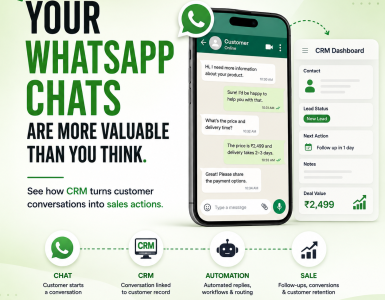
- Integrate WhatsApp with CRM
- Use AI chatbots for lead qualification
- Assign chats to multiple agents
If you’re serious about learning how to use WhatsApp Business for marketing at scale, API-based automation is essential.
Step 6: Use AI Chatbots to Automate Marketing Conversations
AI chatbots play a major role in modern WhatsApp marketing.
They help by:
- Engaging users instantly
- Asking qualifying questions
- Recommending products
- Capturing lead details
- Routing hot leads to sales teams
With tools like Picky Assist AI Chatbot, businesses can run marketing conversations 24/7, without manual effort.
Step 7: Personalize Messages for Better Conversions
Personalization is the difference between spam and success.
Best practices:
- Use customer names
- Reference past interactions or purchases
- Send messages based on behavior
- Time campaigns intelligently
Personalized WhatsApp marketing consistently outperforms generic messaging.
Step 8: Track Performance and Optimize
To truly master how to use WhatsApp Business for marketing, you must track results.
Key metrics to monitor:
- Message open rates
- Response rates
- Click-through rates
- Conversion rates
- Opt-out and block rates
Advanced platforms like Picky Assist provide analytics dashboards to measure ROI and optimize campaigns.
Best Use Cases of WhatsApp Business for Marketing
WhatsApp marketing works across industries:
- E-commerce: Offers, order updates, abandoned cart reminders
- Education: Lead nurturing, course updates, follow-ups
- Real Estate: Property sharing, site visit scheduling
- Healthcare: Appointment reminders, health campaigns
- Travel: Package promotions, booking confirmations
Common Mistakes to Avoid
When learning how to use WhatsApp Business for marketing, avoid these pitfalls:
- Sending messages without opt-in
- Over-broadcasting promotions
- Ignoring personalization
- Not using automation
- Failing to track performance
WhatsApp Business is a Marketing Channel You Can’t Ignore
Now that you understand how to use WhatsApp Business for marketing, one thing is clear: WhatsApp is no longer just a support channel. It’s a high-conversion marketing platform. With the right strategy, automation, and tools like Picky Assist, businesses can:
- Engage customers in real time
- Build trust through conversations
- Drive higher conversions
- Scale marketing without increasing workload
Frequently Asked Questions FAQs
1. How to use WhatsApp Business for marketing effectively?
To use WhatsApp Business for marketing effectively, businesses should:
- Collect customer opt-ins
- Use catalogs and quick replies
- Run targeted WhatsApp broadcasts
- Automate conversations with chatbots
- Personalize messages based on user behavior
Combining these steps ensures higher engagement and better conversions.
2. Is WhatsApp Business free for marketing?
The WhatsApp Business app is free to use. However, for advanced marketing features like automation, AI chatbots, CRM integration, and large-scale broadcasting, businesses need the WhatsApp Business API, which may involve platform and message costs.
3. Can WhatsApp Business be used for promotions?
Yes, WhatsApp Business can be used for promotions such as offers, discounts, product launches, and announcements, but only for opted-in users. Sending promotional messages without consent can result in account restrictions.
4. What is the difference between WhatsApp Business app and WhatsApp Business API?
The WhatsApp Business app is suitable for small businesses with limited conversations.
The WhatsApp Business API is designed for scaling marketing and automation with features like:
- AI chatbots
- Message templates
- CRM integrations
- Multi-agent access
Platforms like Picky Assist help businesses use the API without technical complexity.
5. How often should businesses send marketing messages on WhatsApp?
There is no fixed rule, but best practice is:
- 1–2 promotional messages per week
- More frequent transactional or informational messages if relevant
The key is relevance and value, not volume.
6. Is WhatsApp marketing better than email marketing?
WhatsApp marketing typically has:
- Higher open rates
- Faster responses
- More personal engagement
Email still has value, but WhatsApp works better for real-time, conversational marketing.
Add comment