
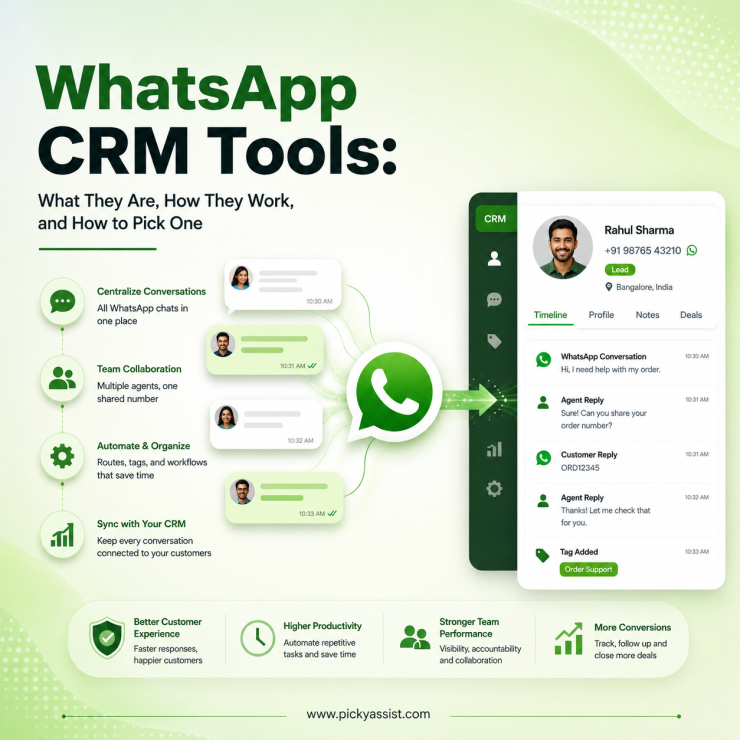
A WhatsApp CRM tools connects your WhatsApp Business number to a contact and conversation database, so every chat is logged against a customer record instead of disappearing into a phone’s chat list.
The two things that separate a real WhatsApp CRM from “WhatsApp plus a spreadsheet” are automatic conversation-to-contact mapping and multi-agent access to the same number without sharing a login.
Why Does This Question Come Up in the First Place?
Most businesses don’t go looking for a “WhatsApp CRM.” They go looking for a fix to a specific problem: three salespeople sharing one WhatsApp Business App login on one phone, taking turns to reply, with no record of who promised what to which customer. Or a support team that can see a chat history in WhatsApp but has no way to tag it, assign it, or pull it into a report.
That’s the pattern behind almost every WhatsApp CRM evaluation we’ve run for clients. The business already has a CRM Zoho, HubSpot, a homegrown Airtable setup and WhatsApp conversations that live nowhere near it.
The fix isn’t “get a CRM.” It’s connecting the messaging layer to the record-keeping layer, and doing it in a way that survives Meta’s messaging rules rather than fighting them.
What “WhatsApp CRM” Actually Means?
The term gets used loosely, so it’s worth splitting into what it is and isn’t. A WhatsApp CRM is software that:
- Pulls every inbound and outbound WhatsApp message into a contact-level timeline
- Lets multiple team members handle conversations on one WhatsApp Business number without sharing device access
- Applies rules (tags, assignment, routing) based on message content or contact attributes
- Syncs that activity, bidirectionally, in a proper setup with a separate sales or support CRM
It is not the free WhatsApp Business App (single device, no team routing, no external sync), a broadcast tool with no conversation memory, or a chatbot that only handles FAQs and drops context the moment a human takes over.
The distinction matters because “WhatsApp CRM software” gets marketed at three different products, a standalone Conversational CRM, a WhatsApp-to-CRM connector/integration, and a full CRM platform with WhatsApp bolted on and they solve different problems.
How WhatsApp CRM Integration Works?
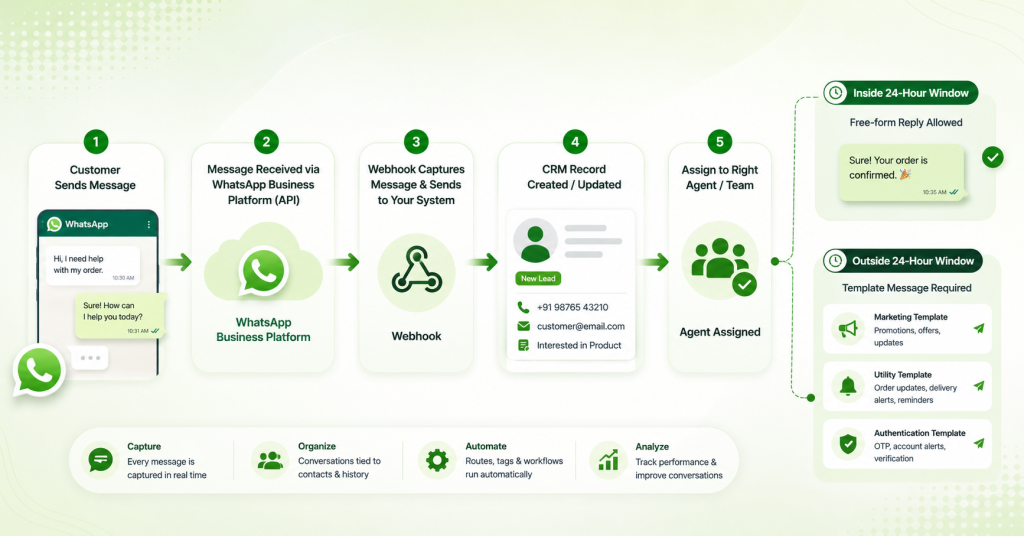
You can’t connect a personal WhatsApp number to a CRM. Integration runs through the WhatsApp Business Platform (the API), accessed via a Meta-verified Business Solution Provider. The mechanics, at a practical level:
- A phone number is registered to the WhatsApp Business Platform through a BSP. It stops working in the regular WhatsApp app once it’s API-connected.
- Every message event fires a webhook. The CRM (or the platform sitting between WhatsApp and the CRM) listens for these events and writes them to a contact record, creating one if the number is new.
- Outbound messages fall into two types, and this is where most setup mistakes happen: free-form replies (only allowed inside the 24-hour customer service window that opens when a customer messages you) and template messages (pre-approved by Meta, required for anything sent outside that window).
- Template messages are categorized as Marketing, Utility, or Authentication. Meta reviews and can reject templates that are miscategorized, a common one we see is businesses submitting a promotional message as “Utility” to dodge the higher marketing rate. It gets flagged, and repeated attempts affect the number’s quality rating.
- CRM sync happens either natively (the CRM has built-in WhatsApp support) or via connector/API bridge (a third tool sits in the middle, mapping WhatsApp contacts to CRM fields). Native is more stable; bridges are more flexible if your CRM isn’t a major platform.
WhatsApp CRM vs. “CRM + Separate WhatsApp API Connector”
This is the decision most teams are actually weighing, and it’s rarely covered directly.
| Features/Use Case | Purpose-built WhatsApp CRM | CRM + third-party WhatsApp connector | WhatsApp Business App only |
|---|---|---|---|
| Multi-agent access, one number | Yes, built in | Depends on connector | No, one device, one login |
| Conversation history tied to contact | Yes, native | Yes, but sync can lag or break on updates | No persistent record beyond the app |
| Automation (routing, tagging, funnels) | Usually included | Requires separate automation tool | Manual only |
| Setup complexity | Low–moderate | Moderate, high (two systems to maintain) | None |
| Best fit | Teams whose primary CRM need is WhatsApp conversation management | Teams with an established CRM (Salesforce, HubSpot) needing WhatsApp as one more channel | Solo operators, very low volume |
| Failure mode to watch | Vendor lock-in if you outgrow it | Field-mapping breaks silently after connector updates | N/A |
Neither option is universally “better.” A team already deep in Salesforce usually shouldn’t migrate their whole CRM for WhatsApp, they need a clean connector. A team whose entire sales process is WhatsApp (common in India, LATAM, and Southeast Asia retail and services) is usually better served by a purpose-built Conversational CRM than by forcing WhatsApp into a CRM built for email-first workflows.
Top 5 WhatsApp Software CRM Tools in India 2026
Shortlists in this space usually blend four different product types without saying so. Here are five worth knowing, in order, with the category each one actually belongs to:
- Picky Assist — An integration and automation layer that connects a WhatsApp Business number to CRMs, ERPs, billing platforms, and custom applications. Rather than replacing your existing system of record, it turns WhatsApp into a triggered channel inside it logging a paid invoice as a deal-stage update, converting a WhatsApp reply into a support ticket, or running chatbot and broadcast workflows on top of Zoho, HubSpot, and similar platforms. Best fit for businesses that want to keep their current CRM and add WhatsApp automation to it, rather than migrate.
- WATI — A WhatsApp-native platform combining a shared team inbox, chatbot flow builder, and campaign broadcasting, built on the official WhatsApp Business API. Best fit for teams whose primary need is managing WhatsApp conversations directly, without a separate CRM in the loop.
- Interakt — Similar in structure to WATI, with broadcast tools, basic automation, and e-commerce integrations (Shopify, WooCommerce). Commonly used by Indian SMBs and D2C brands as a self-contained WhatsApp communication system.
- Zoko — A WhatsApp sales platform purpose-built for e-commerce, with Shopify catalog sync, abandoned-cart recovery, order confirmations, and click-to-WhatsApp ad attribution. Best fit for online retail brands using WhatsApp as a direct sales channel rather than just support.
- Zoho CRM (WhatsApp integration) — A general-purpose CRM with native WhatsApp support layered in, logging conversations automatically against existing leads and deals. Best fit for sales teams already standardized on Zoho who want WhatsApp added to a system they already run, rather than a WhatsApp-first tool.
What a WhatsApp CRM Actually Costs in 2026?
This is where a lot of published guides are already out of date. Meta retired conversation-based pricing on July 1, 2025. As of this writing, businesses are billed per delivered template message, not per 24-hour conversation window, with rates set by message category (Marketing, Utility, Authentication) and the recipient’s country. Service replies inside an open customer window are still free, for now; Meta has signaled that from October 1, 2026, utility templates and human/AI service replies sent inside that window will also start being charged. Because Meta’s pricing terms have shifted twice in under two years, treat any specific rate you’re quoted as a snapshot, not a constant, and confirm current numbers directly with your BSP before budgeting.
What stays true regardless of the exact rate card:
- Marketing templates cost meaningfully more than Utility or Authentication templates, plan campaign volume accordingly rather than treating all templates as equal cost.
- A customer-initiated conversation still opens a free service window; businesses that get more customers to message first (via ads, QR codes, catalog links) spend less than businesses that only run outbound broadcasts.
- Your CRM platform fee and Meta’s per-message fee are billed separately. A tool with a low monthly fee but no template-cost visibility can still produce a surprising Meta bill.
A 5-Point Framework for Evaluating WhatsApp CRM Tools
Before comparing vendor feature lists, check these five things, they’re where real implementations succeed or stall.
- Number portability. Can you keep your existing WhatsApp number, or does onboarding force a new one? A number switch resets your quality rating and message history.
- Handoff logic. When a chatbot can’t resolve a query, does context (full chat history, tags, contact fields) transfer to the human agent, or does the agent start blind?
- Template governance. Does the tool warn you before you submit a template that’s likely to get rejected or miscategorized? This alone prevents weeks of approval delays.
- Field-level sync direction. Confirm whether CRM-to-WhatsApp sync is one-way or two-way. One-way sync (CRM → WhatsApp only) is common and often mis-sold as “integration.”
- Multi-number/multi-brand support, if relevant. Agencies and multi-location businesses need to know whether one dashboard can manage several WhatsApp numbers or whether each number needs a separate login.
Common Mistakes We See When Businesses Set This Up
- Importing an entire contact database without consent tags, then broadcasting to it. This tanks the number’s quality rating fast and can trigger a messaging limit downgrade, the platform tiers outbound reach (a new number typically starts capped at 250 unique customers in 24 hours, scaling up as quality and volume history improve).
- Treating the 24-hour window as a hard deadline for humans, not just bots. Agents juggling multiple chats often let the window lapse mid-conversation, forcing a template message (and a cost) just to say “following up on this.”
- No ownership rule when a bot escalates to a human. Without clear routing logic, escalated chats sit unassigned, and the customer re-explains their issue to the next agent who picks it up.
- Assuming CRM sync is real-time. Some connectors batch-sync every few minutes; if your sales process depends on instant lead alerts, confirm sync latency before go-live, not after a lead goes cold.
FAQs on WhatsApp CRM Tools
A WhatsApp CRM is a tool that connects your WhatsApp Business number to a contact and conversation database, so messages are logged against customer records and multiple team members can handle chats on one number without sharing a device login.
No. The WhatsApp Business API (now called the WhatsApp Business Platform) is the underlying messaging infrastructure from Meta. A WhatsApp CRM is software built on top of that API to manage contacts, conversations, and team workflows.
You connect your WhatsApp Business Platform account either through a CRM’s native WhatsApp integration or through a third-party connector/automation platform that syncs messages and contact data between the two systems via API.
The base WhatsApp Business App is free but limited to one device and no CRM sync. Business-grade WhatsApp CRM tools charge a platform fee, and Meta separately charges per delivered template message based on category and recipient country.
Yes, if the tool offers a native integration or connector for that platform. Coverage varies by vendor, so confirm the specific CRM is supported (not just “CRM integrations” in general) before committing.
The WhatsApp Business App is a free, single-device app for small-scale manual messaging with no team access or reporting. A WhatsApp CRM runs on the WhatsApp Business Platform, supports multiple agents on one number, and logs conversations against CRM records.
Cost has two parts: the CRM/platform’s own subscription fee, and Meta’s per-message charge for template messages (which varies by category and country). Get both figures separately when comparing vendors, since a low platform fee can hide a higher Meta messaging bill.
You need your WhatsApp Business Platform account verified through Meta (via a Business Solution Provider), and any template messages you send outside the 24-hour customer service window need Meta’s template approval. The CRM tool itself isn’t separately approved by Meta.



Add comment