
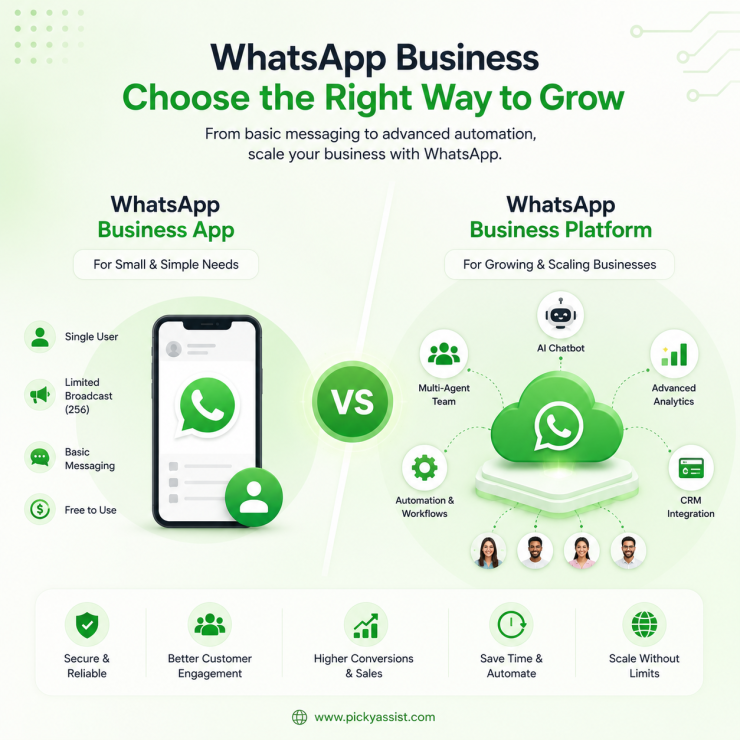
WhatsApp business marketing works by combining an opted-in contact list, Meta-approved message templates, and the WhatsApp Business Platform (API) rather than the free consumer app. You send promotions as “Marketing” category templates (paid, per message), use “Utility” templates for order and account updates (cheaper, often free inside service windows), and rely on chatbots or CRM tools to manage replies once a conversation opens. Get the opt-in and category logic wrong, and Meta will throttle your number before your campaign even finishes sending.
Most businesses find this out the hard way. A retail client we worked with launched their first WhatsApp campaign to a purchased contact list of 8,000 numbers. Within six hours, Meta dropped their quality rating to red, capped their sending limit at 250 messages every 24 hours, and stretched a one-day campaign into two weeks. The templates were fine. The offer was fine. The list was the problem, and that’s the part most “how to market on WhatsApp” guides skip entirely.
This guide explains what actually determines whether a WhatsApp marketing campaign succeeds, shows you which platform to use, how message categories and pricing work, how to build a list Meta won’t penalize, and how to avoid the mistakes that restrict your number.
WhatsApp Business App vs. WhatsApp Business Platform
This is the first fork in the road, and it decides everything downstream.
| Categories/Features | WhatsApp Business App | WhatsApp Business Platform (API) |
|---|---|---|
| Built for | Solo operators, single-location shops | Businesses sending at volume or automating |
| Broadcast limit | 256 contacts, must have your number saved | No hard cap; governed by quality rating and messaging limits |
| Automation | Basic greeting/away messages only | Chatbots, CRM, funnels, integrations |
| Multi-agent access | No (one device/login) | Yes, via a provider like Picky Assist or similar |
| Marketing templates | Not applicable | Required for business-initiated messages outside a service window |
| Cost | Free | Per-message pricing by category and country |
If you’re mailing a newsletter-style promotion to more than a couple hundred people, running drip sequences, or want more than one team member replying, the free app runs out of road fast. The Platform is what “WhatsApp marketing” actually refers to in almost every serious context, it’s also what a WhatsApp marketing agency will set you up on by default, because the app simply can’t support campaign-level work.
How to Use WhatsApp Business for Marketing?
WhatsApp Business itself doesn’t function like a traditional advertising platform where you display banner ads to users. Instead, businesses use Meta’s Click-to-WhatsApp ads on Facebook and Instagram to drive conversations, share WhatsApp QR codes and links across online and offline channels, and engage customers through broadcast messages sent to opted-in contacts.
Once a conversation starts, businesses can use catalogs, automation, and personalized messaging to nurture leads and drive sales.
Create Click-to-WhatsApp Ads
Click-to-WhatsApp ads are the most effective way to generate new conversations.
- Connect your WhatsApp Business account to your Meta Business Account.
- Open Meta Ads Manager and create a new campaign.
- Choose an objective such as Leads, Sales, or Engagement.
- Select Messaging Apps as the conversion location and choose WhatsApp.
- Define your audience, budget, and placements.
- Create your ad and publish it. When users click the ad, a WhatsApp conversation opens with your business.
Market to Existing Customers
Once customers have opted in, you can engage them through WhatsApp by:
- Sending promotional broadcasts and product updates.
- Sharing catalogs, offers, and product launches.
- Sending order updates, appointment reminders, and payment notifications.
- Using AI chatbots or automated workflows to answer queries instantly and qualify leads.
Best Practices
- Always obtain customer consent before sending promotional messages.
- Use automation to respond instantly and route conversations to the right team.
- Keep your product catalog updated with current prices and availability.
- Personalize campaigns based on customer interests instead of sending generic promotions.
- Track campaign performance and continuously optimize your messaging strategy.
The Four Message Categories That Actually Control Your Cost
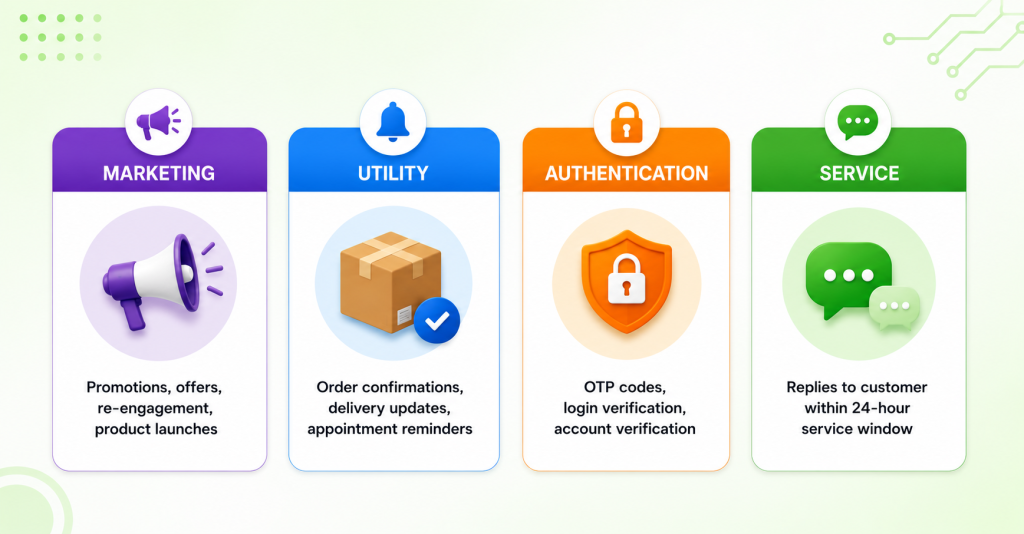
Every business-initiated message sent through the Platform gets classified into one of four categories, and the category, not the content you personally think it resembles; determines whether Meta charges you and how much.
| Category | Use case | Billed? | Notes |
|---|---|---|---|
| Marketing | Promotions, offers, re-engagement, product launches | Yes, always | Highest rate; no volume discount tier |
| Utility | Order confirmations, delivery updates, appointment reminders | Yes, unless inside an open 24-hour service window | Meaningfully cheaper than Marketing |
| Authentication | OTPs, login codes | Yes, at the lowest rate | Separate rate card from Utility |
| Service | Replies to a customer who messaged you first | No | Free, but only inside the 24-hour window they opened |
As of mid-2026, Meta bills per delivered message (this replaced the older per-conversation-window model in mid-2025), and rates vary significantly by category and by the recipient’s country, marketing templates in some markets run several times higher than the same message sent as a utility template elsewhere.
Treat any specific dollar figure you see quoted online as illustrative and check Meta’s current rate card for your markets before budgeting a campaign, since rates get revised periodically and category enforcement has gotten stricter, not looser.
The mistake we see constantly: businesses try to label a promotional template as “Utility” to dodge the Marketing rate. Meta’s review process catches this on resubmission, and repeat offenses affect your template approval history, not just that one message.
Building a List WhatsApp Won’t Penalize You For
This is the part that actually determines campaign success, and it’s the part most guides gloss over in favor of talking about chatbot features.
The opt-in checklist that holds up:
- Explicit, channel-specific consent. “Customer gave us their number at checkout” is not consent to message them on WhatsApp for marketing. You need a clear opt-in specifically for WhatsApp messages, a checkbox, a keyword reply, a website form field.
- No purchased or scraped lists. Meta’s spam detection flags cold-sent templates to numbers with no prior interaction almost immediately; this is the single fastest way to tank a quality rating.
- A visible opt-out. Every marketing template should make it obvious how to stop receiving messages. Businesses that skip this see block rates climb, which drags quality rating down even on an otherwise clean list.
- Segment before you send. A list built from three different lead sources (ads, website, in-store) rarely performs the same across segments. Sending one blanket campaign to all of them is how you get a 2% response mixed with a 40% block rate from one bad segment, and no way to tell which is which afterward.
- Warm the number gradually. New WhatsApp Business Platform numbers start on a lower messaging tier (roughly 250 unique contacts per 24 hours before scaling up, based on sustained quality performance). Don’t plan a 10,000-contact launch campaign on a number that went live last week.
A Simple Framework for Planning What to Send?
Not every message belongs in a broadcast. We generally sort WhatsApp marketing sends into three types, and mixing them up is the second most common mistake after list problems:
- Broadcast campaigns — one-to-many, Marketing category, used for launches, sales, seasonal offers. Highest cost per message, best for reach.
- Triggered sequences — a message sent because a customer did something (abandoned cart, browsed a product, didn’t reply in 48 hours). Often the Utility category is tied to an existing transaction, which changes the cost math substantially.
- Conversational funnels — a chatbot-led flow that qualifies interest after someone replies to an ad or a broadcast, moving them from “Service window reply” (free) into a structured conversation that captures data into a CRM. This is where automation tools earn their cost, since it’s the difference between a one-off broadcast and a lead pipeline you can actually report on.
Platforms like Picky Assist are built around this exact framework, where AI chatbots are made to handle the conversational funnel stages, a broadcaster for the campaign stage, and a CRM to hold everything so a reply eight days later doesn’t land as a cold lead again. If you’re piecing this together manually across the raw API, this is usually the point where teams bring in a provider rather than build it themselves.
Common Failure Modes and Fixes
| Mistake | What happens | Fix |
|---|---|---|
| Sending Marketing templates to a cold or purchased list | Quality rating drops, messaging limit gets capped | Only send Marketing templates to explicitly opted-in contacts |
| Treating every reply the same | Warm leads and support questions get the same follow-up | Route replies through a chatbot or CRM tags, not one inbox |
| No opt-out path | Block rate climbs, quality rating drops even with good copy | Add a visible opt-out line in every promotional template |
| Scaling send volume before the number is “warm” | Hits messaging tier caps mid-campaign | Ramp volume gradually and monitor quality rating daily in the first few weeks |
| Reusing one template indefinitely | Approval or performance issues over time as engagement drops | Rotate template copy and monitor delivery/read metrics per template, not just per campaign |
Measuring What Actually Matters!
Skip vanity delivery rates, most well-configured numbers deliver in the high 90s regardless of list quality. What separates a working campaign from a failing one is read rate and reply/opt-out ratio on Marketing sends specifically, since those are the two signals that feed directly into your quality rating and future sending limits. Treat any specific benchmark percentage you see in an article (including this one) as industry-general and directional, your actual numbers will vary by vertical, list source, and message quality, so track your own baseline from the first campaign rather than chasing a published average.
FAQs on WhatsApp Business for Marketing
The WhatsApp Business App is free but limited to broadcasting to 256 contacts who have your number saved, with no automation beyond basic auto-replies. Real marketing campaigns typically require the WhatsApp Business Platform (API), where Marketing category messages are billed per delivery.
Yes. You need Meta’s approval for both your WhatsApp Business Platform account and each message template you plan to send, and templates go through a review process before they can be used. Sending unapproved or miscategorized content risks template rejection or account restrictions.
Cost depends on the message category (Marketing costs more than Utility or Authentication) and the recipient’s country, with rates set and periodically revised by Meta. Always check Meta’s current published rate card for your target markets rather than relying on a fixed number, since these rates change.
Yes, but only using an approved Marketing or Utility template, since business-initiated messages outside an open 24-hour service window require a template. Free-form replies are only allowed once a customer has messaged you and opened that window.
WhatsApp marketing refers to the campaigns and messages you send to promote your business, while a WhatsApp CRM is the system that tracks contacts, conversation history, and lead status so those campaigns are targeted and followed up on correctly. Most serious WhatsApp marketing setups use both together rather than treating them as separate tools.
No, sending to a purchased or scraped list is one of the fastest ways to trigger spam detection, tank your quality rating, and get your sending limit capped. WhatsApp marketing depends on explicit, channel-specific opt-in, not list size.
WhatsApp has structured message categories and per-message billing tied to a quality rating system, which SMS and email generally don’t enforce as strictly. It also supports richer formats (buttons, catalogs, chatbot flows) inside a conversation, but it penalizes poor list hygiene faster than either channel.



Add comment