
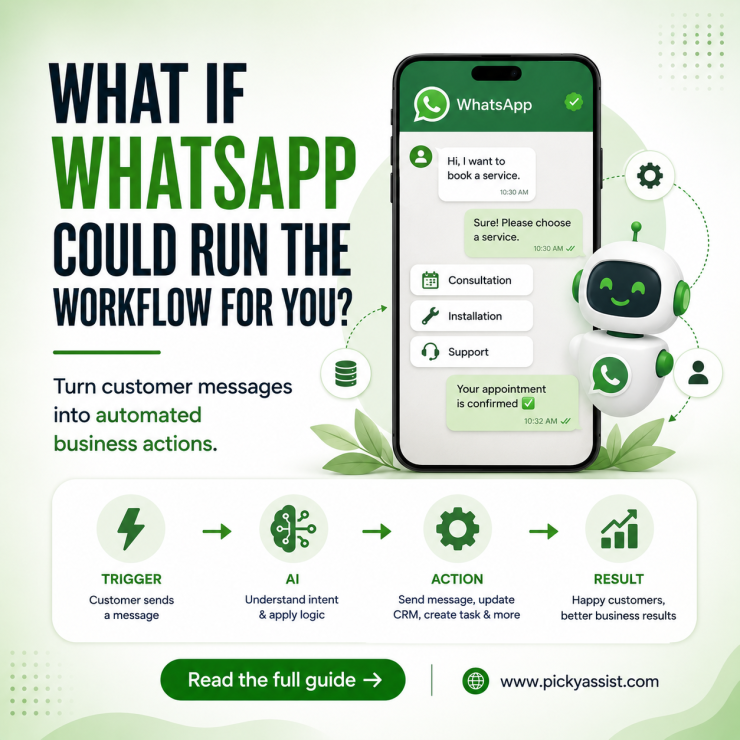
A customer sends a WhatsApp message. Someone replies. The customer asks another question. Your team checks the CRM, confirms a detail, sends a follow-up, and updates the record. Now imagine WhatsApp handling that entire sequence automatically. Instead of simply sending predefined replies, WhatsApp workflow automation connects customer actions with business logic. It collects information, checking conditions, updating systems, triggering follow-ups, and bringing a human into the conversation when needed.
What is WhatsApp Workflow Automation?
WhatsApp workflow automation is a sequence of predefined actions that runs when a customer performs a specific action. Instead of asking an employee to manually respond, the workflow detects an event, evaluates conditions, and performs the next action.
For example:
Customer sends “Hi” → System identifies intent → Sends options → Customer selects “Book Appointment” → Collects details → Checks availability → Confirms booking
The important part is the logic behind the conversation. Good automation does not simply send messages. It decides what should happen next based on customer input and business rules.
This makes WhatsApp workflow automation useful for repetitive processes where businesses need consistent responses and faster execution.
How does a WhatsApp Workflow Work?
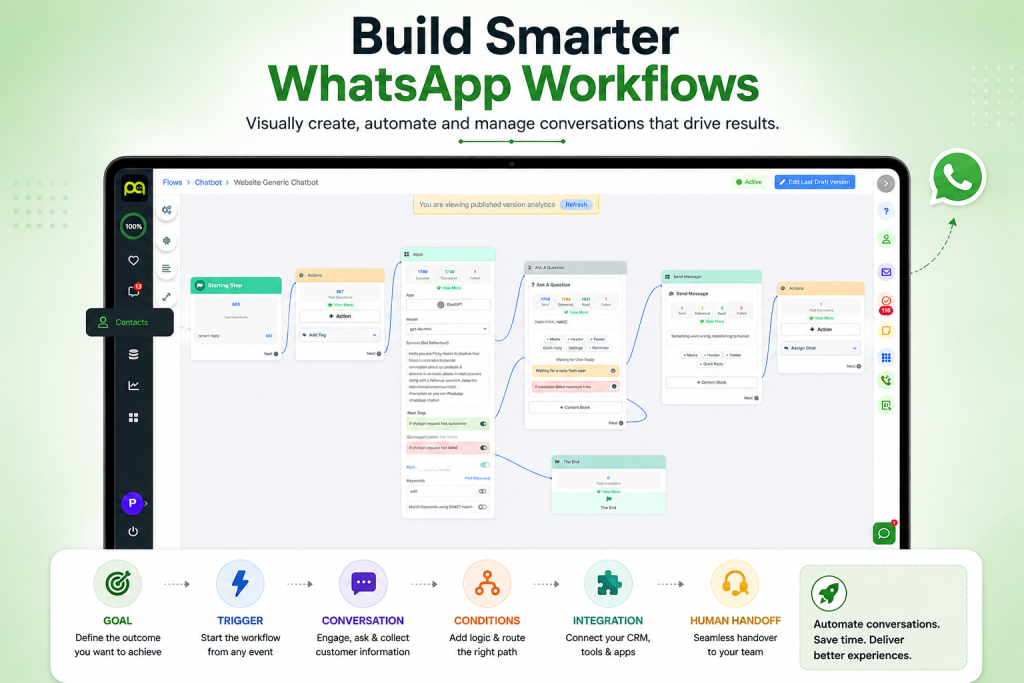
Most workflows contain five building blocks:
- Trigger — Starts the workflow.
- Condition — Checks customer data or their response.
- Action — Sends a message, updates data, creates a task, or calls another system.
- Branch — Sends customers down different paths.
- Handoff — Transfers the conversation to a human when automation cannot complete the request.
For example, a lead submits an enquiry. The workflow asks about their requirement, budget, and preferred time. A high-intent lead goes to sales, while another lead enters a follow-up sequence.
This structure makes a WhatsApp business workflow predictable, measurable, and easier to improve.
What Can You Automate on WhatsApp?
Businesses can automate practical customer journeys such as:
- Lead qualification
- Appointment and booking requests
- Order confirmations and updates
- Payment notifications
- Frequently asked questions
- Cart recovery
- Customer feedback
- Follow-ups
- Support ticket creation
- Internal sales alerts
The best starting point is usually a repetitive process with clear inputs and outputs. Do not automate a complicated journey simply because the technology allows it.
How to Create WhatsApp Workflow Automation
1. Define the Business Goal
Start with the outcome, not the message.
Ask what you want the workflow to achieve:
- Generate qualified leads
- Increase bookings
- Reduce repetitive support work
- Recover abandoned carts
- Improve response times
- Reduce missed follow-ups
A clear goal determines what information your workflow needs to collect and what action it should trigger.
2. Identify the Trigger
Every WhatsApp workflow automation needs a starting event.
Common triggers include:
- Customer sends a message
- Customer clicks a button
- New lead enters the CRM
- Payment succeeds
- Order status changes
- Appointment approaches
- Customer submits a form
For API-based implementations, the trigger can come from your CRM, ecommerce platform, payment system, calendar, or another application.
3. Map the Conversation
Write the journey before building it.
For example:
Enquiry → Qualification → Product recommendation → Contact details → Sales handoff
For appointment booking:
Booking request → Service selection → Date selection → Availability check → Confirmation
This map becomes the foundation of your WhatsApp workflow builder configuration.
Mapping the journey first also exposes unnecessary steps before your team spends time building them.
4. Add Conditions and Branches
Customers rarely follow one identical path.
Use conditions such as:
- New vs existing customer
- Product category
- Lead score
- Location
- Order status
- Payment status
- Availability
For example, a returning customer can receive a different path from a first-time visitor.
A well-designed WhatsApp business workflow should account for these variations rather than forcing every customer through the same sequence.
5. Connect Business Systems
Automation becomes significantly more useful when WhatsApp can exchange information with other systems.
A WhatsApp API workflow can connect customer conversations with a CRM, ecommerce store, payment gateway, calendar, helpdesk, or internal database.
For example:
Successful payment → Payment system → Workflow → WhatsApp confirmation
The customer receives the update automatically without an employee checking the payment dashboard and sending a message manually.
6. Add Human Handoffs
Do not design automation as if every customer will follow the expected path.
Create an exit point for complex questions, complaints, high-value leads, or requests that require human judgment.
The workflow should pass relevant customer information to the agent. Customers should not have to repeat information they already provided.
Where Does AI Fit Into WhatsApp Workflows?
Traditional workflows follow predefined rules. AI can interpret customer language and select the appropriate path.
A WhatsApp AI workflow might recognize that:
- “I need a dentist tomorrow” means appointment intent.
- “Where is my order?” means order-status intent.
- “Can I get this in blue?” means a product question.
The system can then route each intent to the appropriate automation.
AI should handle language and ambiguity, while deterministic rules should control critical actions such as payments, refunds, bookings, and account changes.
This combination provides flexibility without giving an AI model unrestricted control over important business operations.
WhatsApp Workflow Builder vs Coding
A WhatsApp workflow builder gives non-technical teams a visual way to design triggers, conditions, messages, branches, and integrations.
Coding provides greater control, but it requires development resources and ongoing maintenance. Choose based on complexity:
| Requirement | Better approach |
|---|---|
| FAQ and lead capture | Visual builder |
| Basic qualification | Visual builder |
| CRM-triggered messaging | Builder + integration |
| Complex proprietary logic | API/development |
| AI-powered intent handling | Builder + AI |
| Highly customized infrastructure | API + development |
A visual approach can reduce implementation time, while API development provides deeper technical control.
WhatsApp Workflow Automation in Business- Example Scenario
Consider a real estate company receiving enquiries through WhatsApp. The workflow could:
- Ask the customer what property they want.
- Capture location and budget.
- Ask whether they need immediate assistance.
- Assign a lead score.
- Store information in the CRM.
- Alert the appropriate sales representative.
- Send a follow-up if the customer does not respond.
A WhatsApp AI workflow can interpret free-text answers, while fixed rules control lead scoring and routing.
Common Mistakes to Avoid
Creating No Fallback
Always provide a human escalation route for situations automation cannot resolve.
Sending Too Many Messages
Keep the journey concise. Every additional step creates friction.
Ignoring Integration Failures
Define what happens when a CRM, payment gateway, calendar, or another connected system becomes unavailable.
Skipping Testing
Test incomplete information, unexpected questions, duplicate requests, wrong answers, timeouts, and failed integrations.
Measuring the Wrong Metrics
Track completion rate, response time, handoff rate, conversion rate, and workflow failures instead of simply counting messages.
How to Build a Workflow Without Starting From Scratch?
A platform such as Picky Assist can help teams visually map triggers, conversation steps, conditions, integrations, and human handoffs.
Start with one customer journey. Test it using realistic customer language rather than only ideal responses. Measure the results, identify failure points, and improve the workflow before expanding it to additional processes.
This approach keeps WhatsApp workflow automation focused on measurable business outcomes rather than automation for its own sake.
Final Takeaway
WhatsApp workflow automation works best when you treat it as a business process, not simply a chatbot.
Define the goal, choose the trigger, map the conversation, add conditions, connect your systems, provide human handoffs, and measure the outcome.
Start with one workflow, prove its value, and then scale automation across the customer journeys that create the greatest operational or commercial impact.
FAQs on WhatsApp Workflow Automation
WhatsApp workflow automation connects customer actions with predefined business actions. It can qualify leads, collect information, send updates, trigger integrations, and transfer conversations to employees.
Yes. Visual builders can handle many common workflows without custom development. More complex integrations may still require API or developer support.
A WhatsApp workflow builder is a visual interface for designing triggers, conditions, messages, branches, integrations, and human handoffs without manually coding every component.
A WhatsApp API workflow connects WhatsApp with systems such as CRMs, ecommerce platforms, payment services, calendars, and helpdesks so business events can trigger customer communication.
Yes. A WhatsApp AI workflow can classify messages, extract information, answer questions, and route conversations. Businesses should keep high-risk actions under controlled workflow rules.

Add comment